

Add Lists to Contact in FluentCRM when a New Lead comes from Facebook Lead Ads
Each new Facebook Lead Ads lead is created or updated as a FluentCRM contact by email, then added to the FluentCRM lists you choose, ready for your campaigns.
 Facebook Lead Ads
 FluentCRM
3 steps 21 downloads Setup ~5 min Used on 1.4k sites Growth Free to import
What this workflow does
Leads from a Facebook form are only useful once they sit where you send email. Downloading lead files from Meta and importing them into FluentCRM by hand means delays and missed people. This workflow moves each lead into FluentCRM as it arrives and puts the contact on the lists that match the campaign.
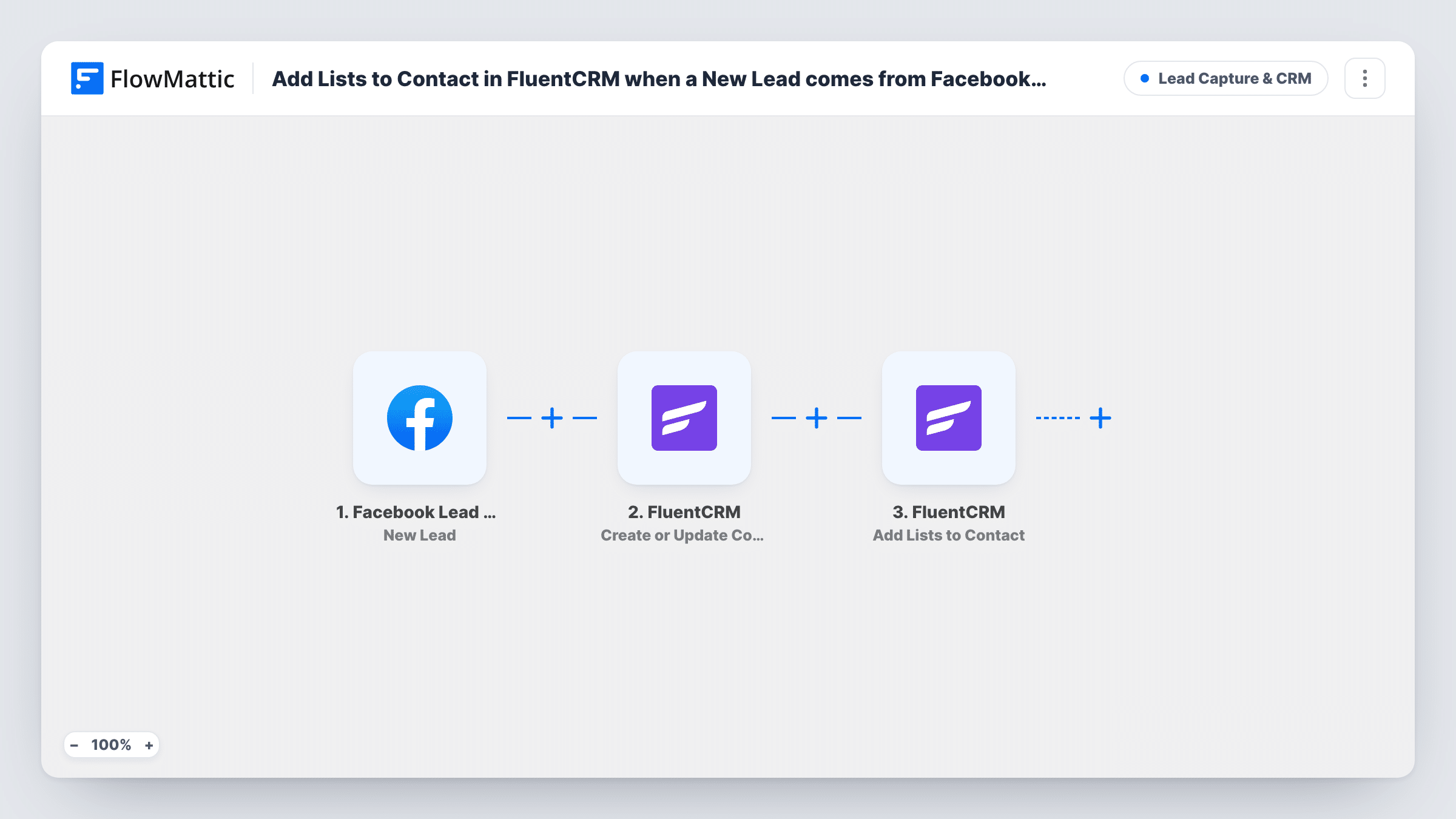
The Facebook Lead Ads trigger starts a run each time someone submits the lead form you pick in Meta. The first FluentCRM step creates a contact, or updates the existing one when the email address is already in your CRM. The second FluentCRM step then adds lists to that contact.
Running the contact step first matters: FluentCRM's Add Lists to Contact action works on a contact that already exists, and step 2 makes sure there is one. Both FluentCRM steps ship unmapped, so after import you map the lead's email, name and any other answers into the contact, then pick the lists and map the contact from step 2 into the list step.
Every lead from the connected form starts a run. If you run several ads, connect each form in its own copy of the workflow so each one feeds its own list. Task History shows what FluentCRM returned for each lead.
One list per ad campaign
A fitness studio runs separate lead forms for a free class and a membership offer, and each form's leads land on their own FluentCRM list for a matching email sequence.
Webinar sign-ups from Facebook
A software company collects webinar registrations through a Lead Ads form and adds every registrant to a webinar list that receives the joining link and reminders.
Returning prospects kept tidy
A real estate agent's past enquirers who fill in a new ad form are updated by email rather than duplicated, and gain the list for the new listing.
How this workflow runs
What happens at each step once the workflow is on, and what you need before you import it.
 Facebook Lead Ads New Lead
Fires when someone submits the Facebook Lead Ads form you connect. Their answers, such as name, email and phone, are passed on to the FluentCRM steps.
- FluentCRM Create or Update Contact
Creates a FluentCRM contact from the lead, or updates the contact that already has that email address. The step ships unmapped: map the lead's email and the other fields you want saved.
- FluentCRM Add Lists to Contact
Adds one or more FluentCRM lists to the contact from step 2. The step ships unmapped: choose the lists, map the contact from the previous step, and check the result with a test lead.
What you need
- FlowMatticCore
- Facebook Lead Ads AccountAccount
- FluentCRM PluginPlugin
After importing, map your own data. To keep the template universal, not every step is pre-filled. Open each step in the builder and connect your accounts and fields (channels, lists, sheets, recipients) before you switch the workflow on.
Make it yours
Changes worth making after you import it.
- Use Facebook's test lead tool after import to send a sample lead, then open Task History to confirm the contact and its lists in FluentCRM.
- Build an automation in FluentCRM that starts when a contact is added to the list, so each lead gets your welcome email without another step here.
- Duplicate the workflow for each Lead Ads form you run and choose a different list in each copy, so you can tell which campaign brought each contact in.
Questions about this workflow
Do my Facebook leads need to be in FluentCRM already?
No. Step 2 creates the contact when the email is new, or updates the existing one, before step 3 adds the lists. That order is what lets the list step find the contact.
What happens when a lead's email is already a FluentCRM contact?
FluentCRM matches on email address, so the existing contact is updated with the fields you map instead of being duplicated, and then gets the lists from step 3.
Will leads collected before I turn this on be added?
No. Only leads submitted after the workflow is active start a run. Export older leads from Meta and import them into FluentCRM separately.
Which FluentCRM lists does the lead go on?
The ones you pick in the Add Lists to Contact step after import. The template doesn't choose any for you, so set them before you turn the workflow on.
More Lead Capture & CRM workflows
Other ready-to-import templates from the same category.







Import this workflow into your WordPress site
Download the JSON, import it from the Workflows screen and connect your accounts. Every run stays on your server, with no per-task fees.
30-day money-back guarantee Unlimited workflows and runs Self-hosted