

Every Router route ended with the same three steps. Now they don’t have to.
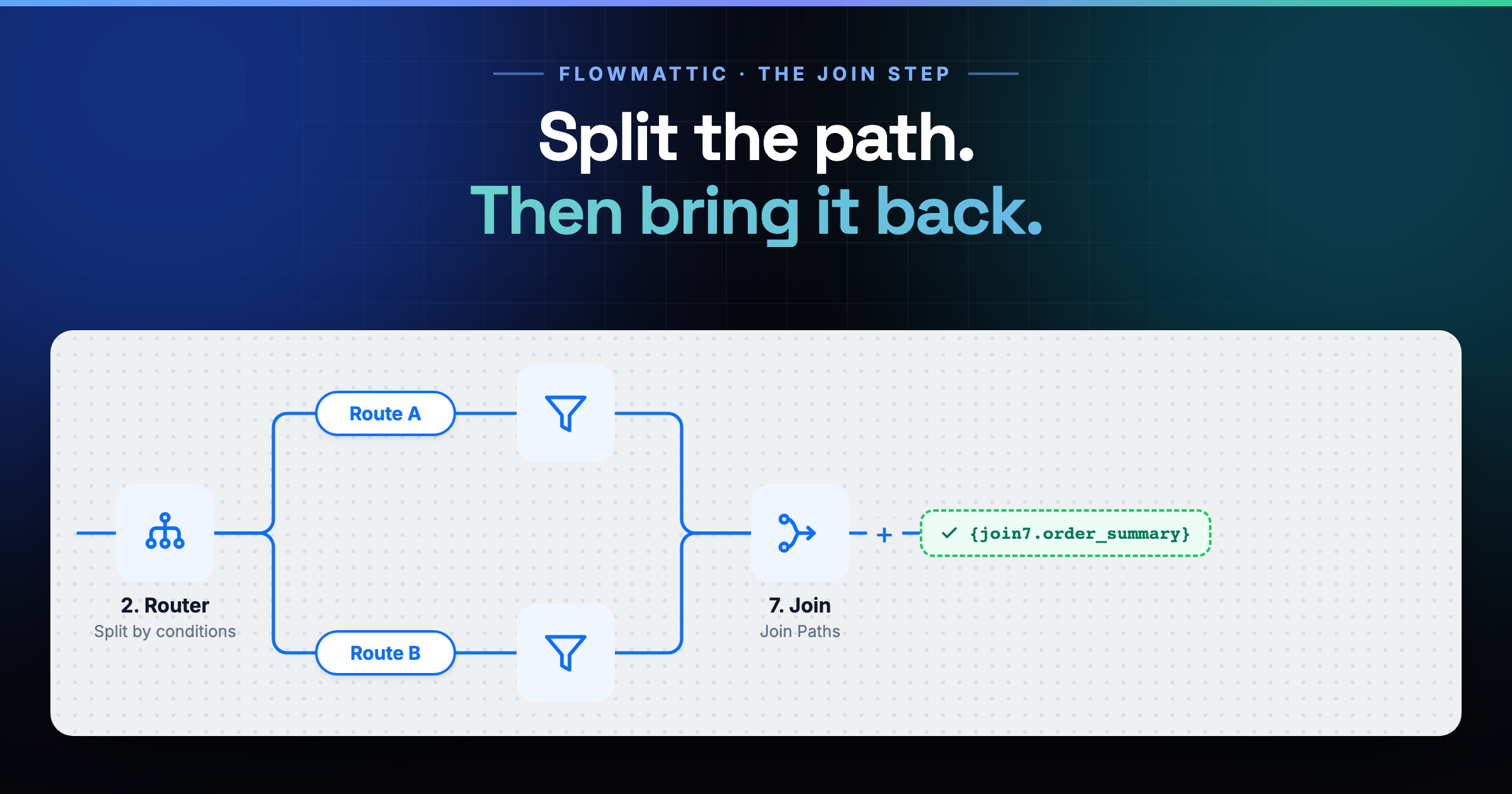
A Router splits your workflow into routes. Retail one way, wholesale the other. That part has always worked.
The awkward part is the ending. Log it, notify the team, update the CRM — the same three steps at the end of every route. Built twice for two routes. Three times for three. And re-edited everywhere each time one of them changes.
The Join step merges them back into one chain.
Adding it
Click the + at the end of any one route and search for Join. One result. Select it — it has a single event, Join Paths, and it’s already chosen.
Then watch the other route. The Join wires itself to the end of every route in that Router; you don’t connect the rest by hand. Each route keeps its own +, so you can still extend them one at a time.
Add your common steps after the Join exactly like anywhere else. They run once per execution, whichever route was taken.
Then the harder half: the data
Which raises the obvious question. What data do those shared steps get?
Only one route actually ran. The other one has nothing. So a tag pointing at a step inside Route A works perfectly — right up until Route B is the one that runs, and then it resolves to nothing at all.
That’s what Merged Fields is for.
Merged Fields
Open the Join and go to its Configure tab. You name an output field once, then map it for each route:
order_summary←{text_formatter4.result}on Route A,{text_formatter6.result}on Route Bchannel← the static textretailon Route A,wholesaleon Route B
Each row’s value is an ordinary template, so a single tag, mixed text, or plain static text all work. And as you type the field name, the tag preview updates beside it — {join7.order_summary}. That’s what every step after the Join uses, and it always resolves.
The picker changes after a Join
Open any step after the Join and look at its data picker. The steps inside the routes are gone — they’re not offered any more, because they aren’t dependable.
What you get instead is the Join, and the fields you merged. Plus one you never defined: {join7.executed_route}, which carries the title of the route this run actually took. Rename a route to “Retail orders” and that’s what it reports — in later steps, in filters, and in Task History.
How a field resolves
- Each field takes its value from the route that actually executed.
- If more than one route matched, the first route with a value wins — the order you see in the panel.
- A route you leave unmapped simply contributes nothing to that field.
And if every route’s test data already shares a key, FlowMattic spots it. A banner counts what it found and offers to add them — behind a review sheet that shows the source step per route, with generic keys like status and message filtered out. Nothing lands unseen.
The Branch works the same way
Build the Yes side, build the No side, then put a Join at the end of either one. Both paths converge into it, and Merged Fields behaves exactly the same.
At run time
The Router picks its route and runs those steps. When that path reaches its end, the run jumps to the Join, resolves your merged fields from the route that ran, and carries on with the shared steps.
And if no route matches at all, it still jumps to the Join — so your closing steps always happen. Without a Join, a Router with no matching route is the end of the workflow.
Watch it built
The Join, Merged Fields, the picker, and a full run — in under four minutes:
Four things worth knowing before you build
- One Join per Router or Branch. A scope converges once — put extra shared steps after the Join you already have.
- Nest from the inside out. If a route contains its own Branch, give that Branch its own Join first, with at least one step after it. The builder tells you if it’s too early.
- Deleting a Join takes everything below it. Past the merge point there’s no single route to reattach those steps to, so they go with it — and every route gets its + button back.
- Delete the Join before its owner. A Router or Branch that’s already joined can’t be deleted directly.
Split the path when the work is different. Join it when the work is the same. And carry the data across in one tag.