
Database Tables Made Simple
Visual Management
The ultimate database tables manager for WordPress with a powerful visual editor. Create, manage, and display database tables without coding. Connect to local or remote databases, import CSV data, and embed tables anywhere on your site.
Manage Database Tables Visually
FlowMattic Tables is a comprehensive database table management system that lets you create, manage, and display database tables with ease. Whether you need to manage customer data, product catalogs, or any structured information, Tables provides a visual interface to handle it all.
Visual Table Editor
Create and manage tables with an intuitive interface - no SQL knowledge required
CSV Import & Export
Import existing data from CSV files and export your tables for backup or analysis
Frontend Display
Embed tables on any page using shortcodes with built-in filtering capabilities
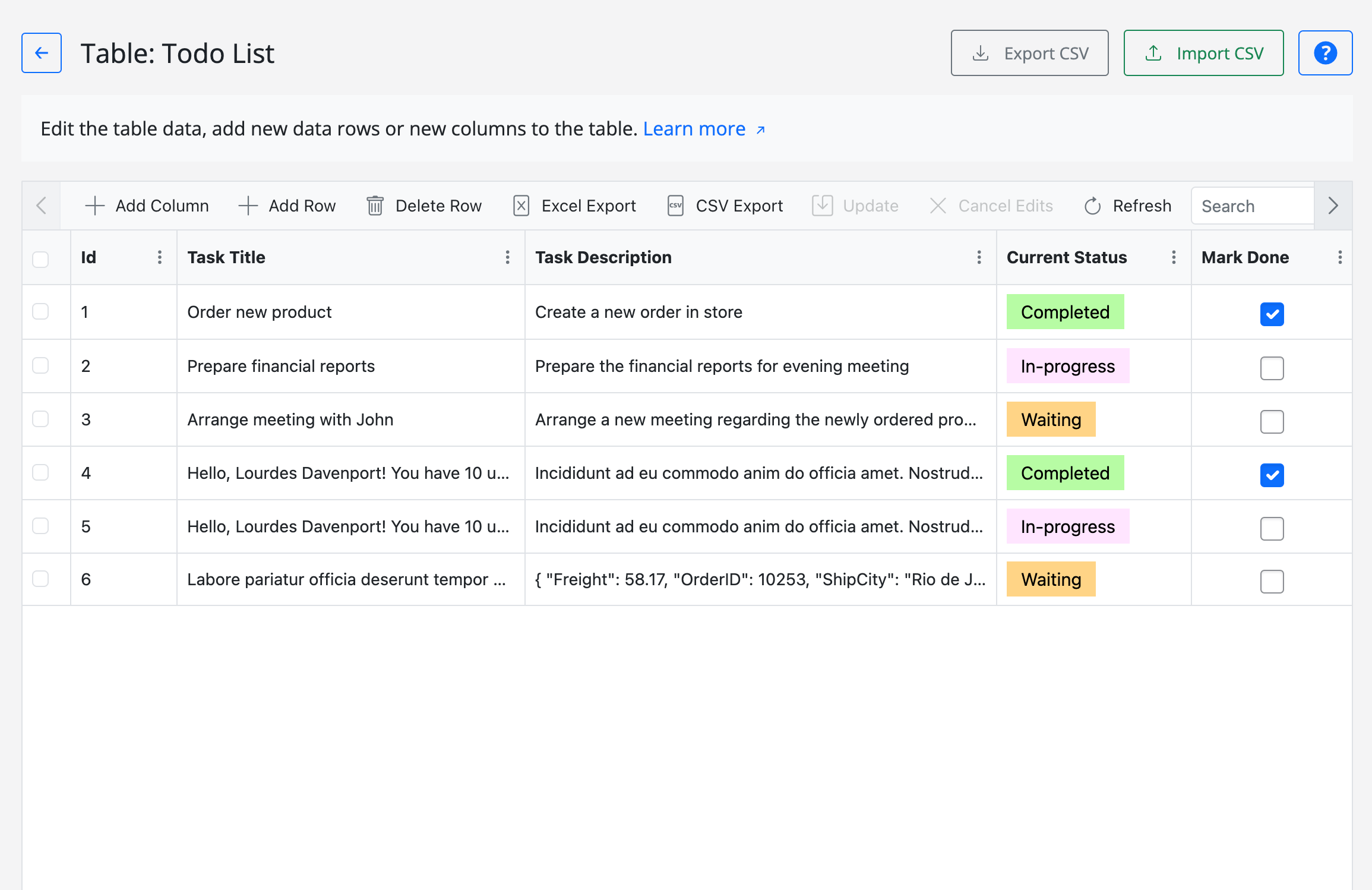
How FlowMattic Tables Works
Create and manage database tables in just four simple steps
01.
Create Table
Define your table structure by adding columns with specific data types. Choose between local or remote database.
02.
Import Data
Add records manually or import CSV files with intelligent column mapping and batch processing.
03.
Manage Records
Edit records, find specific data with dual column filtering, and export to CSV format.
04.
Display Frontend
Use shortcodes to embed tables on any page with optional filtering by column values.
Everything You Need for Table Management
Professional database table tools with advanced capabilities
Visual Table Editor
Create and manage tables with an intuitive visual interface. Add columns, define data types, and organize your data structure without writing SQL.
CSV Import
Import CSV files with drag-and-drop upload, intelligent automatic column mapping, and batch processing (50 rows at a time) with real-time progress tracking.
CSV Export
Export your table data to CSV format for backup, migration, or analysis in external applications.
Remote Database Support
Connect to remote MySQL databases in addition to your local WordPress database. Manage external databases directly from FlowMattic.
Frontend Embedding
Display tables on any page using the shortcode with optional filtering by column values.
Record Finding
Find specific records using dual column filtering with exact match or contains lookup methods. Quickly locate the data you need.
Column Management
Add, edit, and organize columns with various data types including TEXT, VARCHAR, INT, DATETIME, and more.
Statistics Dashboard
View table statistics including total tables count, row counts, and distinction between FlowMattic tables and system tables.
Workflow Integration
Use Tables with FlowMattic workflows to automate data management, create records from form submissions, and more.
Perfect For Every Data Management Need
Tables designed for diverse business requirements
CRM Data
Store and manage customer information, contacts, and relationships in custom database tables.
Product Catalogs
Maintain product information, inventory, and pricing data in structured tables.
Event Registrations
Track event registrations, attendee information, and manage event-related data.
Form Submissions
Store form submission data in custom tables and display submissions on your site.
Inventory Management
Keep track of stock levels, product variants, and inventory movements.
Customer Databases
Build comprehensive customer databases with custom fields tailored to your business needs.
Frequently Asked Questions
Everything you need to know about FlowMattic Tables
What is a database tables manager for WordPress?
A database tables manager for WordPress is a tool that allows you to create, edit, and manage custom database tables directly from your WordPress dashboard. FlowMattic Tables provides a visual interface to work with database tables without writing any SQL code.
Can I import CSV data into tables?
Yes! FlowMattic Tables includes a powerful CSV import feature with drag & drop interface, automatic column mapping, and batch processing. You can easily import large CSV files with comprehensive error handling and validation.
Do I need coding knowledge to use Tables?
No coding knowledge required! Our visual table manager lets you create and manage database tables with an intuitive point-and-click interface. You can add columns, set data types, and manage records without writing any code.
Can I connect to remote databases?
Yes, FlowMattic Tables supports both local WordPress databases and remote database connections. You can connect to external MySQL databases and manage them directly from your WordPress dashboard.
How do I display tables on my website?
You can embed tables anywhere on your site using shortcodes or blocks. Tables are fully responsive and can be customized to match your website's design. You can also control which columns to display and add filtering options.
Is there a limit on the number of tables I can create?
No, you can create unlimited database tables with FlowMattic. There are no restrictions on the number of tables, rows, or columns you can have in your database.
Ready to Simplify Database Management?
Start creating and managing database tables today with FlowMattic's powerful visual editor. No SQL required, fully flexible, and packed with advanced features.
Get FlowMattic Now
Create unlimited database tables and automate your data workflows.