

An email template builder for WordPress, sent by your workflows
Design responsive transactional and marketing emails in a block editor inside WordPress, then send them from any workflow step with the customer's name, order lines or booking details merged in. Twenty-six prebuilt templates cover receipts, newsletters and notifications, and the email template builder shares its merge tags with the rest of FlowMattic.
12 block types26 prebuilt templatesLoop and conditional blocksSend from any step

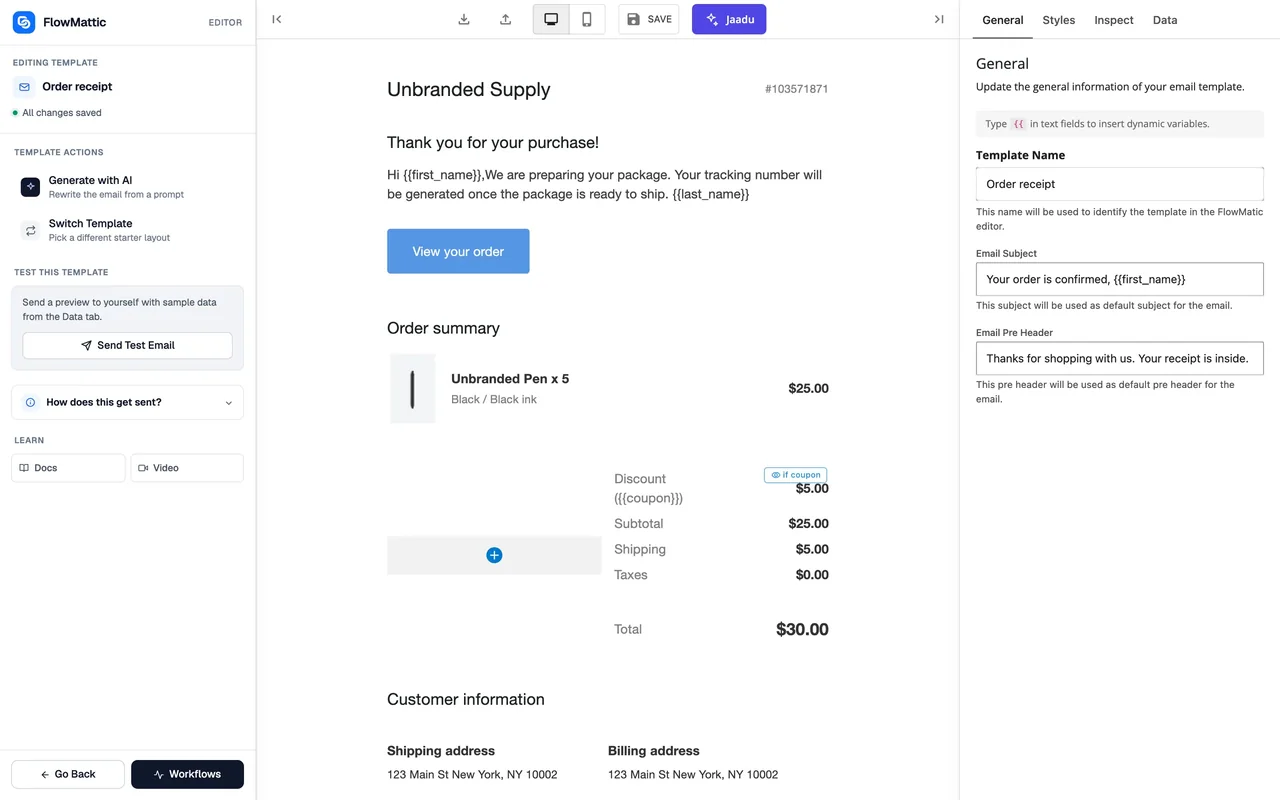
Design, personalise, send
The template is built once; the workflow fills it in and sends it whenever the trigger fires.
-
Design
Build it from blocks
Start from one of 26 templates or a blank canvas, drag Heading, Text, Image, Button, Columns and other blocks into place, and set brand colours and fonts once as global styles.
-
Personalise
Add merge tags and loops
Type {{ in any text field to pick a merge tag from the workflow's data. Wrap repeating content in a Loop block, hide a block when its data is empty, and give the subject and pre-header the same tags.
-
Send
Send it from a step
Add Send Template Email from Email by FlowMattic, or pick the template in Gmail's send action, after any trigger. Send Test Email with your own test data first and check it in your inbox.
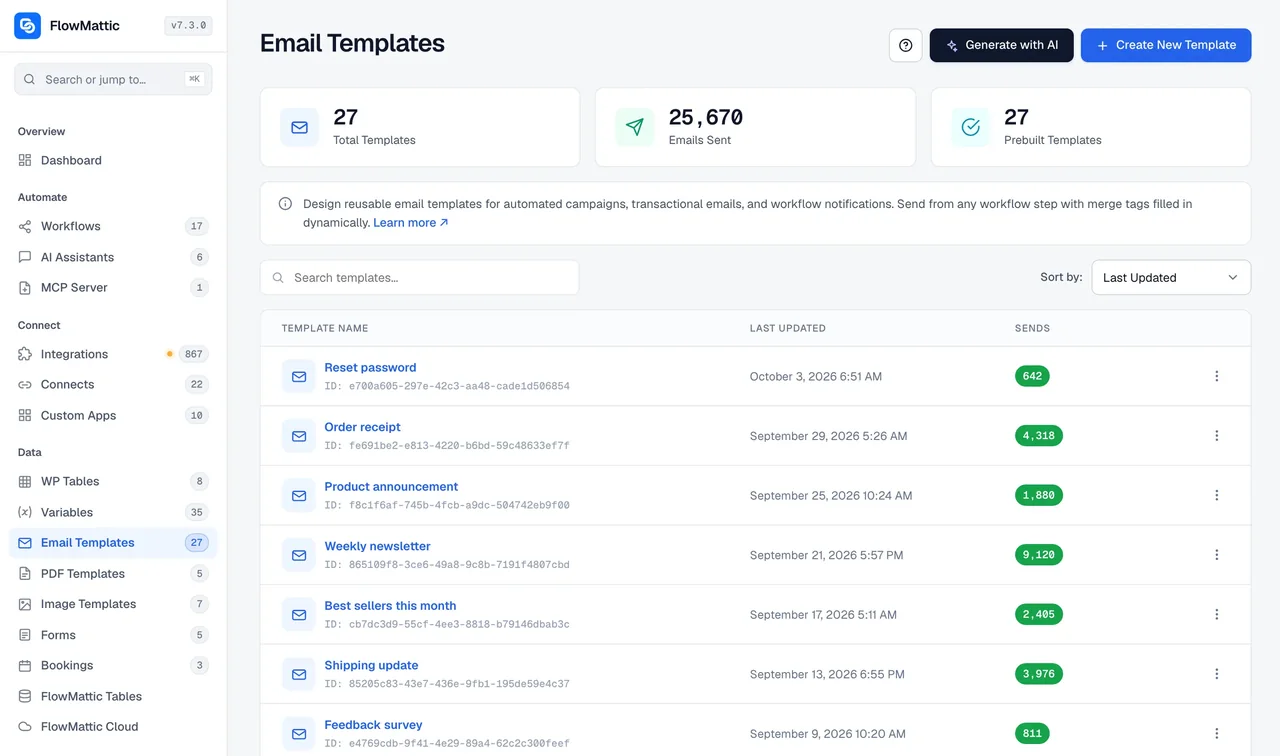
26 templates for the emails sites actually send
The Email Templates screen lists your templates and the prebuilt ones you can duplicate. Twelve of them use a Loop block, so the pattern for a catalogue, an invoice or a schedule is already there to copy.
- Transactional: welcome, one-time passcode, reset password, e-commerce receipt, subscription receipt, reservation reminder, reply to an inquiry
- Marketing: weekly newsletter, best sellers, announcement, notification newsletter, feedback and multi-choice surveys, post metrics
- Loop examples: product catalogue, team directory, event schedule, order invoice, restaurant menu, property listings, job listings, course catalogue, travel destinations, Black Friday, Cyber Monday and Christmas promotions
Merge tags, loops and conditions
Any text, link or image source can hold a merge tag, and typing {{ opens an autocomplete of the fields the workflow has. A Loop block repeats its child blocks for every item in an array, and a visibility condition hides a block when a field is empty, equals a value or contains text.
- Autocomplete for {{ merge tags in every text field
- A Loop block over products, line items, attendees or orders
- Conditional visibility per block: is empty, is not empty, equals, not equals, contains
- A pre-header that uses dynamic data, plus Dynamic data and HTML blocks for the odd case
Send it from any step
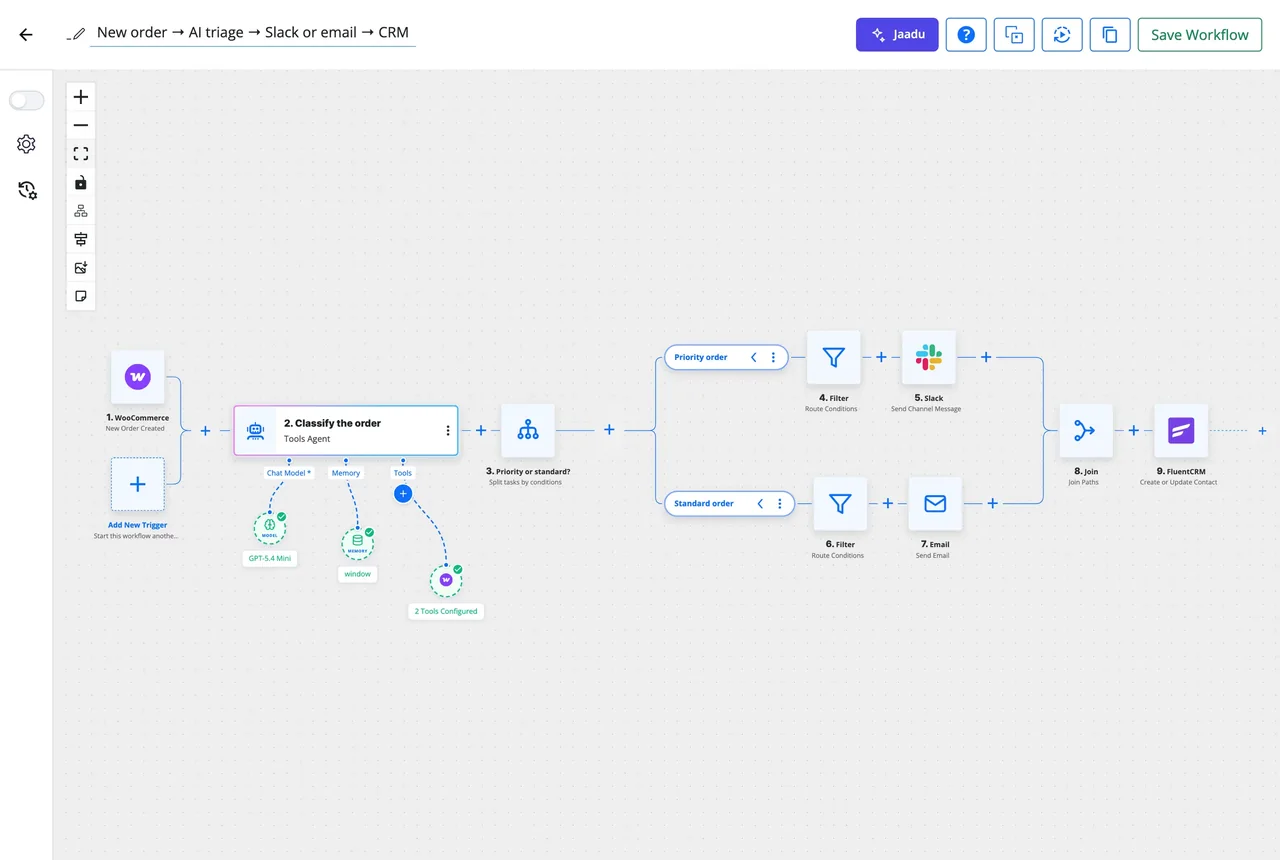
Email by FlowMattic sends a template with a from name, reply-to, CC, BCC and attachments, through whatever mailer your site already uses. Gmail's send action can pick the same template. Because the send is a workflow step, it can sit behind a Router, a Delay, an Iterator or a Human in the Loop approval, as it does in the workflow shown here.
- Send Email for a quick message, Send Template Email for a designed one
- Attachments from an earlier step, such as a generated PDF invoice
- Triggered by any of the 918+ integrations, a form, a table or a schedule
- Every send recorded in Task History with the data that went in
What the Email Template Builder includes
A block editor with the pieces an automated email needs.
12 block types
Heading, Text, Image, Button, Divider, Spacer, Avatar, HTML, Columns, Container, Dynamic data and Loop, each with a duplicate button in its hover menu.
Global styles
Colours, font family, font size and weight set once for the template, with per-block overrides for a heading, a paragraph or a button and a reset back to the global value.
Subject and pre-header
Both accept merge tags, so the inbox preview can say whose order it is before the email is opened.
Test send with test data
Send Test Email has a test-data editor, so you see the template with real-looking values in your own inbox before a workflow uses it.
Loop block
Repeats its child blocks for every item in an array: order lines, attendees, products or rows from a table.
Conditional visibility
Show or hide any block on a field being empty, not empty, equal, not equal or containing text, in the preview and in the sent email.
Generate with AI
Drafts a full email from a prompt, blocks, subject, pre-header and sample data included, from the sidebar, the template picker or the templates page.
Email by FlowMattic
From name, reply-to, CC, BCC and attachments on every send, using the mailer your WordPress site is already configured with.
Shared with Bookings
Booking confirmations, reminders, reschedule and cancellation notices and follow-ups are templates in this library, so you edit them here.
Emails workflows send on their own
Each of these uses a template from this builder and modules that ship with FlowMattic.
Receipt after a WooCommerce order
WooCommerce New Order sends the e-commerce receipt template, with the Loop block listing every line item and the total, from the store's own address.
Welcome email for a new user
WordPress New User sends the welcome template with the person's name and a login link, and a Delay step follows up three days later.
Weekly digest from a table
A Monday schedule reads this week's rows from WP Tables and the Loop block turns them into the newsletter's list, one send per subscriber from the Iterator.
Booking reminder the day before
FlowMattic Bookings sends the reminder template 24 hours ahead with the meeting link, and a Booking Cancelled trigger sends the cancellation notice if plans change.
Questions about the Email Template Builder
What is the Email Template Builder?
A block editor inside FlowMattic for designing responsive emails without writing HTML. You drag Heading, Text, Image, Button, Columns and other blocks into place, add merge tags for the workflow's data, and save the template for any workflow to send.
How many prebuilt templates are included?
26, plus a blank one. They cover welcome, one-time passcode and password reset emails, e-commerce and subscription receipts, newsletters, surveys, announcements and reminders, and twelve of them demonstrate the Loop block with catalogues, invoices, menus, listings and seasonal promotions.
How do merge tags and loops work?
Type {{ in any text field and pick a field from the workflow's data, such as {{customer_name}}. Put the blocks that should repeat inside a Loop block and point it at an array, such as the order's items; each item renders once. A visibility condition on any block hides it when a field is empty, equals a value or contains text.
Which apps can send a template?
Email by FlowMattic, the built-in email app, has a Send Template Email action with from name, reply-to, CC, BCC and attachments, and sends through the mailer your WordPress site already uses. Gmail's send action can also pick a template from this library.
Can I test an email before a workflow sends it?
Yes. Send Test Email in the editor has a test-data editor, so you set the values for each merge tag, send the email to yourself and see the result in your own inbox, rendered with the same logic a real send uses.
Are the emails mobile responsive?
Yes. Templates are built on a block layout that adapts to the width of the inbox, so an email designed once reads correctly on desktop, tablet and phone.
Can AI write the email for me?
Yes. Generate with AI drafts a full email from a prompt, including the blocks, the subject, the pre-header and sample dynamic data, using your own AI provider connection. It is available from the editor sidebar, the template picker and the templates listing page.
Did not find your answer? You can browse the help center or ask us directly.
Design the email once, let workflows send it
Blocks, merge tags and loops in the editor; triggers, routing and timing in the workflow. All on your own WordPress site.
30-day money-back guarantee Unlimited templates and sends Self-hosted