

A dynamic image generator for WordPress
Design an image template once and let a workflow render a new version for every post, order, customer or certificate, with the changing parts filled from live data. Open Graph images, social cards, stat highlights, quotes, certificates and badges all come from the same dynamic image generator inside WordPress.
38 starter templates18 element typesFive size presets or customRendered in headless Chrome

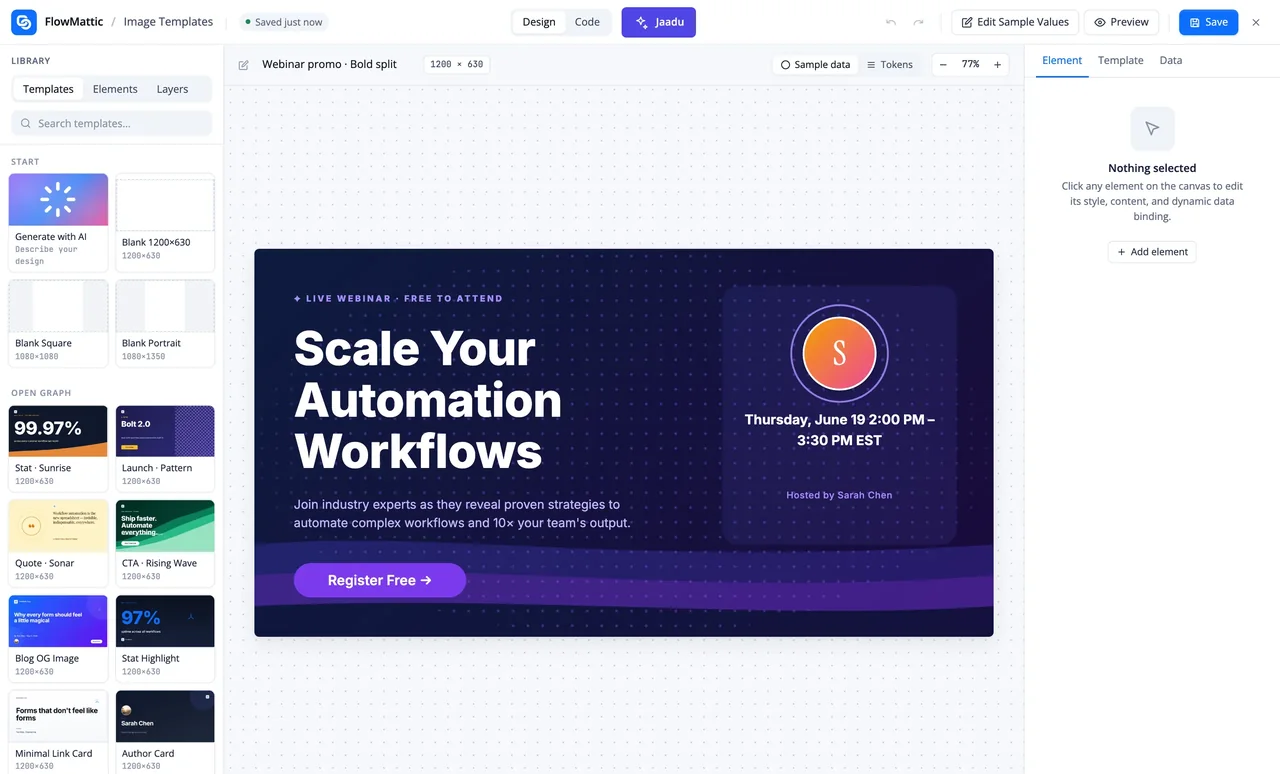
Start, bind, render
The design is yours; the data and the timing belong to the workflow.
-
Start
Pick a starter or a blank canvas
Choose one of 38 templates or a blank canvas at 1200×630, 1080×1080 or 1080×1350, then add headings, images, shapes, badges or a QR code and place them by dragging.
-
Bind
Put tokens where data goes
A token such as {{post_title}} can sit in any text, image source or QR code field. Edit Sample Values shows the design with realistic data while you work on it.
-
Render
Generate it in a workflow
Add Generate Image from Template after any trigger. The step lists the template's tokens as fields, renders the PNG in headless Chrome through Cloudflare Browser Rendering, saves it to the Media Library and passes the URL on.
A library for the images every site keeps remaking
The template library is sorted by what the image is for. Each starter is a finished design with tokens already in place, so the first useful version is a few edits away rather than a blank canvas.
- Open Graph: blog post, stat highlight, quote, launch, author card, link preview, newsletter signup
- Social: quotes, announcements, team spotlight, achievement badge, podcast episode
- Marketing: product launch, feature banner, testimonial, event
- Ads: before and after, coupon code, countdown, discount, bundle, social proof
- Misc: course update, feature checklist, festive sale, meme caption
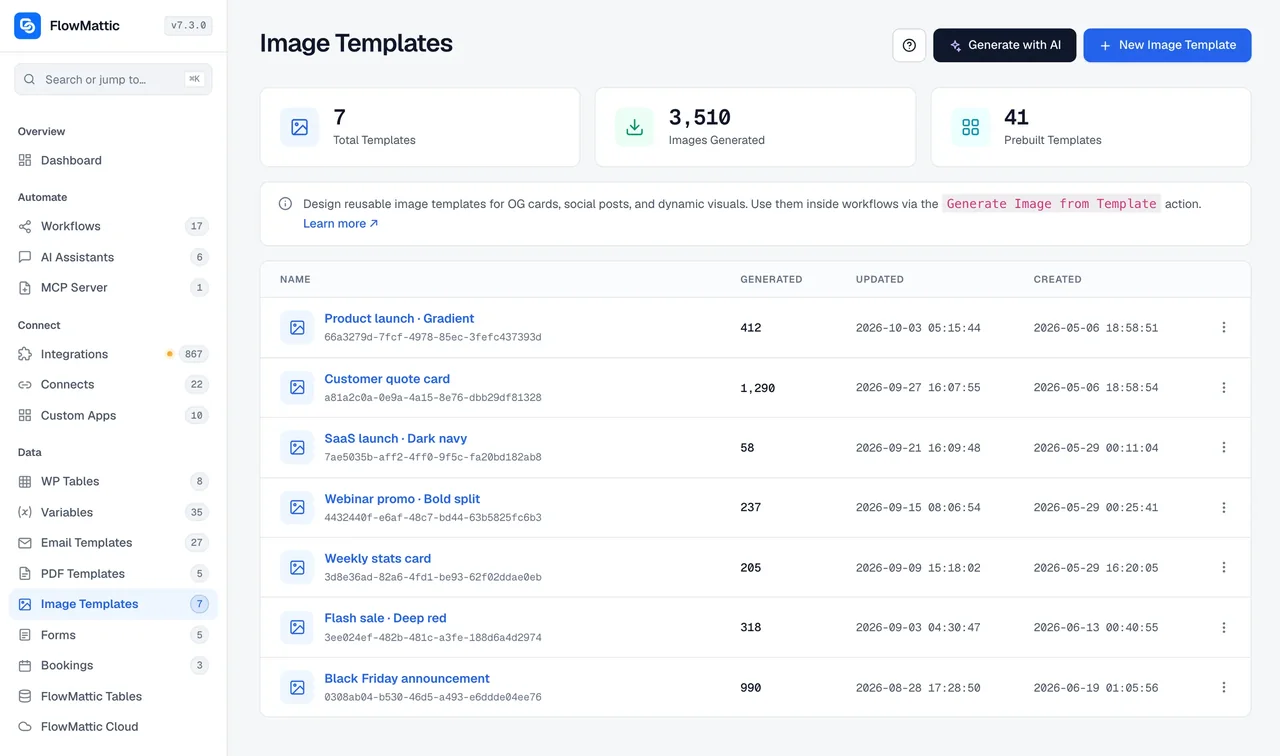
Tokens for the parts that change
Every token is a flat placeholder. The workflow fills it from the trigger's fields or from a JSON object you map in, and each run renders its own file, so a hundred certificates are a hundred different PNGs from one design.
- Tokens in text, image URLs and QR code content
- Data as per-token inputs the step detects, or one JSON object
- Edit Sample Values to see the design with real-looking data
- Solid or gradient backgrounds, drag-to-position canvas, 18 element types
Render it in the publishing workflow
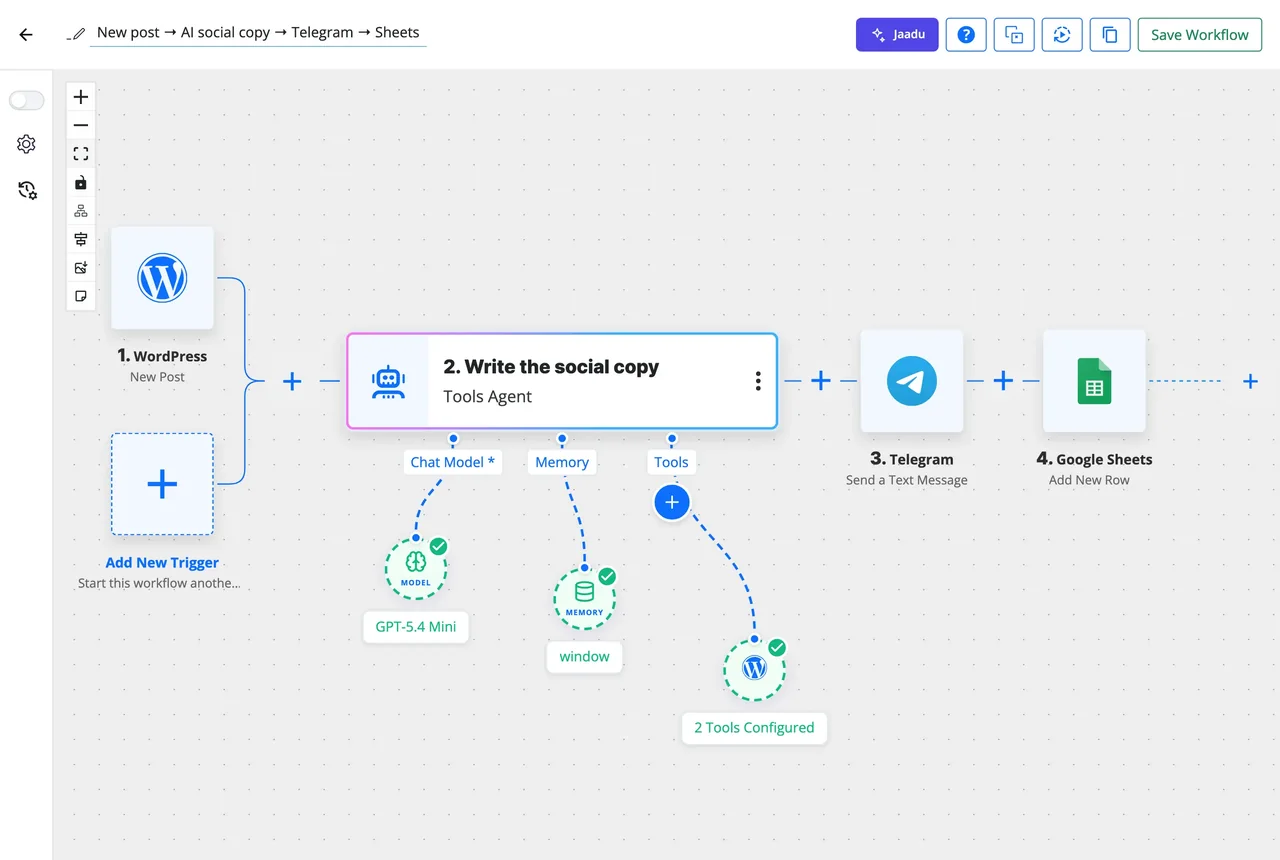
An image step sits wherever a workflow has the data for it. In the workflow shown here, a new WordPress post is handed to an AI Agent before Telegram and Google Sheets steps; put Generate Image from Template after the trigger and the post title, author and date become the card. The URL it returns can update the post, go into a social post or ride along in an email.
- Fires on any trigger: a new post, a WooCommerce order, a form submission, a schedule
- The step detects the template's tokens and shows them as fields
- Output saved to the Media Library or a custom folder, with URL and attachment id
What the Image Template Builder includes
A design canvas with the data plumbing of a dynamic image generator already attached.
Size presets
Open Graph 1200×630, square 1080×1080, portrait 1080×1350, story 1080×1920 and a 1500×500 header, or any custom width and height.
18 element types
Heading, paragraph, image, avatar, button, icon, shape, pattern shape, border shape, waves, arrow, callout lines, ribbon, badge, coupon, divider, logo and QR code.
Backgrounds and fonts
Solid or gradient backgrounds and a font, size, weight and colour per text element, so the output matches the brand without CSS.
Dynamic tokens
Flat {{token}} placeholders in text, image sources and QR content, filled per run from the trigger or a JSON object.
Sample data preview
Edit Sample Values once and the canvas shows every token resolved, so line breaks and overflow are checked before a workflow renders anything.
Generate Image from HTML
Your own HTML and CSS to a PNG or JPEG, at a fixed size or grown to fit the content, for the designs the canvas does not cover.
Save destinations
The Media Library by default or a custom folder, with the URL and attachment id in the step output for any later step.
Generate with AI
Write a brief and a template is generated with your AI provider; Jaadu rides along in the editor to adjust it in conversation.
Cloudflare Browser Rendering
Rendering runs in headless Chrome on Cloudflare, so fonts, gradients and shapes come out as designed. Add your Account ID and API token once in Settings.
Images workflows can make on their own
Each of these uses the Image Builder step and triggers from the 918+ integrations.
An Open Graph image for every post
WordPress New Post fills the blog OG template with the title, author and date, and the rendered PNG is ready for the share preview before the post is announced.
A certificate when a course is completed
A LearnDash or Tutor LMS completion trigger renders the learner's name, course and date onto the certificate template, and the file goes out by email.
A weekly stat card from a table
A Monday schedule reads the week's numbers from WP Tables, renders the stat highlight template and posts the image to Slack.
A personal coupon per customer
A WooCommerce order renders the coupon template with the customer's name and a code, and the image goes into the thank-you email.
Questions about image generation
Do I need a Cloudflare account to generate images?
Yes. Images are rendered in headless Chrome through Cloudflare Browser Rendering, so Generate Image from Template needs a Cloudflare Account ID and API token saved once under FlowMattic Settings. FlowMattic paces renders to your account's limit and retries after a rate-limit response, so a Workers Free account works.
What format and sizes does it produce?
A template renders to PNG at the size you designed: Open Graph 1200×630, square 1080×1080, portrait 1080×1350, story 1080×1920, a 1500×500 header, or any custom size. Generate Image from HTML can also output JPEG, at a fixed size or grown to fit the content.
How does personalisation per record work?
Any text, image source or QR code field can hold a flat {{token}}. In the workflow, the step reads the template and lists each token as a field you map from the trigger or an earlier step, or you pass one JSON object. Every run renders its own PNG from the same design.
Can I preview a template with sample data?
Yes. Edit Sample Values in the editor sets a value for each token and the canvas shows the design resolved, so you can check line breaks and overflow before any workflow renders it.
Where does the generated image end up?
In the Media Library by default, or a custom folder. The step returns the URL and attachment id, which any later step can use: update a post, send it in an email, post it to a social app or store the link in a table.
Can I use my own HTML instead of the canvas?
Yes. The Image Builder app also has Generate Image from HTML, which turns HTML and CSS from any step, including text an AI Agent wrote, into a PNG or JPEG through the same renderer.
Can AI draft a template for me?
Yes. Generate with AI takes a short brief and produces a template with elements and tokens in place, using your own AI provider connection. Jaadu rides along in the editor to change it in conversation afterwards.
Did not find your answer? You can browse the help center or ask us directly.
One design, a new image every run
Pick a starter, drop in the tokens, and let the workflow render the rest.
30-day money-back guarantee Unlimited templates and renders Self-hosted