

A PDF generator for WordPress: invoices and documents from your workflows
Design a PDF template once in WordPress, then let any workflow merge live data into it and hand the finished file to the next step. Invoices, certificates, contracts and reports come out of the same editor, rendered on your own server.
25 element typesLetter, A4, A5 and LegalLine items and totalsNo external service needed

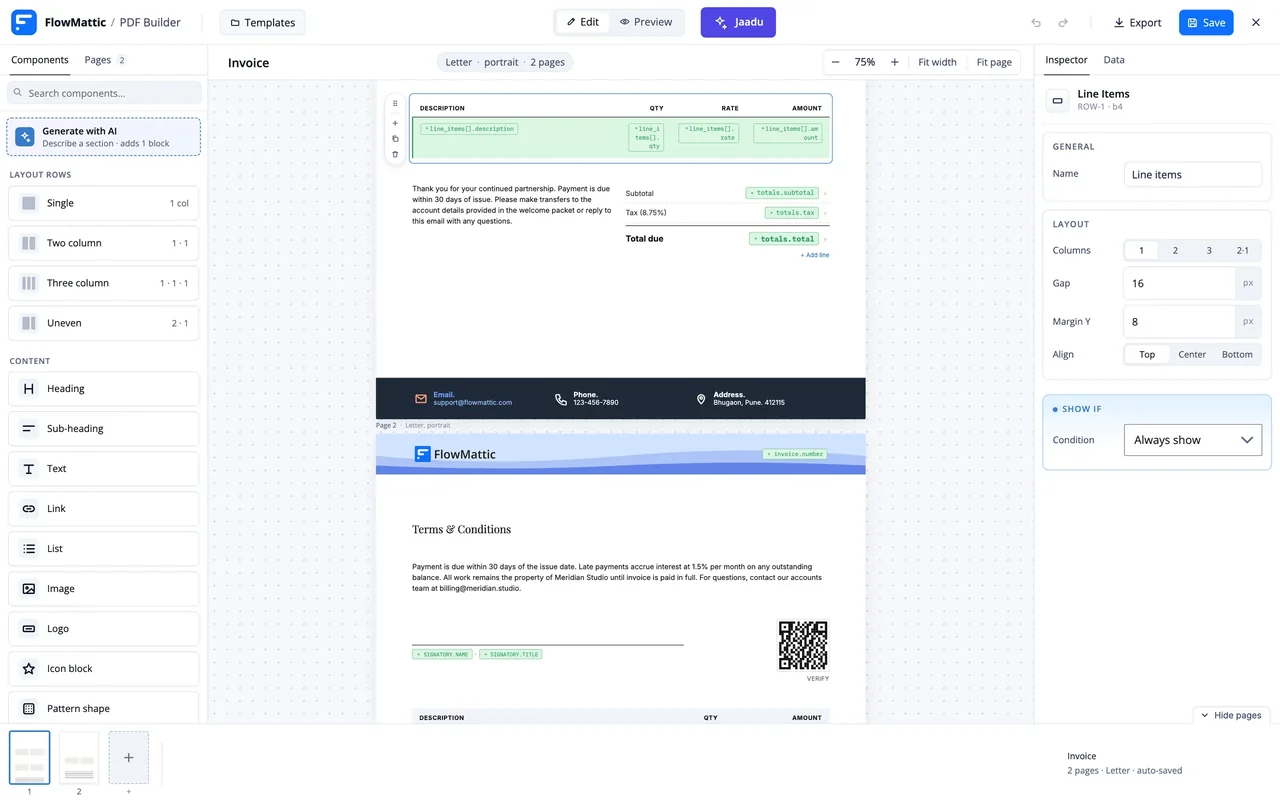
Design, bind, generate
A template is built once. The workflow decides when it is rendered and with whose data.
-
Design
Lay out the page
Pages are rows of cells. Drop in headings, text, tables, totals, key/value blocks, signatures, QR codes and barcodes, or start from the invoice, quote, receipt, report, proposal or statement of work template.
-
Bind
Point elements at data
Any text can hold a tag such as {{customer.name}}. Point a table at an array, such as order line items, and it repeats a row per item; totals compute from the same rows. The Data panel previews it all with sample values.
-
Generate
Render it in a workflow
Add Generate PDF from Template after any trigger. The step detects the template's parameters and shows them as fields, saves the file to the Media Library or a folder, and passes the URL to the next step.
Line items, totals and the maths between them
Point a Table element at an array, such as the line items of an order, and it repeats a row for every item. A Totals element computes subtotal, tax and discount from those rows, and any line can carry its own formula, so an invoice is right without a spreadsheet step in front of it.
- Table rows repeat for every item in a bound array
- Totals for subtotal, tax, discount and the grand total, formatted as currency
- Formulas with + - * / and sum(), count(), avg(), min() and max() over any data path
- Key/value blocks for invoice numbers, dates and terms; Address blocks for billing details
The file goes wherever the workflow goes
Generate PDF from Template returns the file's URL, path, attachment id and filename, so the next step can use it like any other field. Attach it to an email, upload it to Google Drive or Dropbox, post it to Slack, store the link in a table row, or send it on through a webhook.
- Save to the Media Library, a custom Media Library folder or a plain folder in uploads
- Attach it with Email by FlowMattic's Send Email or Send Template Email
- Upload it with the Google Drive or Dropbox integration, among 918+ apps
- Hand it to the PDF Parser or an AI Agent when a workflow needs to read it back
One editor for every document
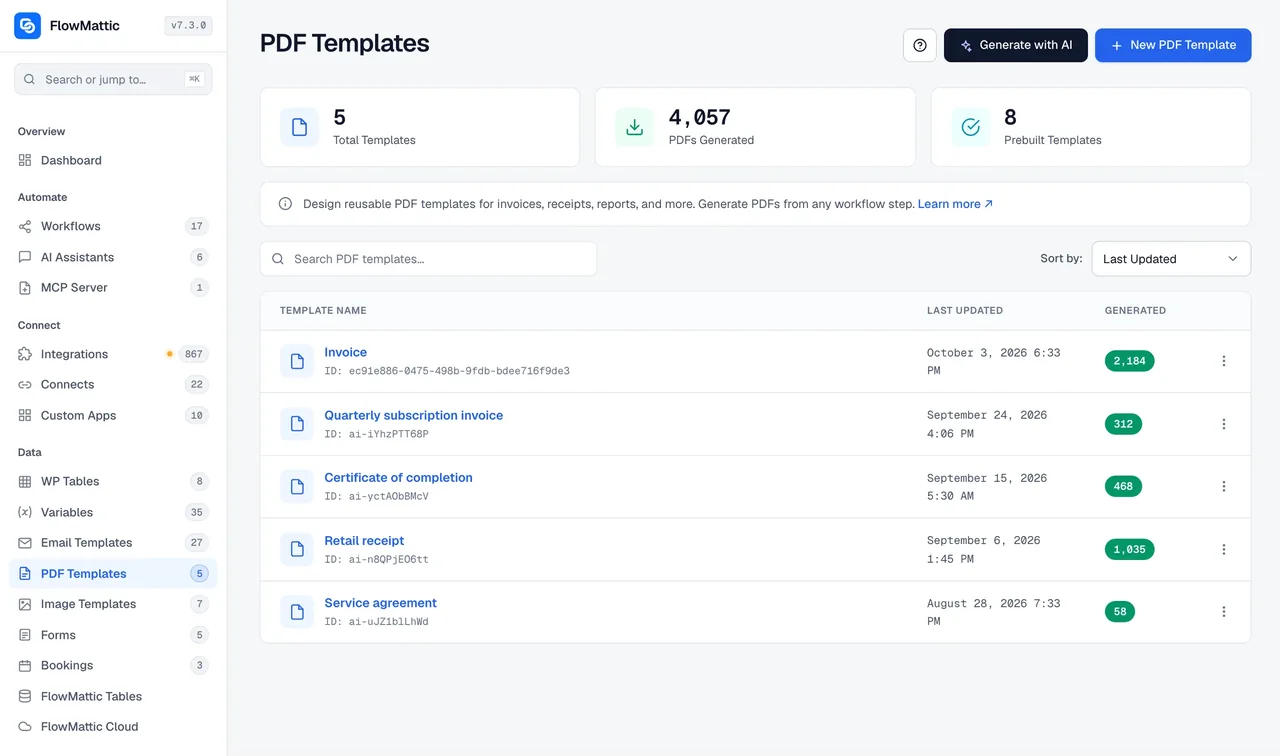
The PDF Templates screen lists what you have built and the starters you can begin from: Invoice, Quote or estimate, Receipt, Monthly report, Weekly status report, Proposal letter and Statement of work. Select an element on the page and the Inspector, Styles and Data panels change it.
- Letter, A4, A5 or Legal, portrait or landscape
- Headers and footers on every page, with {{page}} of {{pages}} numbering
- Conditional visibility, so a block prints only when its data is present
- Signature, quote, alert, badge and card blocks for contracts and reports
What the PDF Template Builder includes
The parts that turn a page layout into a PDF generator for WordPress.
Dynamic bindings
A tag such as {{customer.name}} goes anywhere text goes. The Data panel previews the page with sample values while you design.
Two ways to supply data
Map each parameter to a field from an earlier step, or pass one JSON object. The step reads the template and lists its parameters for you.
Two rendering engines
The built-in engine renders on your server with nothing to sign up for. Switch on Cloudflare Browser Rendering in Settings for full modern CSS.
Generate PDF from HTML
Bring your own HTML and CSS, from a step or an AI Agent, and get a PDF back through either engine.
QR codes and barcodes
A QR code for a payment or verification link and a barcode for a product or ticket, both filled from data at render time.
Graphs and key/value blocks
A Graph element draws from an array for monthly and status reports; Key/Value blocks line up labels and figures.
Signatures
A Signature block with the signatory's name and title, for contracts, proposals and statements of work.
PDF Parser for the reverse
Parse PDF, Get PDF Metadata, Search PDF Text and Extract Images from a URL or a Media Library file, then act on the result.
Jaadu in the editor
Describe the document you need and Jaadu drafts it on the canvas, then changes it with you in conversation, using your own AI provider.
Documents workflows already need to produce
Each of these uses the PDF Builder step and modules that ship with FlowMattic.
Daily invoices from a table
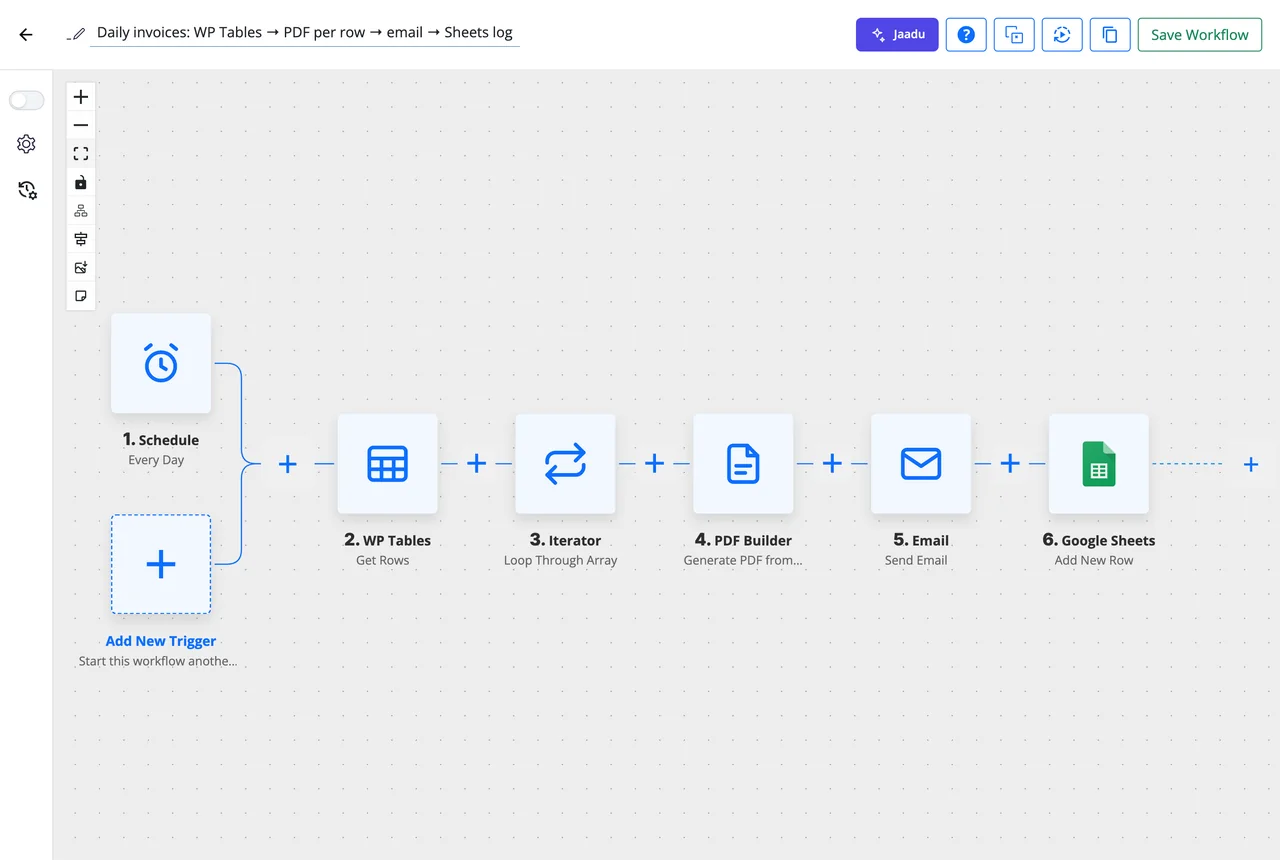
A 09:00 schedule reads unpaid rows from WP Tables, an Iterator loops through them, a PDF invoice is rendered for each, emailed with Email by FlowMattic and logged in Google Sheets. This is the workflow shown above.
Certificate when a course is completed
A course-completion trigger from your LMS integration fills the learner's name, course and date into a certificate template, and the PDF goes out by email and into Google Drive.
Quote from a form submission
A Form Builder submission with a quantity and a product renders a quote with line items and totals, and Send Template Email delivers it before the visitor has closed the tab.
Contract after an approval
A Human in the Loop step waits for sign-off, then a contract with a Signature block is generated, uploaded to Dropbox and linked from the deal's row in a table.
Questions about PDF generation
Do I need an external service to generate PDFs?
No. The built-in engine renders every template on your own server; it is fetched once on first use and needs no account or API key. Cloudflare Browser Rendering is an optional second engine you can switch on in Settings when a layout relies on modern CSS that the built-in engine does not support.
How do invoice line items and totals work?
Bind a Table element to an array from an earlier step, such as the line items of a WooCommerce order, and it repeats a row for each item. A Totals element then computes subtotal, tax, discount and the grand total from those rows, formatted as currency, and each line can carry a formula using + - * / and sum(), count(), avg(), min() or max().
How does workflow data get into the template?
Any text can hold a tag such as {{customer.name}} or {{invoice.number}}. In the workflow, Generate PDF from Template reads the template, lists its parameters as fields you map from earlier steps, or accepts one JSON object for all of them. The Data panel in the editor previews the page with sample values.
Which page sizes and layouts are supported?
Letter, A4, A5 and Legal, in portrait or landscape. Each page is built from rows of one, two or three columns or an uneven two-column split, and headers and footers repeat on every page with {{page}} of {{pages}} numbering.
Where does the generated PDF go, and how do I send it?
The step saves the file to the Media Library, a custom Media Library folder or a plain folder in uploads, and returns its URL, path, attachment id and filename. Any later step can use those: attach the file with Email by FlowMattic, upload it with the Google Drive or Dropbox integration, post the link to Slack or store it in a table.
Can I use my own HTML instead of the editor?
Yes. The same PDF Builder app has a Generate PDF from HTML action that takes HTML and CSS from any step, including text written by an AI Agent, and renders it through the built-in engine or Cloudflare Browser Rendering.
Can a workflow read a PDF as well as make one?
Yes. The PDF Parser app has Parse PDF, Get PDF Metadata, Search PDF Text and Extract Images from PDF, from a URL or a Media Library file. A typical pair is an email attachment parsed into text, read by an AI Agent and written to a table.
Did not find your answer? You can browse the help center or ask us directly.
Design the document once, let workflows fill it in
Invoices, certificates, contracts and reports from one PDF generator, rendered on your own server and passed to any step.
30-day money-back guarantee Unlimited templates and renders Self-hosted