

WP Tables: database tables inside WordPress
Store leads, approvals, logs and app data in tables that live in your own WordPress database, with no extra service to pay for. Every workflow can read and write the rows, a Button column can start a workflow from a row, and a table can be shown on any page with a shortcode.
13 column types5 triggers and 10 actionsFree with every planRunning on 12,908+ sites

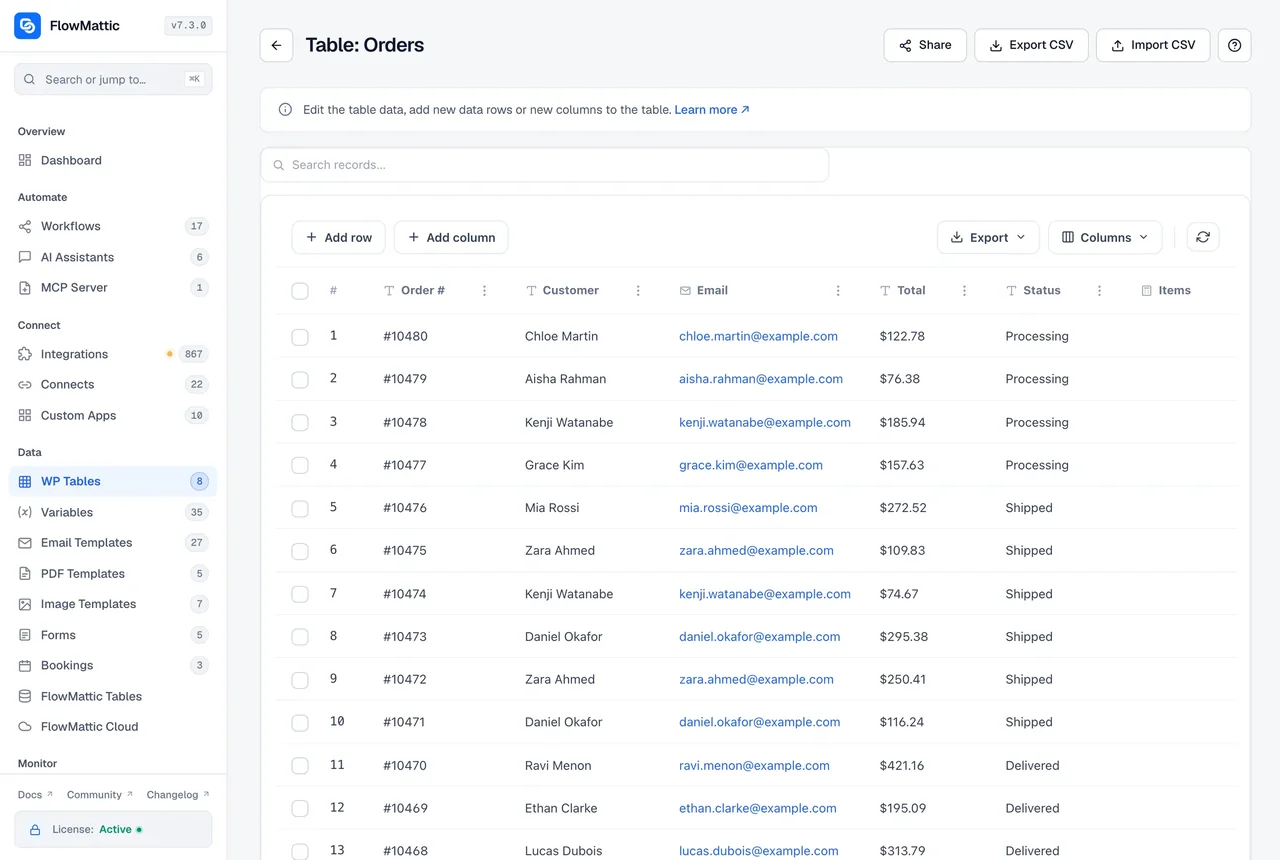
From an empty table to a running workflow
Tables are created and filled in the admin, then the workflows take over.
-
Create
Design the table
Create a table and add columns, each with a type: Text, Long text, Rating, Dropdown, Link, Email, Number, Date, Date and time, Checkbox, Image, Button or Shortcode. Or import a CSV and let WP Tables read the column names and types from the file for you to review.
-
Fill
Add rows from anywhere
Type rows into the grid, import them in batches from a CSV, or let a workflow write them: a form submission, a webhook payload or an AI step's answer becomes a record with the New Record action.
-
Automate
Let rows start workflows
A new, updated or deleted record, a changed cell or a clicked button fires a trigger. Any later step can find, get, count, update or delete rows in the same table or another one.
Read and write rows from any workflow step
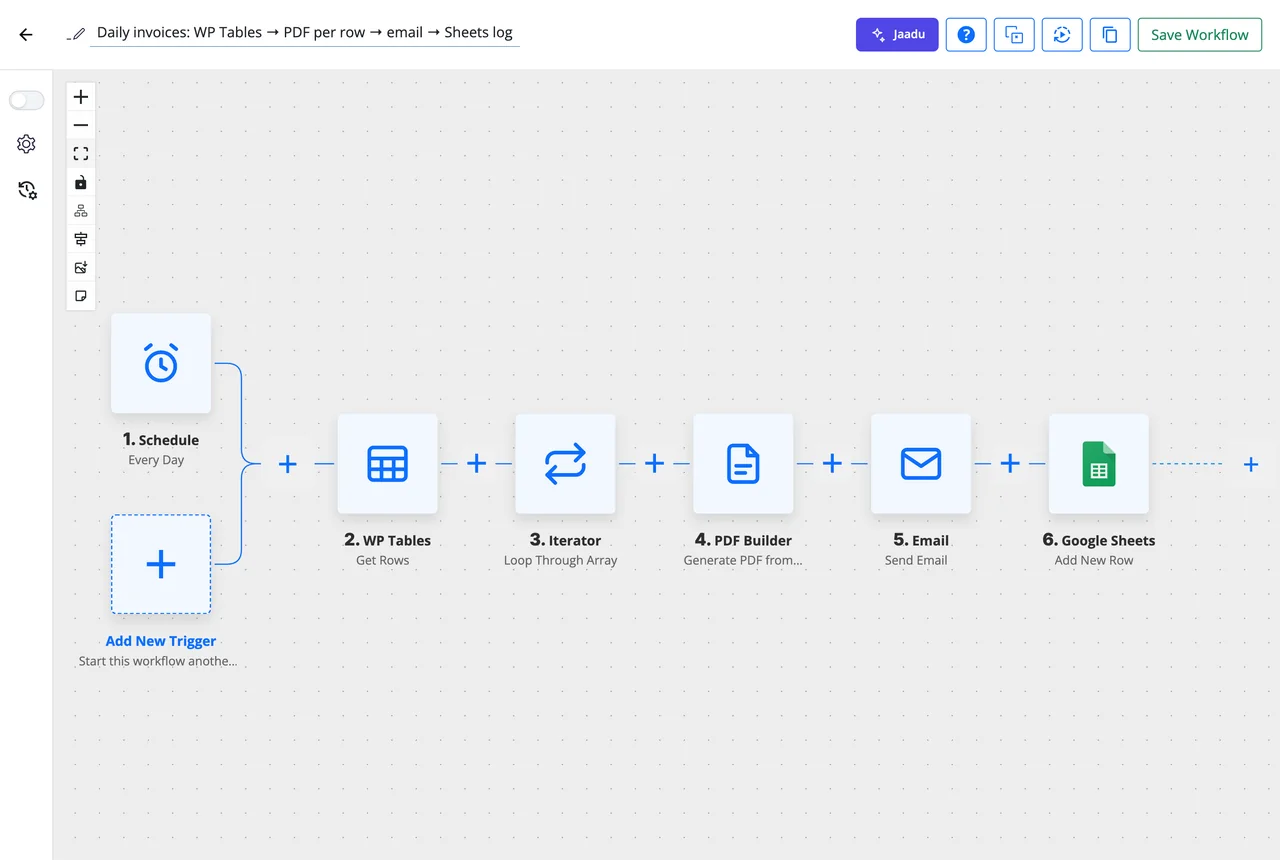
WP Tables is an app in the builder like any other. Five triggers watch a table for changes, and ten actions read and write it, so a schedule can pull unpaid rows, an Iterator can walk through them and a PDF step can bill each one.
- Triggers: New Record, Updated Record, Deleted Record, Updated Cell, Button Clicked
- Find Record and Find Multiple Records by a column value, exact or contains, with an optional second column
- Get Row by ID, Get Rows with a limit and offset, Get Row Count
- New Record, Update Record, Update Cell and Delete Record
- Continue on Approve or Reject, for tables that hold approvals
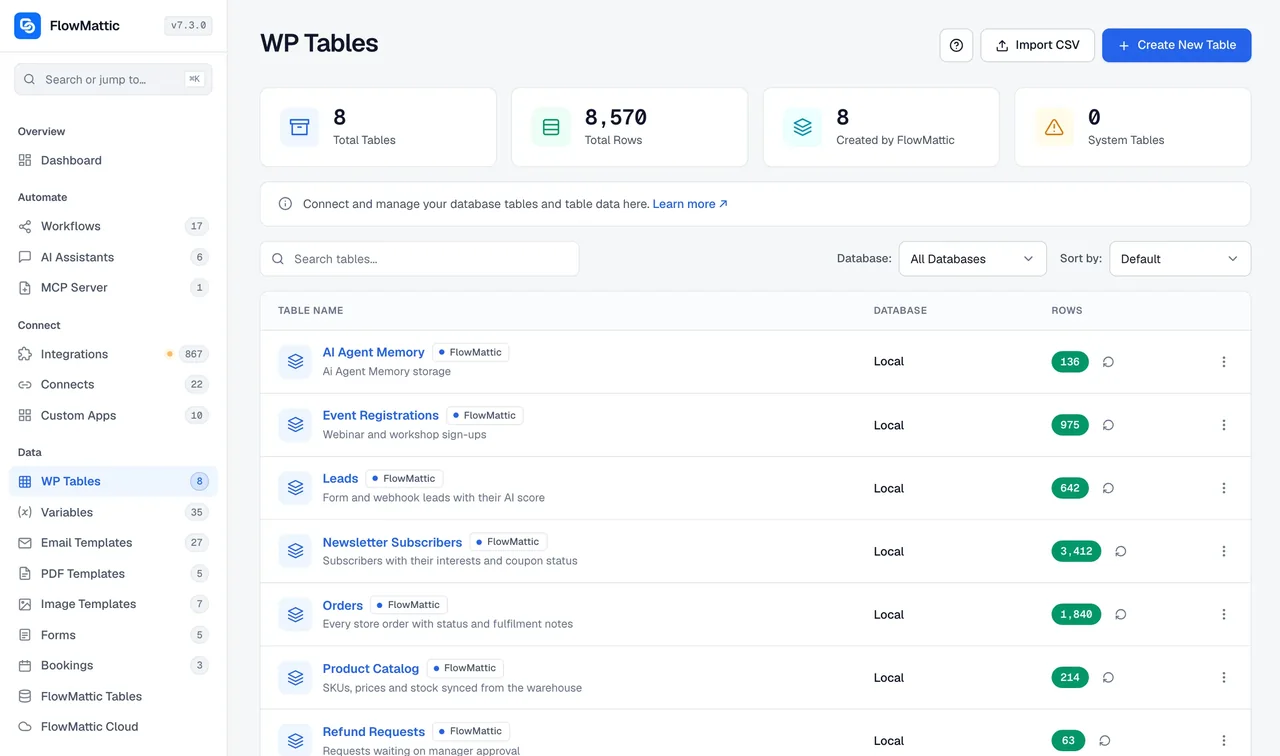
Your database, local or external, with CSV in and out
Tables are created in the WordPress database by default, and the same screen can manage tables in an external MySQL database you connect. The list shows every table with its row count, and each one can be exported as CSV or filled from one.
- Import a CSV to create a table or to add rows to one, with column mapping and batch processing
- Export any table as CSV from the list
- Connect an external MySQL database and work with its tables from the same screen
- Show a table on the front end with the [flowmattic_table] shortcode, built for you by the Share and Embed generator
A button in a row that runs a workflow
Add a Button column and every row gets a button that fires the Button Clicked trigger with that row's data. Approval tables go a step further: a Human in the Loop step can wait for an Approve or Reject button in the table, then continue down the matching branch.
- Button Clicked trigger carries the row, so the workflow knows which record to act on
- Continue on Approve or Reject resumes a waiting run from the table
- Bulk updates fire the trigger once per row, not once per page
What a WP Table can do
Everything here ships in the plugin and runs in your own database.
13 column types
Text, Long text, Rating, Dropdown, Link, Email, Number, Date, Date and time, Checkbox, Image, Button and Shortcode, each validated in the grid.
Lookups without SQL
Find Record and Find Multiple Records match a column by exact value or contains, with an optional second column, and return up to 1,000 rows.
CSV import and export
Create a table from a CSV, add rows to one, or export a table. The CSV Parser and CSV Creator modules do the same inside a workflow.
Front-end shortcode
[flowmattic_table] shows a table on any page or post, for logged-out visitors too, and the Share and Embed generator writes it for you.
External MySQL databases
Add a database connection in Settings and manage its tables beside your local ones. A workflow opens one connection per database for the whole run.
MCP tools, off by default
A WP Tables Tools switch on the MCP Server lets a connected AI client list tables, create tables and columns, and add, update or delete rows.
WP Tables or FlowMattic Tables
Both are tables in the builder with the same kind of triggers and actions. The difference is where the data lives and what the grid can do.
| Compare | WP TablesIncluded | FlowMattic TablesManaged |
|---|---|---|
| Where the rows live | Your WordPress database, or an external MySQL database | A per-site managed database, off the WordPress database |
| Column types | 13 | 13, plus 13 managed-only types |
| Triggers and actions | 5 triggers, 10 actions | 5 triggers, 11 actions including SQL Query |
| Saved views, card layouts, HTML templates | Yes | |
| Point-in-time restore | Yes | |
| Cost | Free with every plan | Metered plan; a Free Cloud account comes with every license |
Questions about WP Tables
Do I need to know SQL to use WP Tables?
No. Tables, columns and rows are managed in a grid, and workflows use named actions such as Find Record or Update Cell. Nothing in WP Tables asks you to write a query.
Can I import a CSV?
Yes. Import a CSV to create a new table, and WP Tables reads the column names and types from the file for you to review before the rows are imported in batches. You can also import into an existing table with the same column-mapping wizard, and export any table as CSV.
Can I work with tables in another database?
Yes. Add an external MySQL database connection in Settings and its tables appear in the same list, with the same triggers and actions. A workflow opens one connection per database for the whole run, so long runs stay inside the server’s connection limit.
How do I show a table on my site?
Use the [flowmattic_table] shortcode on any page or post. The Share and Embed generator on the table builds the shortcode for you, and the embed renders for logged-out visitors as well.
Is there a limit on tables or rows?
WP Tables does not add one. The rows live in your own WordPress database or an external MySQL database, so the only limits are the ones your hosting sets. For data that would weigh down the site database, FlowMattic Tables keeps it in a managed database off WordPress.
Can an AI client read or change my tables?
Only if you switch it on. The MCP Server has a WP Tables Tools switch, off by default, that lets a connected client such as Claude or Cursor list tables, create tables and columns, and add, update or delete rows.
Did not find your answer? You can browse the help center or ask us directly.
Give your workflows somewhere to keep their data
WP Tables is included in every FlowMattic plan, alongside 918+ integrations and unlimited workflows.
30-day money-back guarantee Unlimited workflows and runs Self-hosted