FlowMattic 5.5.0: Horizontal Workflow Layout, Share Secrets, Multisite & MCP Tools
We’re excited to announce FlowMattic 5.5.0, a major update packed with powerful new features to enhance your WordPress automation workflows. This release introduces the Horizontal Workflow Builder, Share Secrets module for secure information sharing, WordPress Multisite integration, MCP tools creation, and significant workflow builder improvements.
What’s New in FlowMattic 5.5.0
Horizontal Workflow Builder Layout
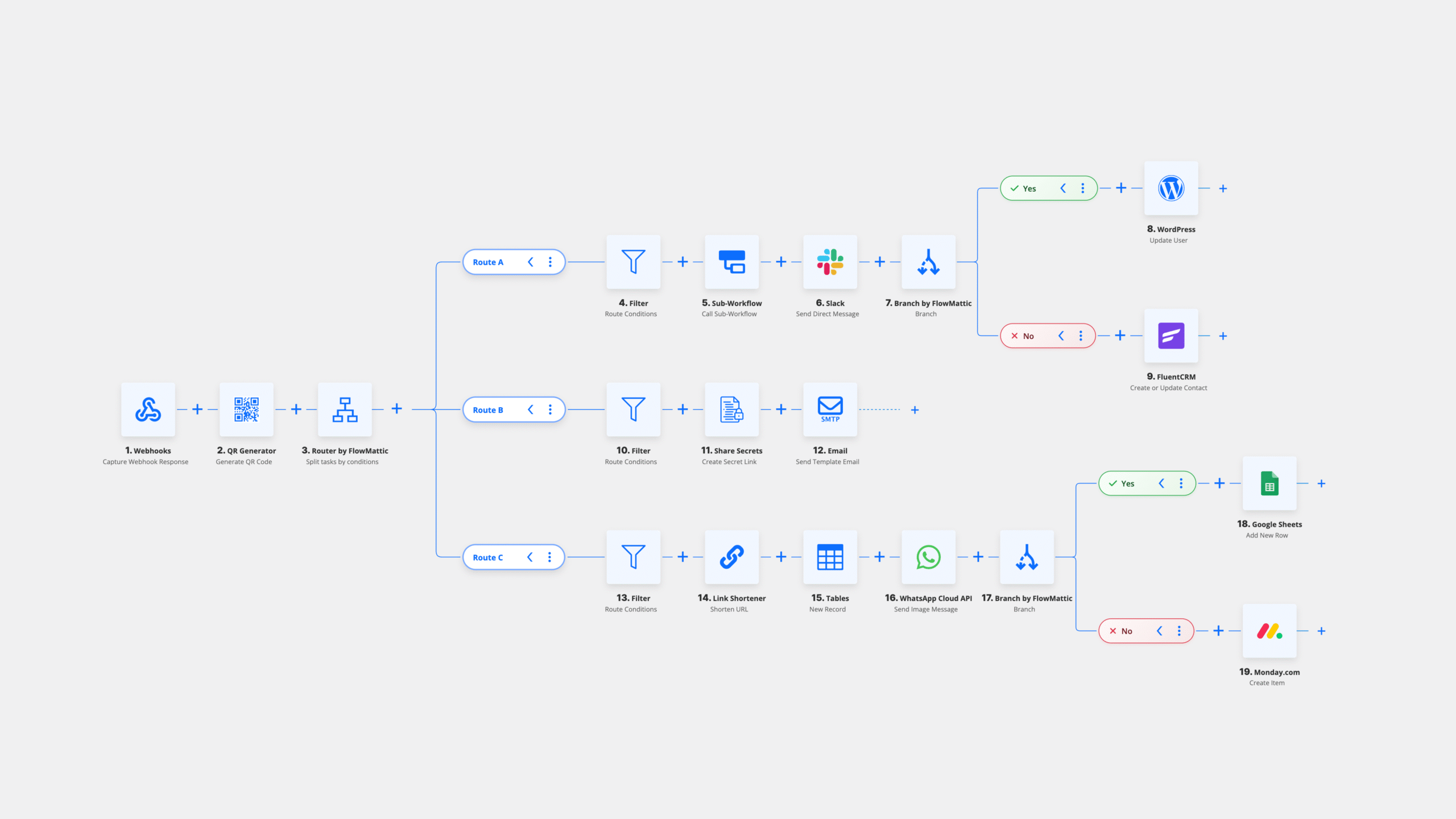
We’ve added a new horizontal layout option for the workflow builder. This alternative view provides a different perspective for designing complex workflows, especially useful for workflows with many parallel branches or when working on wider screens.
You can set your preferred default layout in FlowMattic Settings, and the builder will remember your choice across sessions.
Download Workflow as Image
Need to document or share your workflow designs? The new download button in the workflow controls lets you export your workflow as a PNG image. This is perfect for documentation, presentations, or sharing workflow designs with team members who don’t have FlowMattic access, or on social media to showcase your creativity.
Share Secrets: Secure Information Sharing Made Simple
The standout feature of this release is the new Share Secrets module. This powerful addition allows you to securely share sensitive information like passwords, API keys, license codes, and confidential content through self-destructing links.
Key Features of Share Secrets
- Flexible Expiration Options – Choose between time-based expiration (minutes to days) or view-based limits (burn after reading)
- Password Protection – Add an extra layer of security with optional password requirements
- Custom Branding – Personalize the secret reveal page with your logo and custom text
- Access Notifications – Receive email alerts when secrets are accessed, including viewer details like IP address and browser information
- AES-256 Encryption – All secrets are encrypted using industry-standard AES-256-CBC encryption
- Custom CSS Support – Style the reveal page to match your brand identity

Share Secrets is perfect for businesses that need to share sensitive credentials with clients, onboard new team members securely, or transmit confidential information without leaving a permanent digital trail.
WordPress Multisite Integration
Managing a WordPress Multisite network just got easier. FlowMattic 5.5.0 introduces comprehensive Multisite integration with 15 triggers and 25 actions for complete network automation.
You can now automate tasks across your entire network, including:
- Creating and managing network sites
- User management across the network
- Super admin operations
- Cross-site content synchronization
- Network-wide settings management
Create MCP Tools from Integrations
FlowMattic now allows you to create Model Context Protocol (MCP) tools directly from your installed integrations. With just a few clicks, you can expose your workflow actions as MCP tools, enabling seamless integration with AI assistants and other MCP-compatible applications.
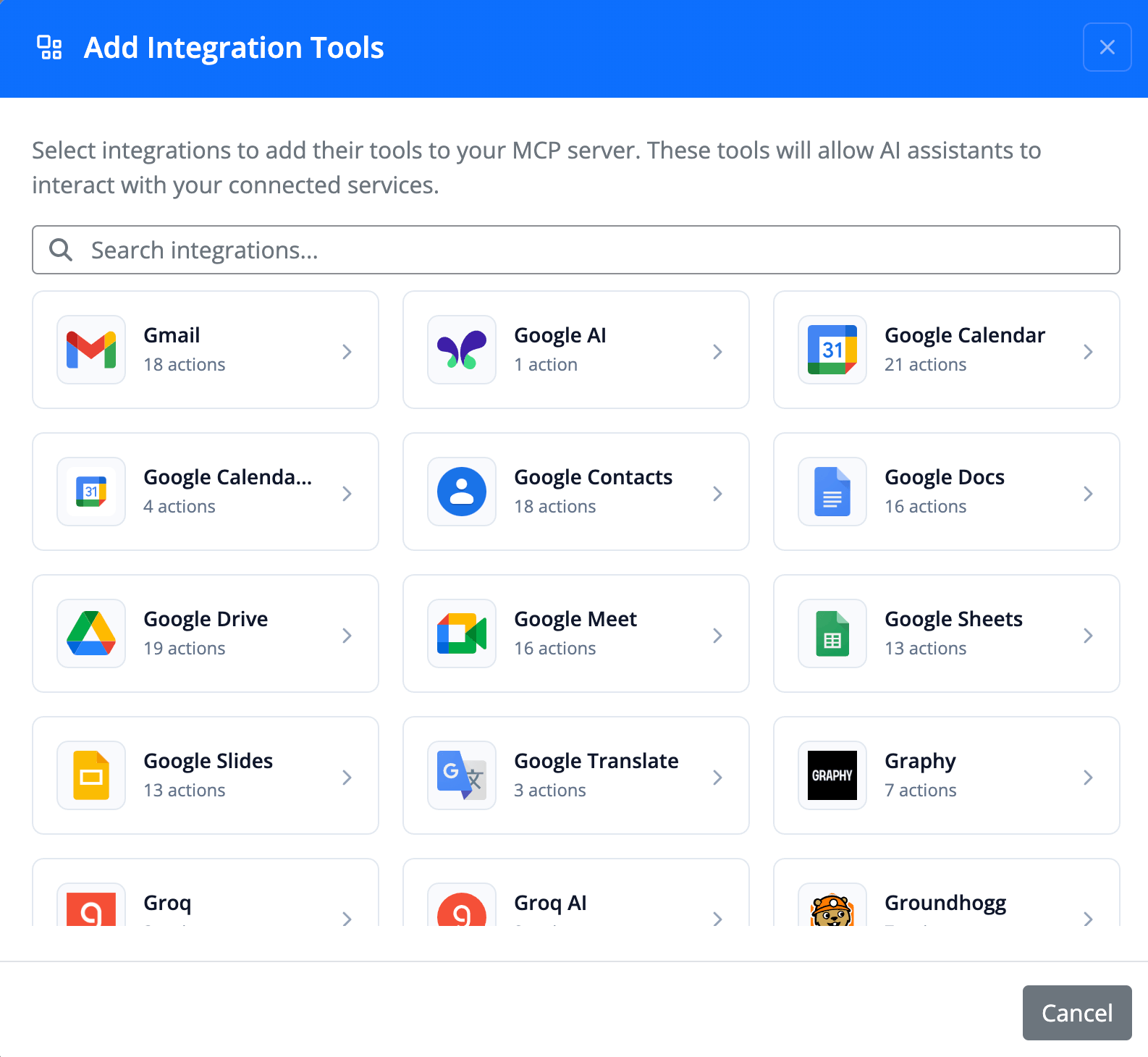
This feature opens up exciting possibilities for AI-powered automation, allowing language models to interact with your WordPress site and connected services through standardized protocols.
Fetch from Database for WordPress Triggers
Testing workflows just became faster. The new “Fetch from Database” button for WordPress and WordPress Multisite triggers allows you to quickly capture sample data from your existing database without waiting for live events to occur.
This feature significantly speeds up workflow development and testing, especially for triggers that don’t fire frequently.
Settings Popup Auto-Close Option
Based on user feedback, we’ve added an option to control the settings popup behavior in the workflow builder. You can now choose whether clicking outside the settings popup should automatically close it, giving you more control over your workflow editing experience.
Improvements
Enhanced Workflow Builder Experience
Workflow nodes are now draggable by default, with the lock icon correctly reflecting the current state. This provides a more intuitive editing experience right from the start.
Automatic Integration Installation on Import
When importing workflows or workflow templates, FlowMattic now automatically detects and installs any missing integrations. This streamlines the workflow sharing process and reduces setup friction when adopting workflows from the template library or other users.
Bug Fixes
This release includes several important bug fixes to improve stability and reliability:
- Scheduled Workflow Settings – Fixed undefined variable warning when workflow settings are incomplete
- App Authentication – Resolved timeout issues causing authentication failures for apps with slower redirect processes
- FlowMattic Tables – Fixed visibility issues after table creation by properly clearing transient caches
- Table Column Settings – Corrected issues with column settings not being applied on fresh installations
- OAuth Token Renewal – Fixed cron scheduling for access token renewal to prevent authentication lapses
- Router in Iterator – Resolved compatibility issues with WooCommerce actions on PHP 8.4
- Repeater Fields – Fixed dynamic field item removal in action settings for external apps
- Authentication Notifications – Corrected email notification sending for authentication failures
How to Update
FlowMattic 5.5.0 is available now. To update:
- Go to your WordPress admin dashboard
- Navigate to Plugins → Installed Plugins
- Find FlowMattic and click “Update Now”
As always, we recommend backing up your site before updating any plugins.
Get Started with Share Secrets
Ready to securely share sensitive information? After updating to FlowMattic 5.5.0, you can start using Share Secrets immediately:
- Create a new workflow or edit an existing one
- Add the “Share Secrets” action to your workflow
- Configure your secret content, expiration settings, and optional password protection
- Customize the appearance with branding options
- Run your workflow to generate a secure sharing link
You can also customize the error page button text and URL in FlowMattic Settings under the Share Secrets section.
Feedback and Support
We’re constantly working to improve FlowMattic based on your feedback. If you have suggestions, feature requests, or need help with any aspect of the plugin, please reach out through our support channels.
Thank you for choosing FlowMattic for your WordPress automation needs. We’re excited to see what you’ll build with these new features!