

When new form submission is received in AidaForm, check if a field contains a word using Filters, and add the data to Google Spreadsheet
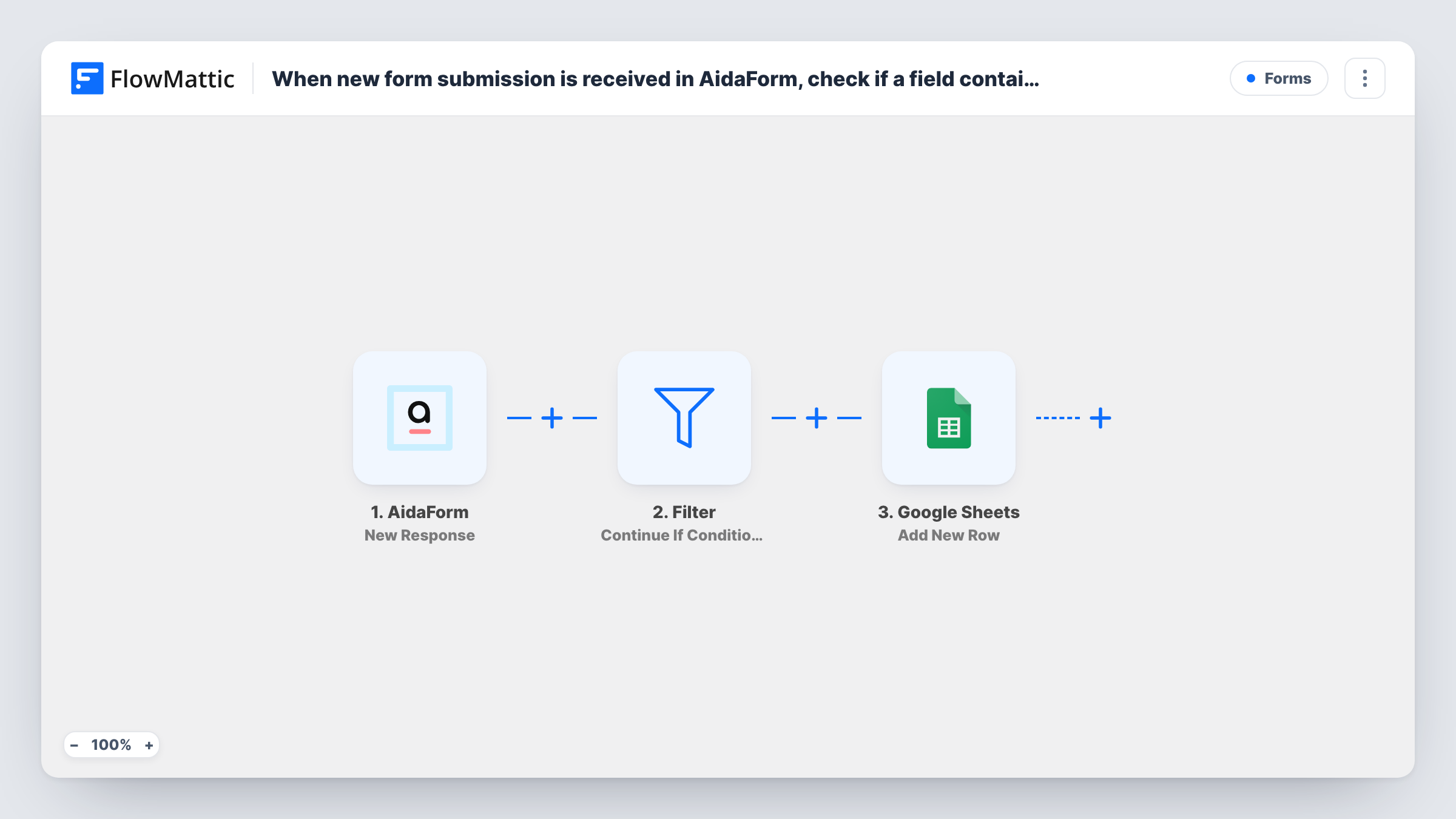
Each AidaForm response is checked by a Filter for a word in the field you choose, and only matching responses are added as a new row in Google Sheets, so the sheet holds just the entries you care about.
 AidaForm
 Filter
 Google Sheets
3 steps Setup ~5 min Used on 2.0k sites Free to import
What this workflow does
One AidaForm form can collect many kinds of answers, and the people reading your spreadsheet may only need some of them. Sorting them by hand afterwards wastes time. This workflow checks each response for a word and keeps only the matching ones in the sheet.
Every new response to your form fires the AidaForm trigger. The next step is a Filter set to continue if its condition is met: here, a field that contains the word you choose. Responses that match go on to the Google Sheets step, which adds a new row with the answers you mapped. Responses that don't match end at the Filter.
After import, open the Filter and set or confirm which field it checks and the word it looks for. Task History shows every run, including the ones the Filter stopped, so you can confirm it behaves the way you expect.
Only enquiries about one service
A studio's AidaForm contact form asks what the visitor needs. Only responses where that answer contains the word Branding reach the branding team's sheet.
Feedback that mentions a bug
Customer feedback responses go to a sheet only when the comment field contains the word bug, giving developers a short list to review.
Applications from one city
A job form keeps only applicants whose location field contains a particular city name, so local recruiters see their candidates.
How this workflow runs
What happens at each step once the workflow is on, and what you need before you import it.
 AidaForm New Response
Fires when someone submits your AidaForm form. All answers are passed on to the Filter and the Google Sheets step.
- Filter Continue If Condition Meet
Checks whether the field you choose contains your word. A match sends the run on to Google Sheets, while a response without the word ends the run at this step.
- Google Sheets Add New Row
Adds a row to your chosen spreadsheet for each AidaForm response that passed the Filter. Connect Google and map each column to an answer.
What you need
- FlowMatticCore
- AidaForm AccountAccount
- Google Sheets AccountAccount
After importing, map your own data. To keep the template universal, not every step is pre-filled. Open each step in the builder and connect your accounts and fields (channels, lists, sheets, recipients) before you switch the workflow on.
Make it yours
Changes worth making after you import it.
- Want the other responses kept too? Replace the Filter with a Router: one route for responses containing your word and one for responses that do not, each with its own Google Sheets step.
- Add a second condition to the Filter if one word isn't precise enough, for example the field contains your word and the email field is not empty.
- Send two test responses after import, one with the word and one without, then check Task History to see that only the first added a row.
Questions about this workflow
Which AidaForm field does the Filter check?
The one set in the Filter's condition. Open the Filter after import and pick the field and word that fit your form.
What happens to AidaForm responses without the word?
They end at the Filter and never reach the spreadsheet. The response is still stored in AidaForm as usual.
Is the word check case-sensitive?
Test it with a response in different capitalisation and check Task History. If it matters, add a second condition for the other spelling.
Can matching responses go to more than one sheet?
Yes. Add another Google Sheets step after the first one, mapped to the second spreadsheet.
More Forms workflows
Other ready-to-import templates from the same category.




Import this workflow into your WordPress site
Download the JSON, import it from the Workflows screen and connect your accounts. Every run stays on your server, with no per-task fees.
30-day money-back guarantee Unlimited workflows and runs Self-hosted