

A WooCommerce automation plugin that runs inside your WordPress store
FlowMattic turns every order, product, customer and cart event in WooCommerce into the start of a workflow, and runs that workflow on your own server with no per-task fee. Route orders with an AI agent, send PDF invoices, keep your CRM in step and alert your team, all from one canvas in wp-admin.
40+ WooCommerce triggers55+ WooCommerce actionsUnlimited runs, no per-order fee909+ integrations

From order event to finished workflow in three steps
The WooCommerce app fires inside your store the moment something happens, so there is nothing to poll and no connector plugin to install.
-
Trigger
Pick the store event
New Order Created, Order Paid, Order Status Set to Completed, Product Low Stock, New Cart Abandonment, Customer Total Spend Threshold and 35 more. Place a test order and the trigger captures the real order fields for mapping.
-
Decide
Add the logic
A Filter keeps the run to the orders you care about, a Router splits it into named branches, and an AI Agent can read the order and decide for you. Skip Duplicate Events keyed on the order id stops a resent webhook from running twice.
-
Act
Send it where it belongs
Render a PDF invoice, send a designed email, post to Slack, add the customer to FluentCRM or Mailchimp, write a row to Google Sheets, or change the order status back in WooCommerce. Every run lands in Task History.
Order routing with AI triage
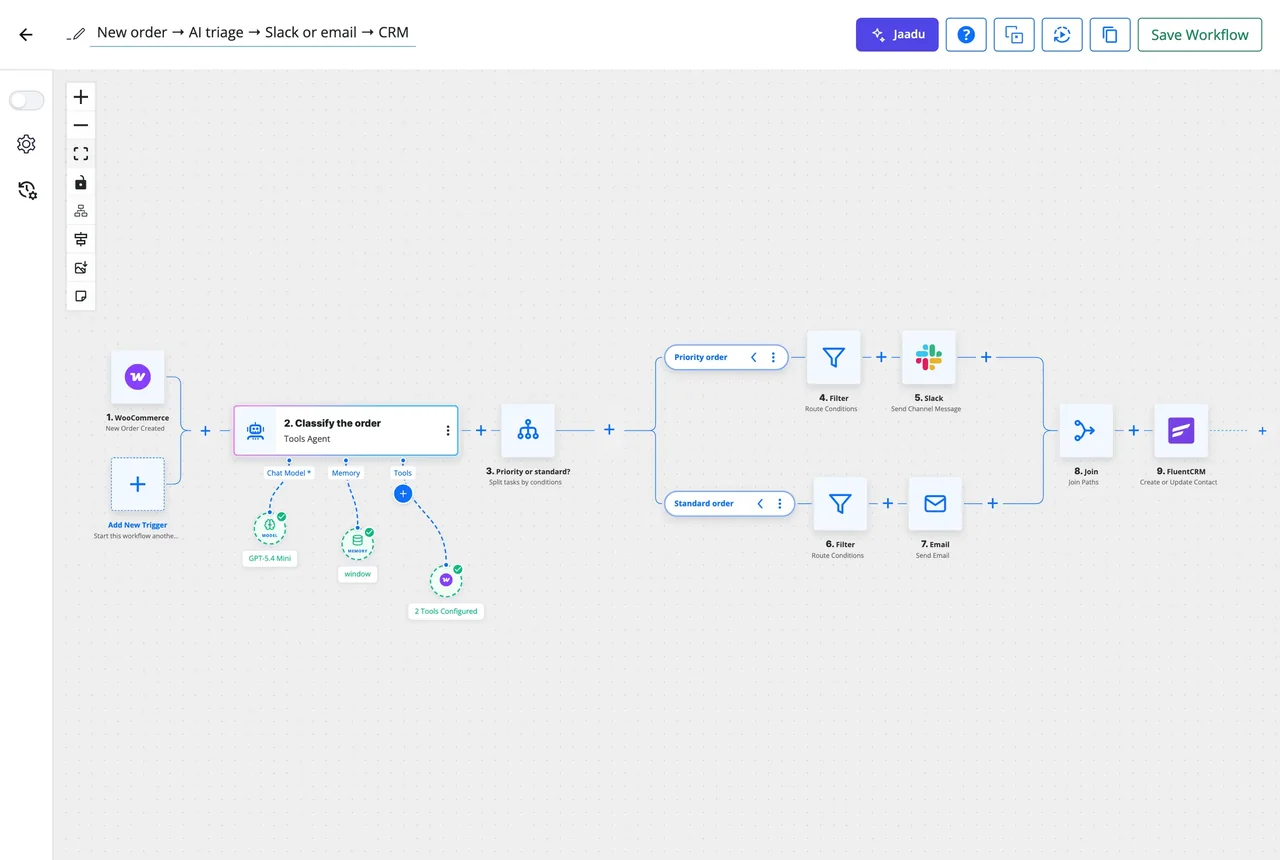
Give an AI Agent step the order and a goal such as "flag anything that looks like fraud, mark rush orders as priority, and summarise the rest". It answers with a classification you map straight into a Router, so priority orders reach Slack, standard orders get a confirmation email and doubtful ones wait for a person. The agent uses your own API key with any of 11 providers, including a local model through an OpenAI-compatible endpoint.
- AI Agent reads order totals, items, shipping and customer history you pass it
- Router branches on the agent's answer; Join brings the paths back together
- Human in the Loop pauses a branch until someone approves by email or Slack
- Customer Order Count Threshold and Customer Total Spend Threshold triggers catch VIPs without AI
Invoices as PDF, from your own template
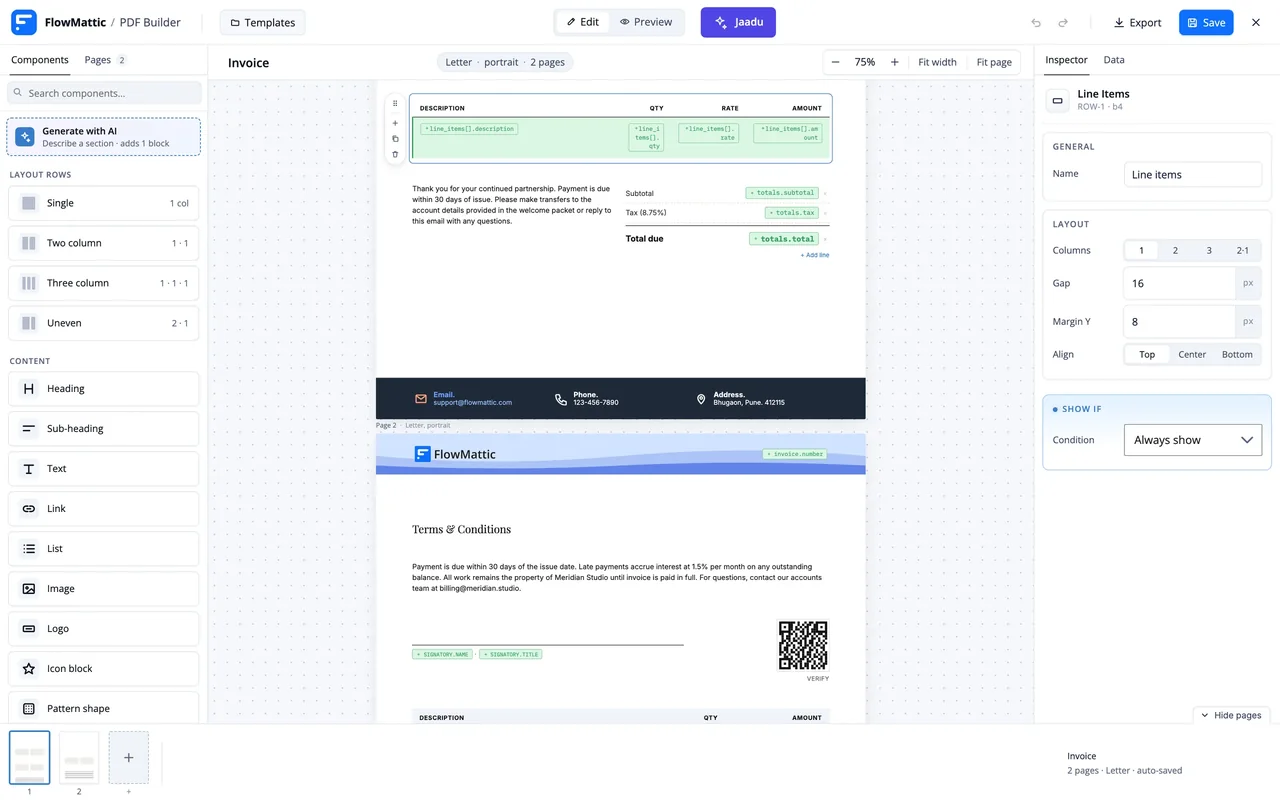
Design an invoice once in the PDF Template Builder with line items, totals, terms and a QR code, then let a Generate PDF from Template step fill it from the order at run time. The file is handed to the next step, so Email by FlowMattic can attach it, Google Drive can file it and an Add Order Note step can record that it went out.
- Generate PDF from Template or from HTML, with order data merged in
- Attach the PDF to any email step, or upload it to Drive, Dropbox or a table
- Already use WooCommerce PDF Invoices & Packing Slips? Its Generate Invoice and Generate Packing Slip actions and Invoice Created trigger are built in
Review requests, receipts and cart recovery, on a timer
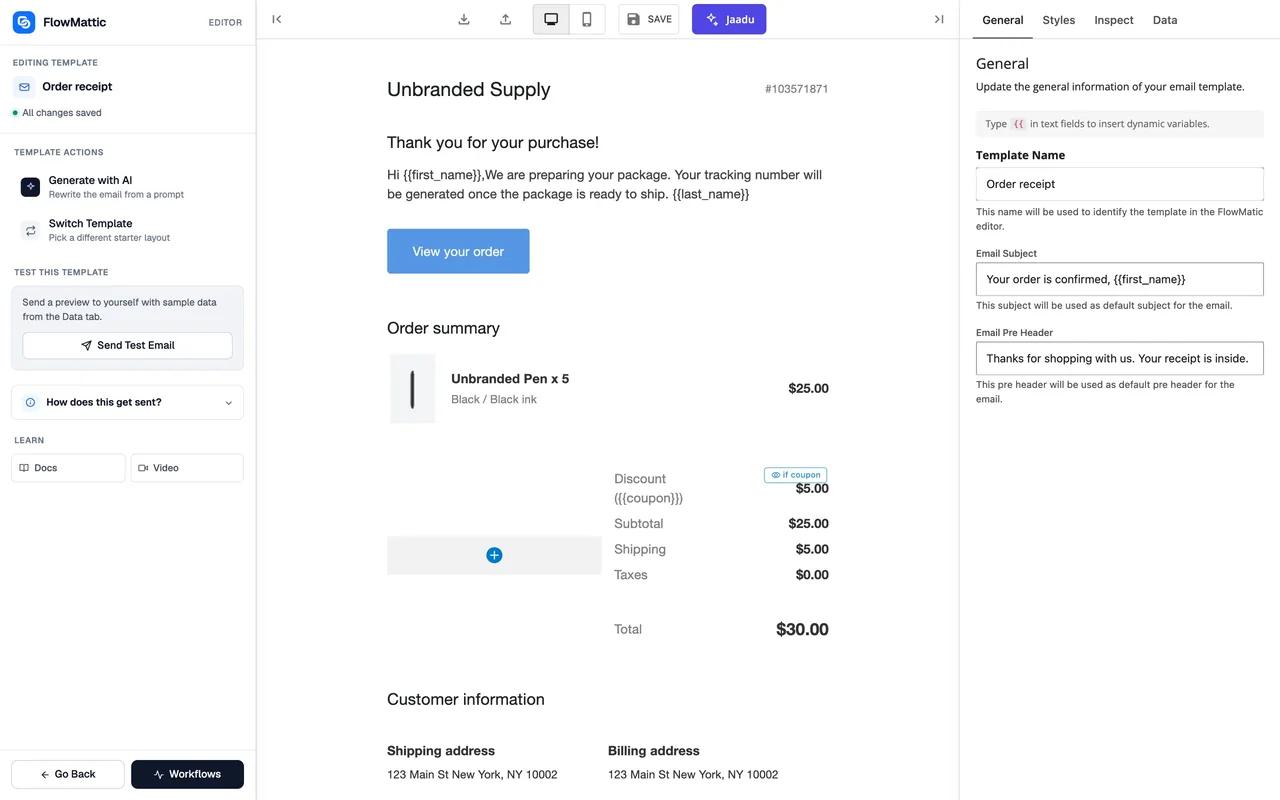
Start from Order Status Set to Completed, add a Delay For step of seven days, then send a review request built in the Email Template Builder. Receipts work the same way from Order Paid, without a delay. For carts, the New Cart Abandonment trigger fires after the cutoff you set (30 minutes by default, guests included once they enter an email), and Check Cart Status confirms the cart is still open before a Send Abandoned Cart Email or a coupon goes out.
- Delay For a duration, or Delay Until a date in any time zone
- Email templates with a Loop block that lists the order's items
- Create Coupon and Add Email(s) to Coupon make one-customer discounts
- WooCommerce Smart Coupons adds Send Coupon via Email and store credit actions
Every order run, logged on your server
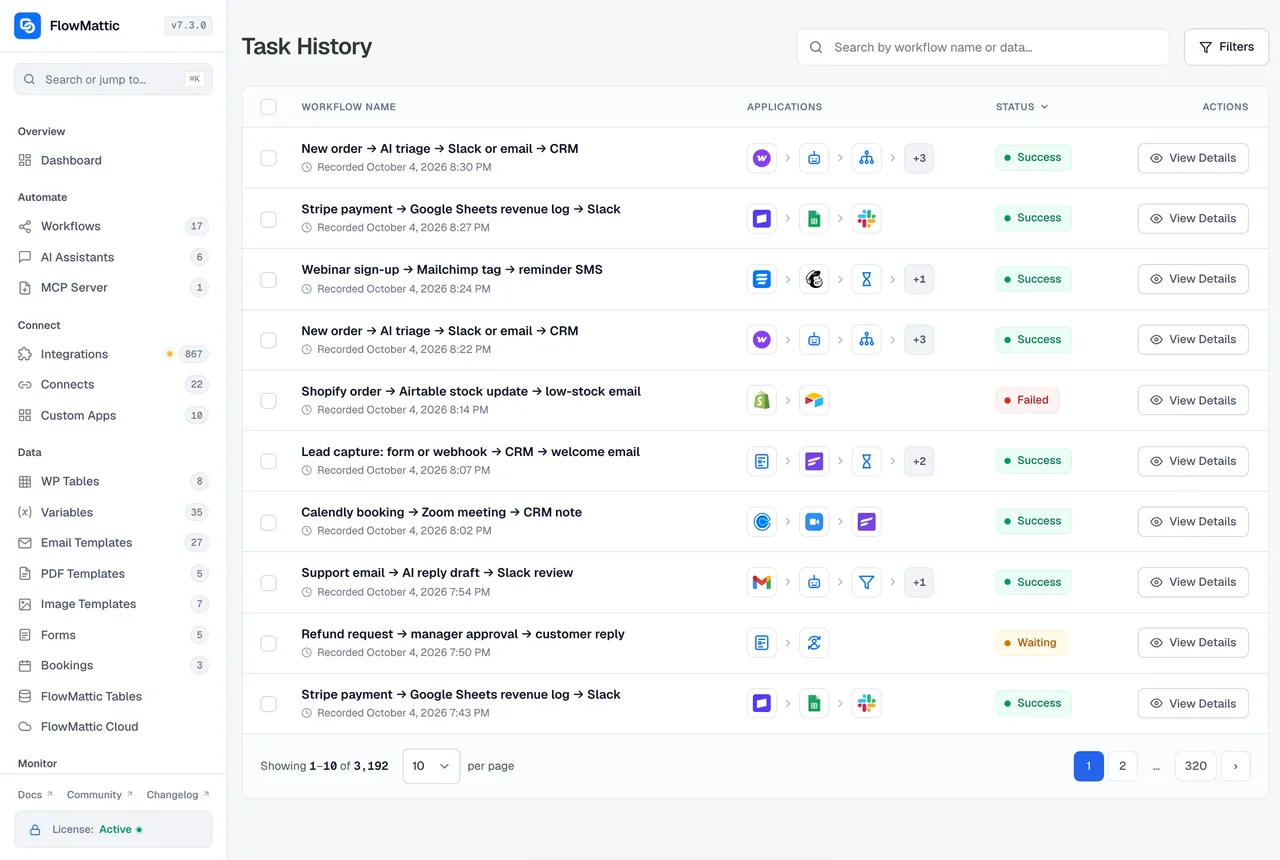
Task History keeps each run with the order data the trigger received and the request and response of every step, secrets masked. A failed invoice run can be re-executed with its original order, or with an edited payload. Because the workflow runs in your WordPress, order data is never copied to a third-party automation cloud.
- Statuses for Success, Failed, Waiting, Skipped and Interrupted runs
- Filter by workflow, status and a live date range such as Last 7 days
- Load a live run's order into the builder to map new fields against it
WooCommerce triggers and actions, by object
These are the events and actions the WooCommerce app registers, plus the four extension apps for subscriptions, coupons, invoices and bookings.
| Object | Triggers | Actions |
|---|---|---|
| Orders | New Order Created, Order Paid, Order Updated, Order Note Added, Order Status Set to Pending, Failed, On-hold, Processing, Completed, Refunded or Cancelled, Order Deleted, Restore Order | Create New Order, Change Order Status, Add Order Note, List All Order Notes, Get Order by ID, Get Orders by Email, Get Orders of User, List All Orders, Retrieve a List of Refunds, Add/Update Custom Fields |
| Products and stock | New Product Created, Product Updated, Product Deleted, Restore Product, Product Viewed, Product Purchased, Variable Product Purchased, Product Category Purchased, Product Reviewed, Product Refunded, Product Low Stock, Product Goes Out of Stock, Product Back in Stock, Product Variation Goes Out of Stock, Product Variation Back in Stock | Create New Product, Create Variable Product, Create Product Variation, Update Product, Update Product Variation, Update Product Price, Update Product Stock Quantity, Get Product by ID, by SKU or by Name/Slug, Get All Products, Get Product Variation, Get Product Sales Count, Create Attribute, Add Attribute Terms, Add and Update Product Attributes, Create Product Category, Create and Delete Product Tag, Create Product Review |
| Customers | New Customer Created, Customer Updated, Customer Deleted, Customer Order Count Threshold, Customer Total Spend Threshold | Create a Customer, Update Customer, Delete Customer, Get Customer by ID or by Email, Get All Customers, Get Customer Total Spent, Get Customer Order Count, Get Customer Last Order |
| Cart | Product Added to Cart, Product Removed from Cart, New Cart Abandonment | Add Product to Cart, Remove Product from Cart, Check Cart Status, Send Abandoned Cart Email |
| Coupons | New Coupon Created, Coupon Updated, Coupon Deleted, Coupon Restored | Create Coupon, Update Coupon, Delete Coupon, Apply Coupon, Add Email(s) to Coupon, Fetch Coupon Details |
| Reports | Retrieve Sales Report, Retrieve Top Sellers Report, Retrieve Orders, Products, Customers, Coupons and Reviews Totals | |
| Extension apps | ||
| WooCommerce Subscriptions | Subscription Created, Activated, On Hold, Cancelled, Expired, Pending Cancellation, Trial Ended, Switched, Renewal Payment Complete, Renewal Payment Failed, Payment Method Updated, Date Updated, Deleted, Trashed, User Purchases Variable Subscription | Create, Update, Cancel and Reactivate Subscription, Update Subscription Status and Dates, Extend Subscription Duration, Add Subscription Note, Apply Coupon to Subscription, Schedule Payment Retry, Process Early Renewal, Suspend Subscription Temporarily, Create Subscription Product and 16 more |
| WooCommerce Smart Coupons | New Coupon Generated, Bulk Coupons Generated, Coupon Sent via Email, Gift Card Purchased, Store Credit Used, Store Credit Restored | Create, Update and Delete Coupon, Generate Bulk Coupons, Send Coupon via Email, Get Coupon Details, Get Coupon Usage, Get Coupons by Email, Set Coupon Status, Update Store Credit Balance, Get User Store Credits, Apply Store Credit |
| WooCommerce PDF Invoices & Packing Slips | Invoice Created, Saved, Deleted and Regenerated, Packing Slip Created, Saved and Deleted, Document Attached to Email, Document Created Manually | Generate Invoice, Generate Packing Slip, Generate Bulk PDF, Get Invoice Data, Get Packing Slip Data, Get Document PDF Path, Check Document Exists, Mark and Unmark Document as Printed, Regenerate Document, Delete Document |
| WooCommerce Booking | Create Booking, Delete Booking, Create Bookable Product, Update Bookable Product | |
What a store team automates first
Each of these is a trigger, a module and an app you already have in the plugin.
AI order triage
Classify, summarise or flag an order with an AI Agent step before anyone reads it.
PDF invoices and packing slips
Render your own template from the order, or drive the WooCommerce PDF Invoices plugin.
CRM sync
Add or update the customer in FluentCRM, Mailchimp, MailerLite, Brevo or Zoho CRM with tags from the order.
Slack, Telegram and Discord alerts
Post rush orders, failed payments and low stock to the channel that should see them.
Delayed follow-ups
Review requests a week after delivery, a reminder an hour after a cart is abandoned.
Refunds with approval
Pause a refund until a manager approves by email or Slack, then change the order status.
Stock and sales in a table
Write every order or stock change to WP Tables and build reports from Retrieve Sales Report.
Webhooks from a second store
Receive WooCommerce webhooks from another site with their signature verified.
Daily and weekly reports
A schedule pulls Retrieve Top Sellers Report and sends the summary to the team.
Four WooCommerce workflows, step by step
Each chain uses only triggers, modules and apps named on this page. The library has 4,686 importable workflows for more.
New order, triaged by AI, routed to the right team
New Order Created, then AI Agent classifies the order, a Router sends priority orders to Slack and standard orders a confirmation email from a template, a Join merges the paths, and FluentCRM adds the customer with an order tag.
Paid order to PDF invoice in the inbox
Order Paid, then Generate PDF from Template fills the invoice, Send Template Email delivers it with the PDF attached, Google Drive files a copy, and Add Order Note records the invoice number on the order.
Review request a week after delivery
Order Status Set to Completed, then Delay For 7 days, a Filter checks the order was not refunded, Send Template Email asks for a review with links to each item, and Google Sheets logs that the request went out.
Abandoned cart, recovered with a coupon
New Cart Abandonment, then Delay For 1 hour, Check Cart Status confirms it is still open, a Filter stops if not, Create Coupon makes a one-use code for that email, and Send Template Email delivers it.
Questions about WooCommerce automation
Do I need a connector plugin or WooCommerce webhooks to use these triggers?
No. FlowMattic runs inside the same WordPress site as WooCommerce and listens to its hooks directly, so New Order Created or Order Paid fires the moment the event happens. Webhooks are only needed when the orders come from a second store, and the Webhook trigger verifies WooCommerce signatures for that case.
Does FlowMattic recover abandoned carts?
Yes. The WooCommerce app tracks carts and fires the New Cart Abandonment trigger after the cutoff you set, 30 minutes by default, with optional guest tracking once an email is known. A workflow can wait, run Check Cart Status, then send the built-in abandoned cart email or your own template with a coupon created in the same run.
Can I generate and email an invoice for every paid order?
Yes. Start from Order Paid, add a Generate PDF from Template step using a template from the PDF Template Builder, and attach the result to a Send Template Email step. If your store already uses WooCommerce PDF Invoices and Packing Slips, its Generate Invoice action is available instead.
Which CRMs and email tools can an order be synced to?
FluentCRM, Mailchimp, MailerLite, Brevo and Zoho CRM are among the integrations in the library, each with its own create and update contact actions and tag or list fields. Anything missing can be reached through the API module or a Custom App built from its OpenAPI spec.
Is there a per-order or per-task fee?
No. Every FlowMattic plan includes unlimited workflows and unlimited runs, and the workflows run on your own server. A store with thousands of orders a day pays the same flat licence as a store with ten.
Are WooCommerce Subscriptions and bookings covered?
Yes. The WooCommerce Subscriptions app has 18 triggers, from Subscription Created and Trial Ended to Renewal Payment Failed, and 29 actions. WooCommerce Booking adds Create Booking, Delete Booking and bookable product actions, and WooCommerce Smart Coupons covers gift cards, store credit and bulk coupons.
Did not find your answer? You can browse the help center or ask us directly.
Automate your store from inside your store
Install FlowMattic on the site that runs WooCommerce and build your first order workflow this afternoon. Running on 12,859+ sites.
30-day money-back guarantee Unlimited workflows and runs Self-hosted