

AI agent that promotes each new event across your channels
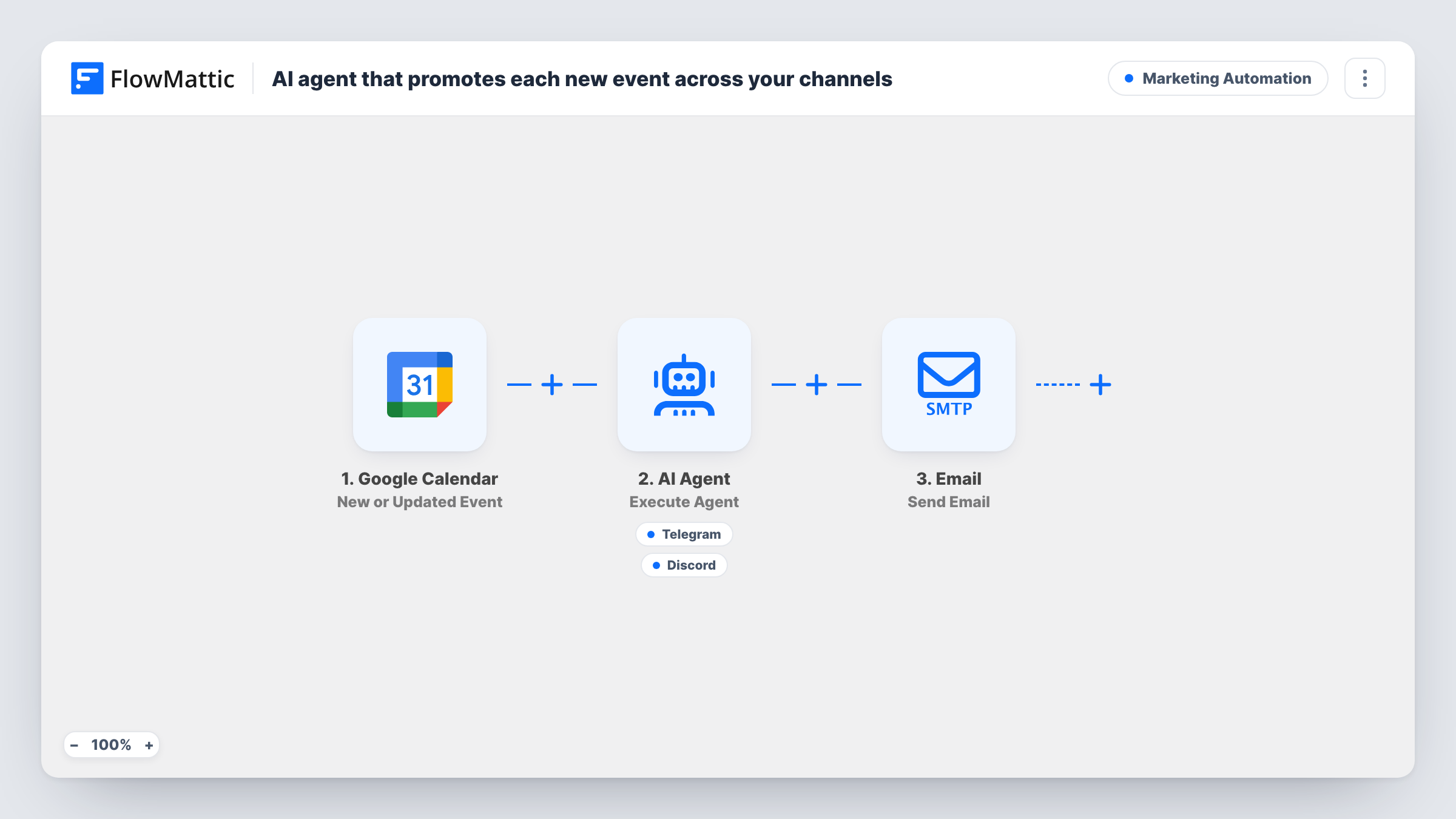
When a Google Calendar event matching your search is created, an AI agent writes announcements for Telegram and Discord and posts them, then a save-the-date email goes to the address you set.
 Google Calendar
 AI Agent
 Telegram
 Discord
 Email
5 steps Setup ~8 min Used on 2.0k sites Marketing Free to import
What this workflow does
Announcing an event means writing the same news three times: a short post for the Telegram channel, something chattier for Discord, and an email. This workflow starts from the calendar entry you create anyway, has an AI agent write the posts for each community, and sends a save-the-date email without you copying details around.
The Google Calendar trigger fires when an event is created that matches a search you set, so you can promote only events with a word like webinar or public in them. The search isn't filled in the template, so add it when you connect your calendar. The event's title, start time and description are passed on.
The AI Agent step, on OpenAI GPT-4o, is told to promote the event with tailored announcements on Telegram and Discord. It has a Telegram Send a Text Message tool and a Discord Send Channel Message tool, and it writes the text of both. The agent decides when to use each tool, so read its first few posts before trusting it with a public channel.
After the agent finishes, an Email step sends a save-the-date message with the event title and start time to [email protected]. Change that to your own list address. The email goes out on every run, whatever the agent posted.
Community meetups announced in two places
An open-source project adds each meetup to a shared Google Calendar with public in the title. Its Telegram group and Discord server both get an announcement written for that crowd.
Webinar promotion from the marketing calendar
Marketers book every webinar on a shared Google calendar first. Each new one is posted to the company's Telegram channel and Discord, and the mailing address gets a save-the-date.
Course live sessions for students
An online course creator puts live Q&A sessions on a calendar, and students in Telegram and Discord see an announcement as soon as each session is booked.
How this workflow runs
What happens at each step once the workflow is on, and what you need before you import it.
 Google Calendar New Event Matching Search
Fires when an event is created in Google Calendar that matches the search you set. The search term isn't in the template, so choose one after import. The event title, start time and description are passed on.
- AI Agent Execute Agent
Runs an AI agent on OpenAI GPT-4o, told to promote the event with announcements tailored to Telegram and Discord. It receives the event's title, start time and description.
- Telegram Send a Text Message
Agent tool that sends a text message on Telegram, with the agent writing the announcement. Connect your bot and set the chat or channel it posts to after import.
- Discord Send Channel Message
Agent tool that posts a message to a Discord channel, with text the agent writes for that audience. Choose the server channel when you set up the Discord connection.
 Email Send Email
Emails a save-the-date with the event title in the subject and the start time in the body. It goes to [email protected] as imported, so replace that with your own address.
What you need
- FlowMatticCore
- Google Calendar AccountAccount
- AI ProviderAccount
- Telegram AccountAccount
- Discord AccountAccount
After importing, map your own data. To keep the template universal, not every step is pre-filled. Open each step in the builder and connect your accounts and fields (channels, lists, sheets, recipients) before you switch the workflow on.
Make it yours
Changes worth making after you import it.
- Use a word you only put in public events, such as promo, as the trigger's search, so private meetings on the same calendar never reach your channels.
- Add your event link and any posting rules to the system prompt, such as length limits or no emoji, so every announcement includes the registration page.
- Map the event description and location into the save-the-date email body, so readers get more than the title and time.
Questions about this workflow
Do edits to a Google Calendar event post again?
The trigger fires when a matching event is created, so editing an existing event shouldn't start a new run. Test by editing one event and checking Task History.
Will the AI agent always post to both Telegram and Discord?
It is told to post to both, but it decides when to use each tool. Check the first runs, and tighten the system prompt if it skips one.
Who receives the save-the-date email?
One address, [email protected] as imported. Point it at a mailing list address or group inbox, or replace the step with your email marketing tool to reach subscribers individually.
What does the agent know about the event?
The title, start time and description from Google Calendar. Put the registration link and key details in the event description so the agent can include them.
More Marketing Automation workflows
Other ready-to-import templates from the same category.




Import this workflow into your WordPress site
Download the JSON, import it from the Workflows screen and connect your accounts. Every run stays on your server, with no per-task fees.
30-day money-back guarantee Unlimited workflows and runs Self-hosted