

Route orders to a fulfilment centre by shipping country
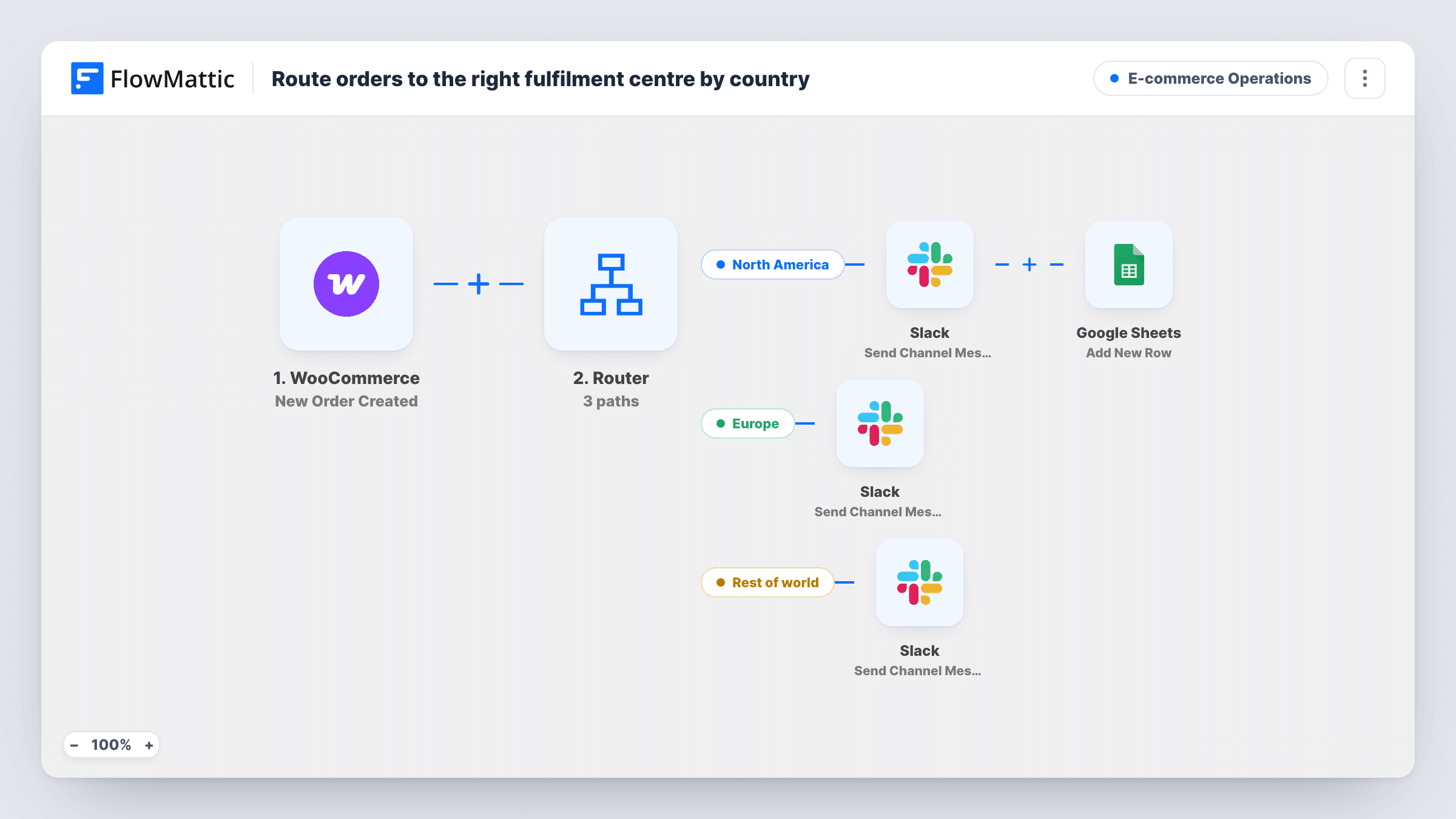
New WooCommerce orders are routed by shipping country: US orders alert your North America team in Slack and add a row to a regional sheet, while UK orders send a separate Slack alert for your EU team.
 WooCommerce
 Router
 Slack
Slack
 Google Sheets
5 steps Setup ~8 min Used on 1.1k sites Store Ops Free to import
What this workflow does
When you ship from more than one warehouse, the first question for every order is which team packs it. This workflow answers that from the shipping address, so each fulfilment centre hears about its own orders and nobody sorts the order list by hand.
The WooCommerce trigger fires as each new order comes in. A Router then checks the shipping country code. The United States route runs when it is exactly US: it posts "NA order" with the order number to Slack and adds a row to a Google Sheets regional log. The United Kingdom route runs when the code is exactly GB and posts "EU order" with the order number to Slack.
An order has one shipping country, so it follows one route at most. WooCommerce stores the two-letter country code, which is what the conditions compare. Orders shipping anywhere else, and orders with no shipping address, match neither route and nothing is sent.
After import, choose a channel in each Slack step, ideally one per warehouse team. The Google Sheets step on the US route ships unmapped, so pick the sheet and map the order fields your team needs, such as the order number, items and address. The UK route has no sheet step; add one if your EU team wants a log too.
Two warehouses, two channels
A clothing brand with a warehouse in New Jersey and one in Manchester sends each team only the orders it ships, in its own Slack channel.
US pick list in a spreadsheet
A third-party logistics partner in the US works from the Google Sheet that the US route fills, while the UK team reads Slack.
Testing a new UK fulfilment partner
A supplements shop moving UK orders to a new partner sees those orders flagged separately, so it can check every one during the first weeks.
How this workflow runs
What happens at each step once the workflow is on, and what you need before you import it.
 WooCommerce New Order Created
Starts a run when a new WooCommerce order is created. The order number, shipping country and other order details are passed to the Router and later steps.
- Router 2 paths
Holds two routes. United States runs when the shipping country is exactly US, and United Kingdom when it is exactly GB. Other countries take no route.
- Slack Send Channel Message
United States route. Posts "NA order" with the order number to the Slack channel you choose for the North America team.
- Google Sheets Add New Row
United States route, after the Slack post. Adds a row to your regional Google Sheet. Ships unmapped: pick the spreadsheet and map the order fields the US team needs.
- Slack Send Channel Message
United Kingdom route. Posts "EU order" with the order number to a Slack channel. Point it at the channel your European warehouse watches.
What you need
- FlowMatticCore
- WooCommerce PluginPlugin
- Slack AccountAccount
- Google Sheets AccountAccount
After importing, map your own data. To keep the template universal, not every step is pre-filled. Open each step in the builder and connect your accounts and fields (channels, lists, sheets, recipients) before you switch the workflow on.
Make it yours
Changes worth making after you import it.
- Add routes for other countries you ship to, such as CA or DE, each with an exact-match condition on the shipping country and its own Slack step.
- Put the shipping method and item list in each Slack message, so the warehouse can start picking without opening WooCommerce.
- Add a Google Sheets Add New Row step after the UK route's Slack message if your EU team wants the same kind of log as the US route.
Questions about this workflow
What happens to WooCommerce orders shipping outside the US and UK?
Nothing. Neither route matches, so no Slack message or sheet row is created. Add a route for each other country code you want handled.
Why does the condition use GB instead of UK?
WooCommerce stores shipping countries as two-letter ISO codes, and the code for the United Kingdom is GB. Use the same codes when you add more countries.
Can an order reach both fulfilment centres?
No. The Router runs every route that matches, but an order has one shipping country, and US and GB can't both be true.
Do UK orders get a Google Sheets row too?
Not as imported. Only the US route has a sheet step. Add an Add New Row step at the end of the UK route if you want one.
More E-commerce Operations workflows
Other ready-to-import templates from the same category.




Import this workflow into your WordPress site
Download the JSON, import it from the Workflows screen and connect your accounts. Every run stays on your server, with no per-task fees.
30-day money-back guarantee Unlimited workflows and runs Self-hosted