

Assign inbound leads to the right regional sales team
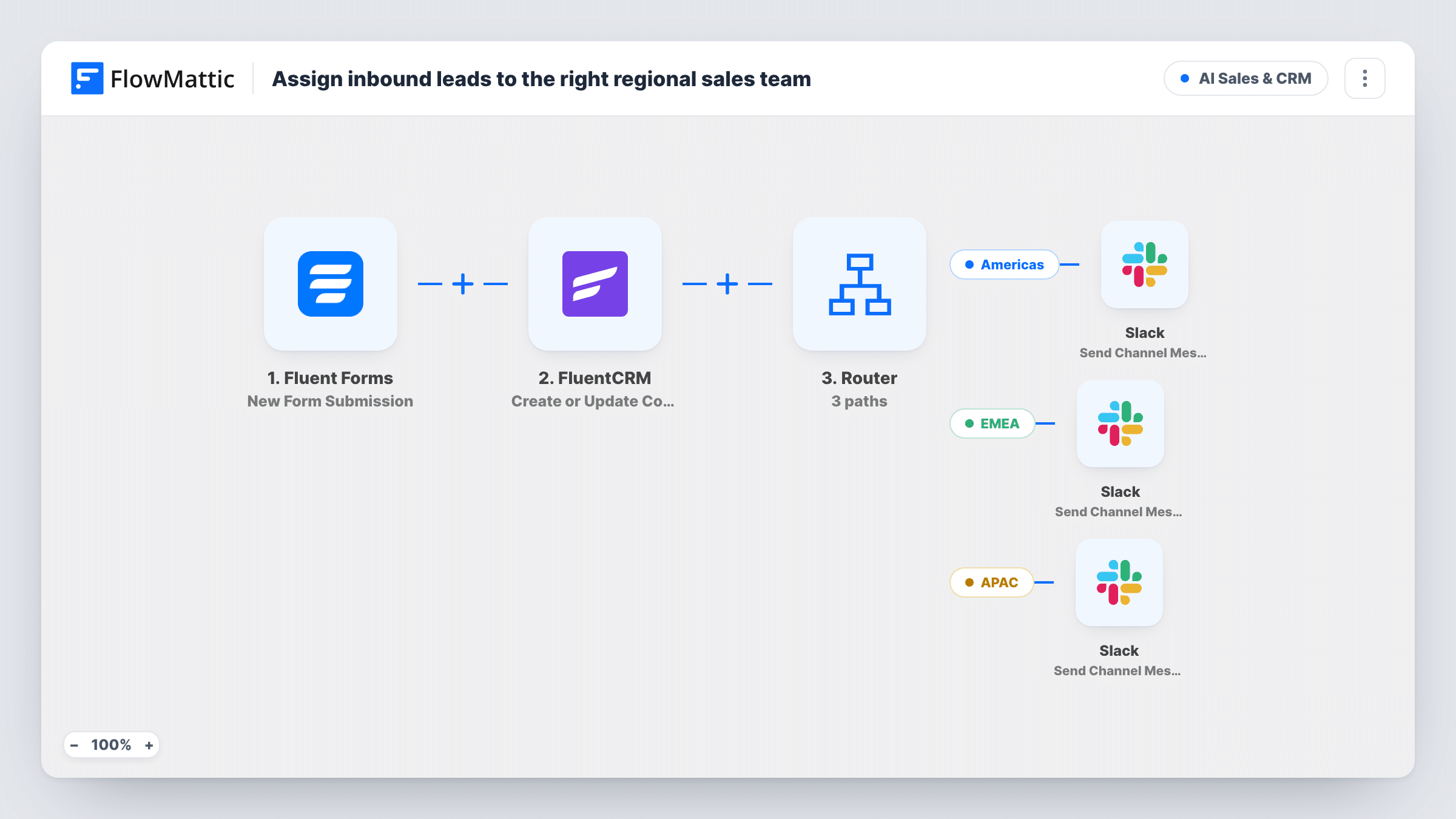
Each Fluent Forms lead is saved to FluentCRM, then a Router reads the region field and alerts the Americas, EMEA or APAC sales channel in Slack.
 Fluent Forms
 FluentCRM
 Router
 Slack
6 steps Setup ~12 min Used on 2.5k sites Revenue Ops Free to import
What this workflow does
Regional sales teams work different hours and languages, so a lead sitting in a shared inbox can wait a day for the right person to notice it. This workflow records every lead in your CRM and then tells only the team that covers the lead's region.
Every lead sent through your Fluent Forms form starts a run. FluentCRM then creates or updates a contact by email, with the name field as the first name. This happens before any routing, so every lead is saved whatever region it gives.
A Router reads a field named region. Leads containing "Americas" go to one Slack channel, with the name and company. Leads containing "EMEA" go to a second channel with the same details, and leads containing "APAC" go to a third with the name only. Pick each channel after import.
The three values don't overlap, so a lead picked from a region dropdown follows one route. A lead whose region contains none of them is still saved in FluentCRM but posts no alert. The field names region, name, email and company are examples to change to your form's own fields.
Global B2B contact form
A software company asks visitors to pick their region on the demo form, so EMEA leads land in the London team's channel and APAC leads with the Singapore team.
Distributor enquiries by territory
A manufacturer routes distributor applications to the regional managers' Slack channels, while keeping every applicant in FluentCRM.
Follow-the-sun sales coverage
A services firm alerts whichever region's team is awake for each lead, without one central person forwarding them.
How this workflow runs
What happens at each step once the workflow is on, and what you need before you import it.
 Fluent Forms New Form Submission
Starts a run whenever someone submits your chosen Fluent Forms lead form. Its name, email, company and region fields feed the steps that follow.
- FluentCRM Create or Update Contact
Creates a FluentCRM contact from the lead's email, or updates the contact that already has it, with the name field as the first name. Runs for every lead before routing.
- Router 3 paths
Reads the region field. Americas, EMEA and APAC each have a route that matches when the field contains that word. A region with none of the three takes no route.
- Slack Send Channel Message
On the Americas route, posts "New Americas lead" with the person's name and company to the Slack channel for that team.
- Slack Send Channel Message
On the EMEA route, sends the EMEA team's Slack channel a "New EMEA lead" message carrying the name and company in brackets.
- Slack Send Channel Message
On the APAC route, posts "New APAC lead" with the lead's name, without the company, to the APAC channel. Add the company field if that team wants it too.
What you need
- FlowMatticCore
- Fluent Forms PluginPlugin
- FluentCRM PluginPlugin
- Slack AccountAccount
After importing, map your own data. To keep the template universal, not every step is pre-filled. Open each step in the builder and connect your accounts and fields (channels, lists, sheets, recipients) before you switch the workflow on.
Make it yours
Changes worth making after you import it.
- Make region a required dropdown with exactly Americas, EMEA and APAC as choices, so every lead takes one route.
- Add a FluentCRM tag for each region by placing an Add Tags to Contact step on each route after its Slack step, so you can segment contacts by region later.
- Add the company field to the APAC message to match the other two, and the email address to all three if reps reply straight from Slack.
- If your form has separate first and last name fields, map both into the FluentCRM step.
Questions about this workflow
Is every lead saved in FluentCRM, even without a region?
Yes. The FluentCRM step runs before the Router, so each submission creates or updates a contact whatever its region says.
What if the lead's email already exists in FluentCRM?
Create or Update Contact matches by email, so the existing contact is updated with the new name instead of a duplicate being created.
Can a Fluent Forms lead alert two regional channels?
Only if its region value contains two of the words, because a Router runs every route that matches. A dropdown with one choice per region prevents that.
Can I route by country instead of region?
Yes. Change the route conditions to check a country field for the countries each team covers, and make sure no country appears in two routes.
More AI Sales & CRM workflows
Other ready-to-import templates from the same category.





Import this workflow into your WordPress site
Download the JSON, import it from the Workflows screen and connect your accounts. Every run stays on your server, with no per-task fees.
30-day money-back guarantee Unlimited workflows and runs Self-hosted