

When a weather webhook is received, convert temperature from Celsius to Fahrenheit in Unit Converter, then send results to Slack
When weather data reaches your FlowMattic webhook, the temperature is converted from Celsius to Fahrenheit with the built-in Unit Converter and the result is posted to a Slack channel.
 Webhook
 Unit Converter by FlowMattic
 Slack
3 steps Setup ~5 min Used on 2.0k sites Free to import
What this workflow does
Weather stations, sensors and weather services often report in Celsius, while some of the people reading the numbers think in Fahrenheit. Converting each reading in your head, or in a script you have to maintain, gets old quickly. This workflow does the conversion between receiving the data and posting it.
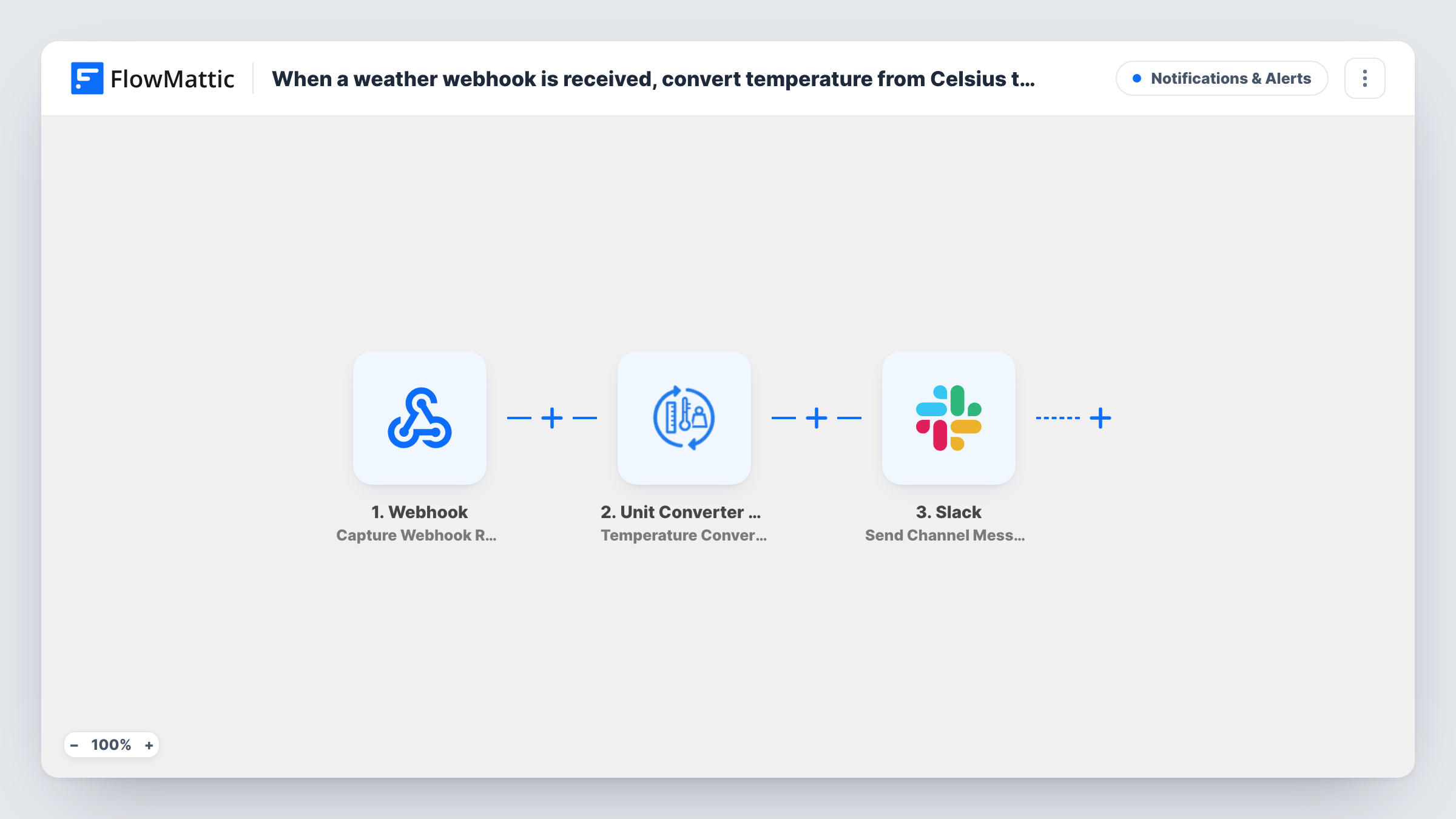
FlowMattic creates a Webhook URL for the workflow. Your weather source sends its reading there, and the payload fields become available to map. The Unit Converter step, Temperature Conversion, takes the Celsius value you map and converts it to Fahrenheit inside FlowMattic, with no outside service involved. Slack Send Channel Message then posts a message that can include the original reading, the converted value and anything else the webhook carried.
Each request to the webhook posts one message, so match the sending schedule to how often you want updates. Unless authentication is on for the webhook, anyone with the URL can start a run and post to your channel, so turn on that setting if the URL might be shared.
Office or warehouse sensor readings
A temperature sensor posts Celsius readings to the webhook. The facilities channel sees each reading in both units, which suits staff who use either scale.
Daily forecast for a mixed team
A scheduled script fetches the day's forecast and sends it to the webhook. Your Slack channel gets the temperature in Fahrenheit for colleagues in the US.
Cold storage checks
A logger in a fridge or freezer sends its reading. The converted value appears in Slack, so staff used to Fahrenheit can read it at a glance.
How this workflow runs
What happens at each step once the workflow is on, and what you need before you import it.
 Webhook Capture Webhook Response
Starts the workflow when your weather source sends data to the webhook URL FlowMattic creates. Send a test reading so the temperature field is captured for mapping.
- Unit Converter by FlowMattic Temperature Conversion
Converts the temperature you map from the webhook from Celsius to Fahrenheit using FlowMattic's built-in Unit Converter. The converted value is passed on to the Slack step.
- Slack Send Channel Message
Posts a message to a Slack #channel. Write the text and include the converted Fahrenheit value, plus the original reading or location if the webhook sent them.
What you need
- FlowMatticCore
- Slack AccountAccount
After importing, map your own data. To keep the template universal, not every step is pre-filled. Open each step in the builder and connect your accounts and fields (channels, lists, sheets, recipients) before you switch the workflow on.
Make it yours
Changes worth making after you import it.
- Add a Filter after the conversion that continues only when the Fahrenheit value is above or below a limit you choose, so Slack hears only about readings that need attention.
- Turn on the webhook's "Require authentication on incoming requests" setting and add the key to your weather source, so only that source can post readings.
- If one person should get the reading instead of a channel, use Slack's Send Direct Message action in place of Send Channel Message.
Questions about this workflow
Does the Unit Converter step need an API key or outside service?
No. Unit Converter by FlowMattic is built in, so the Celsius to Fahrenheit conversion happens inside FlowMattic without an extra account.
Can it convert to Kelvin instead of Fahrenheit?
Yes. The Temperature Conversion action works between Celsius, Fahrenheit and Kelvin, so you can change the target unit in that step.
What if the weather webhook sends a blank temperature?
The workflow still runs and posts to Slack, because nothing checks the value first. Add a Filter that requires the temperature field to be set if you want to stop those runs.
Which weather services can send data to this webhook?
Any service, device or script that can make an HTTP request to a URL. Check the field names in a test request, then map the temperature into the conversion step.
More Notifications & Alerts workflows
Other ready-to-import templates from the same category.




Import this workflow into your WordPress site
Download the JSON, import it from the Workflows screen and connect your accounts. Every run stays on your server, with no per-task fees.
30-day money-back guarantee Unlimited workflows and runs Self-hosted