

Post a daily screenshot of your homepage to Slack
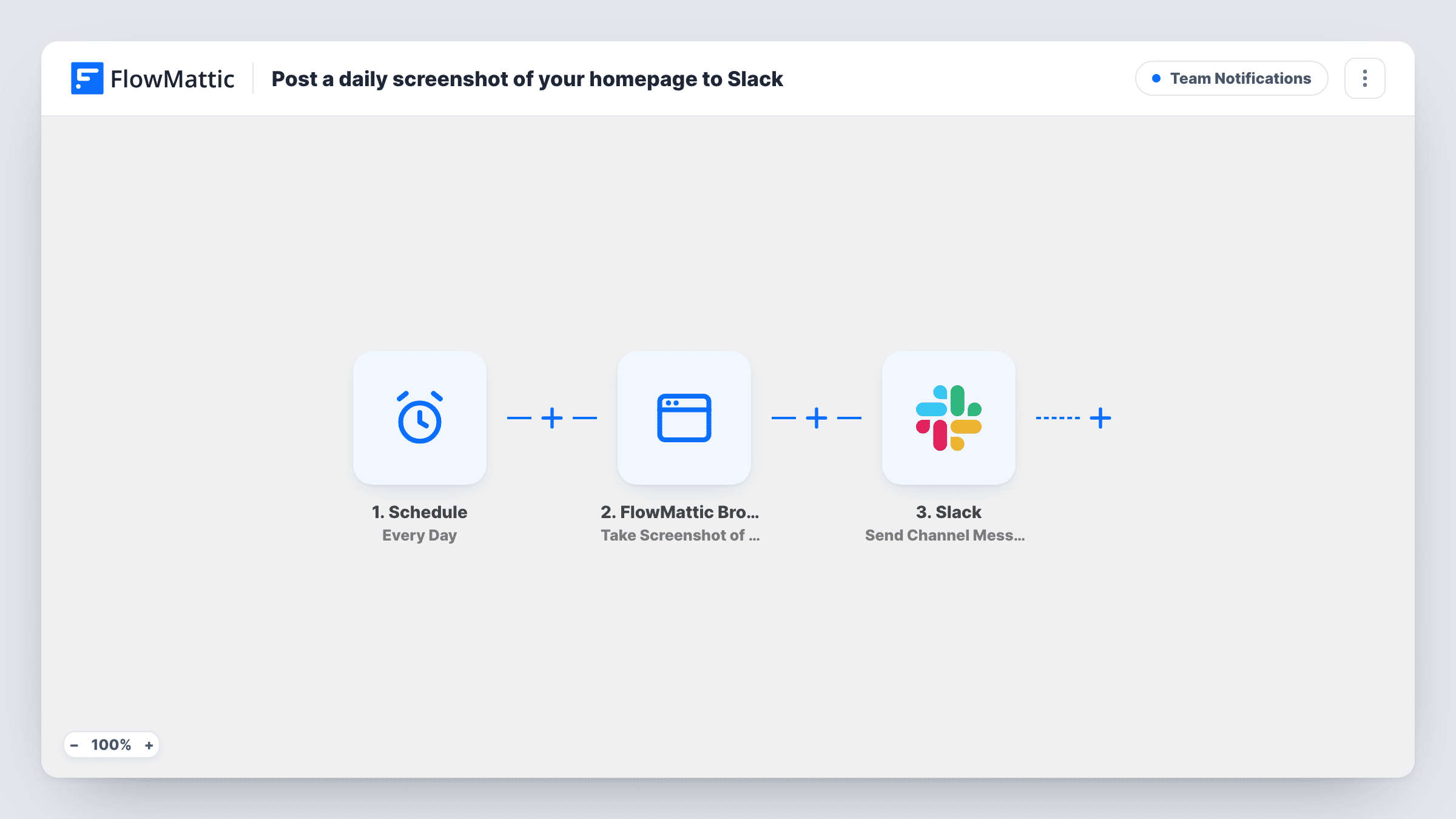
Once a day, FlowMattic Browser takes a full-page PNG screenshot of your homepage, saves it to your Media Library and posts the image link to a Slack channel for your team.
 Schedule
 FlowMattic Browser
 Slack
Slack3 steps Setup ~5 min Used on 850 sites Ops Free to import
What this workflow does
A broken hero banner, a missing menu or a plugin update that shifts your layout can sit unnoticed on your homepage for days. Opening the site every morning to check is easy to forget. This workflow puts a picture of the page in front of your team in Slack each day, so a glance is enough.
Each day the Schedule trigger kicks off a new run. FlowMattic Browser then opens the URL in a headless browser and takes a full-page screenshot in PNG format. The template ships with a placeholder company address, so change it to your own homepage. The image is saved to your WordPress Media Library, and the step returns a public URL for it.
The last step posts a message to your chosen Slack channel that reads "Today's homepage:" followed by that URL. FlowMattic Browser runs through Cloudflare Browser Rendering, so you add your Cloudflare Account ID and API Token in FlowMattic Settings before the first run.
Catching layout breaks after updates
Theme and plugin updates run overnight. The morning screenshot in Slack shows straight away if the homepage no longer looks right.
Keeping an eye on a client site
An agency posts each client's homepage to that client's Slack channel, so the account manager sees the live page without logging in.
A daily record of a changing page
A shop that swaps homepage banners for sales keeps a dated trail of what the page showed each day, in Slack and in the Media Library.
How this workflow runs
What happens at each step once the workflow is on, and what you need before you import it.
 Schedule Every Day
Begins a fresh run every day on its own. Nothing else needs to happen on your site for the screenshot to be taken.
- FlowMattic Browser Take Screenshot of URL
Opens the URL in a headless browser and saves a full-page PNG screenshot to your Media Library, returning its public URL. Replace the placeholder address with the page you want captured.
- Slack Send Channel Message
Posts a message to the Slack channel you pick with the text "Today's homepage:" and the screenshot URL. Connect your Slack workspace and choose the channel during setup.
What you need
- FlowMatticCore
- Slack AccountAccount
After importing, map your own data. To keep the template universal, not every step is pre-filled. Open each step in the builder and connect your accounts and fields (channels, lists, sheets, recipients) before you switch the workflow on.
Make it yours
Changes worth making after you import it.
- Watching more than one page? Add a second FlowMattic Browser step for your pricing or checkout page and include both screenshot URLs in the Slack message.
- Each run saves a new image file, so the Media Library grows by one screenshot a day. Clear out old screenshots now and then if storage matters to you.
- If the team channel is private, swap the Slack step for Send Private Channel Message, FlowMattic's separate Slack action for private channels.
Questions about this workflow
Do I need a Cloudflare account for the homepage screenshots?
Yes. FlowMattic Browser runs through Cloudflare Browser Rendering. Add your Cloudflare Account ID and API Token under FlowMattic Settings before you turn the workflow on.
Is the screenshot uploaded to Slack as an image file?
No. The image is saved to your WordPress Media Library and the Slack message carries its URL. Your team opens the link to see the screenshot.
Can it capture pages that need a login?
The step opens the URL in a fresh headless browser without your login, so it sees what a logged-out visitor sees. Use it for public pages.
Does it capture the whole page or just the top?
The whole page. The template has full-page capture turned on and saves the image as a PNG.
More Team Notifications workflows
Other ready-to-import templates from the same category.




Import this workflow into your WordPress site
Download the JSON, import it from the Workflows screen and connect your accounts. Every run stays on your server, with no per-task fees.
30-day money-back guarantee Unlimited workflows and runs Self-hosted