

AI agent that preps your team before every booked call
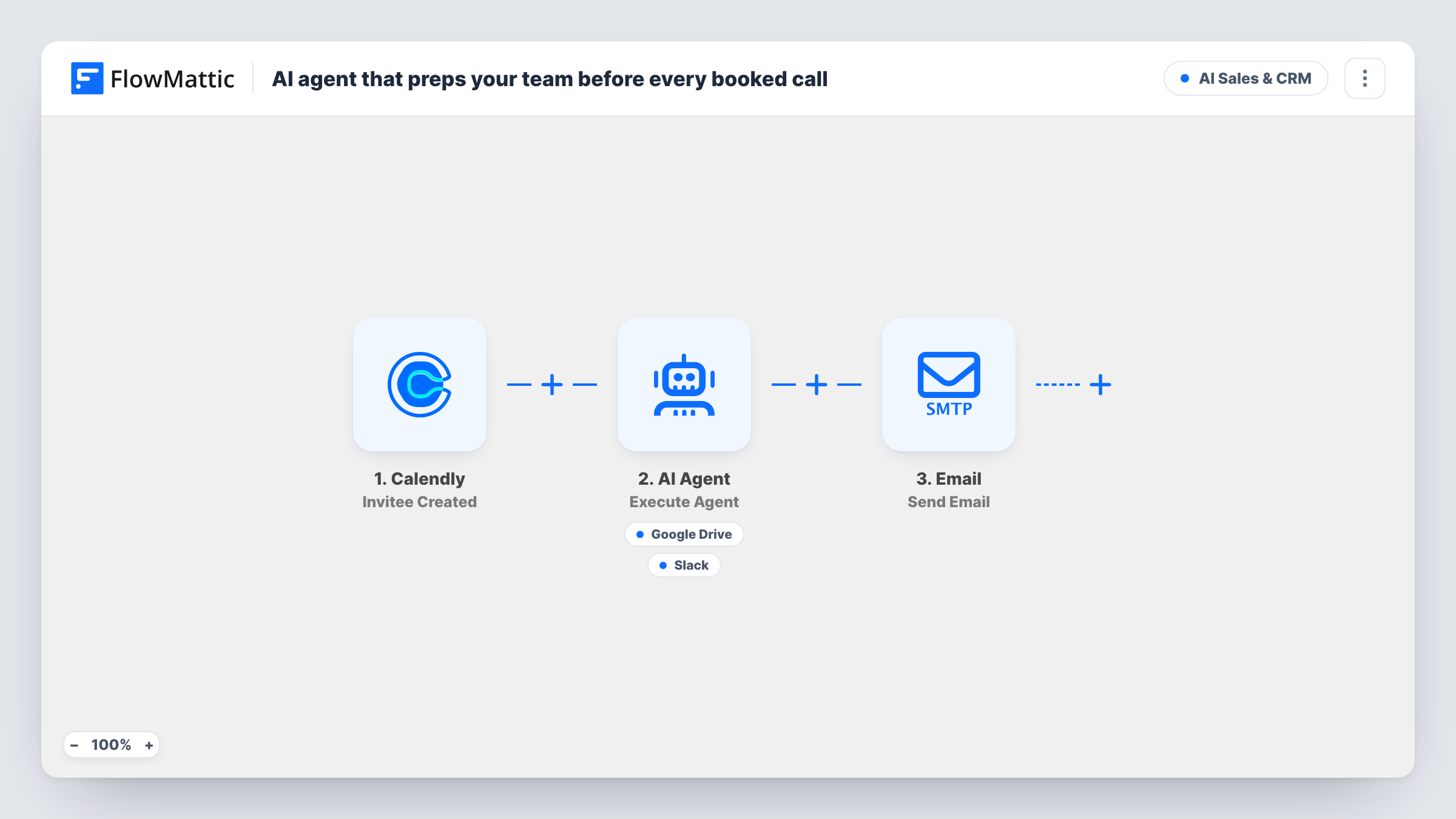
When someone books a Calendly call, an AI agent writes a short prep brief it can save to Google Drive and share as highlights in Slack, and the invitee gets a thank-you email from you.
 Calendly
 AI Agent
 Google Drive
 Slack
 Email
5 steps Setup ~8 min Used on 664 sites Revenue Ops Free to import
What this workflow does
Walking into a sales or discovery call cold means spending the opening minutes catching up. The booking already tells you who is coming, what the meeting is and what they wrote in the booking questions. This workflow turns that into a prep brief as soon as the call is booked.
The Calendly trigger fires when an invitee books. An AI Agent on OpenAI GPT-4o receives the event name, the invitee's name, the start time and their answers to your booking questions. It is told to write a short prep brief, save it to Google Drive and post highlights to Slack. Its tools are Google Drive Create File From Text, where the agent writes the file name and content, and a Slack channel message it writes too.
The brief is only as good as the booking data. As imported, the agent has no tool to look anything up, so it works from what the invitee entered. It also chooses which tools to call, so check Task History on the first bookings.
After the agent step, the invitee receives an email thanking them for booking and greeting them by name. That email is fixed text and goes out on every booking.
Discovery calls for a consultancy
Prospects answer two or three questions when they book. The agent turns those answers into a brief in Drive so whoever takes the call knows the goal before it starts.
Demo bookings for a software team
Each demo booking posts highlights to the sales Slack channel, so the presenter can see the prospect's stated needs and tailor the demo.
Coaching or onboarding sessions
Clients book sessions and note what they want to cover. The brief saved in Drive gives the coach a running record of each session's topic.
How this workflow runs
What happens at each step once the workflow is on, and what you need before you import it.
 Calendly Invitee Created
Fires when an invitee books a call through Calendly. The event name, invitee name and email, start time and booking question answers are passed on.
- AI Agent Execute Agent
Runs an AI agent on OpenAI GPT-4o with the call details and booking answers. It is told to write a prep brief, save it to Google Drive and post highlights to Slack.
- Google Drive Create File From Text
Agent tool that creates a text file in Google Drive. The agent writes the file name and the brief itself. Run a test booking to see where the file is saved.
- Slack Send Channel Message
Agent tool that posts a Slack channel message. The agent writes the highlights from its brief for the team taking the call.
 Email Send Email
Emails the invitee with the event name in the subject, thanking them for booking. The text is fixed in the template, so edit it to match your tone before going live.
What you need
- FlowMatticCore
- Calendly AccountAccount
- AI ProviderAccount
- Google Drive AccountAccount
- Slack AccountAccount
After importing, map your own data. To keep the template universal, not every step is pre-filled. Open each step in the builder and connect your accounts and fields (channels, lists, sheets, recipients) before you switch the workflow on.
Make it yours
Changes worth making after you import it.
- Add booking questions in Calendly that the brief can use, such as company, role or what they want from the call. The agent only knows what the invitee enters.
- Tell the agent to start each file name with the date and invitee name, so the briefs sort neatly in Google Drive.
- If you already send Calendly's own confirmation, remove or rewrite the final email so invitees don't get two thank-you messages.
- Add a Filter after the trigger on the event name if only some meeting types, like sales calls, need a prep brief.
- Let the agent read the invitee's company site by adding the FlowMattic Browser tool to it. Browse URL depends on a Cloudflare Browser Rendering account linked under FlowMattic Settings.
Questions about this workflow
Does the AI agent research the invitee or their company?
Not as imported. It writes from the event name, the invitee's name, the start time and their answers. Ask for a company website in your booking questions and add the FlowMattic Browser tool, and the agent can open that site first.
Will a brief be made for every Calendly event type?
Yes, as imported. Every new booking runs the workflow. Add a Filter on the event name if you want briefs for some event types only.
Does the invitee see the prep brief?
No. The brief goes to Google Drive and Slack. The invitee only gets the fixed thank-you email from the last step.
Which account sends the thank-you email for the booked call?
It goes through the SMTP connection you set up for the Email step in FlowMattic, not through Calendly.
More AI Sales & CRM workflows
Other ready-to-import templates from the same category.







Import this workflow into your WordPress site
Download the JSON, import it from the Workflows screen and connect your accounts. Every run stays on your server, with no per-task fees.
30-day money-back guarantee Unlimited workflows and runs Self-hosted