

Congratulate high quiz scores and offer help for low ones
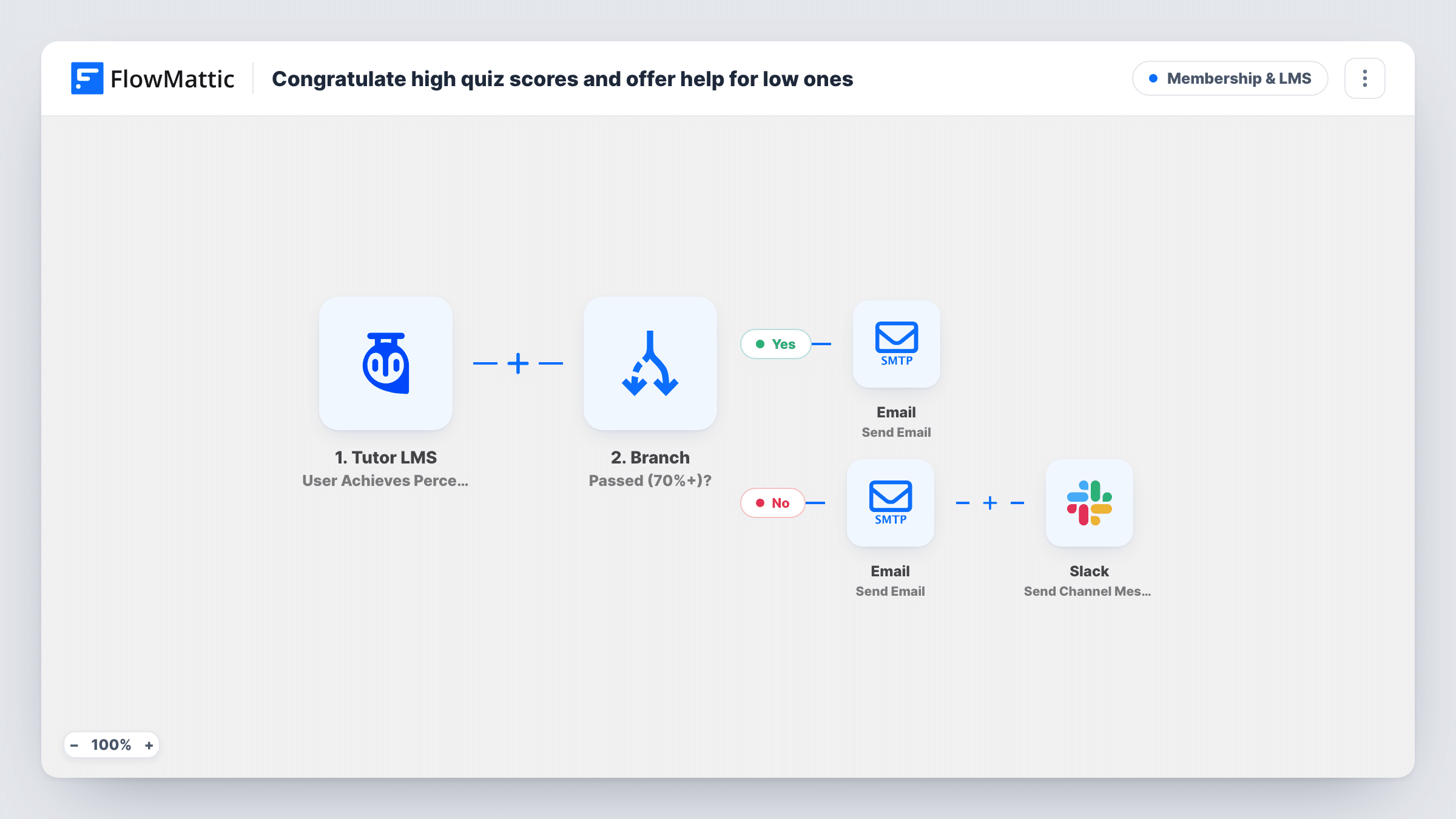
When a Tutor LMS quiz result comes in, a Branch checks the score. Students above 70 percent get a congratulations email; everyone else gets a supportive email and their name is posted to Slack for an instructor.
 Tutor LMS
 Branch
 Email
Email
 Slack
Slack5 steps Setup ~8 min Used on 2.6k sites Community Free to import
What this workflow does
A quiz score says a lot about where a student stands, but in most course sites nobody acts on it. Strong students hear nothing, and students who struggle drift away before an instructor notices. This workflow replies to every result it receives, with a different message depending on how the student did.
The Tutor LMS trigger runs on the User Achieves Percentage in Quiz event and passes on the student's email, display name, the quiz title and the percentage. Next, a Branch tests whether that percentage is greater than 70. On the Yes path, the student gets an email praising the result and pointing to the next module. On the No path, the student gets an email that shows their score and offers help, and a Slack channel message names the student, the quiz and the score so an instructor can step in.
The test is strictly greater than 70, so a score of exactly 70 takes the No path. Change the value or the condition in the Branch if your pass mark works differently. The No-path email says resources follow but includes none, so add links to your own help material before you switch the workflow on.
Self-paced course with no live tutor
Students working alone get a quick reply after each quiz, and the instructor only needs to watch one Slack channel for the ones who scored low.
Certification prep
Learners preparing for an exam see their percentage in the email, and those under the mark are flagged in Slack so a coach can book a review session.
Corporate training compliance
An L&D team sees in Slack which staff members scored low on a policy quiz and can follow up before the training deadline.
How this workflow runs
What happens at each step once the workflow is on, and what you need before you import it.
 Tutor LMS User Achieves Percentage in Quiz
Runs on the Tutor LMS User Achieves Percentage in Quiz event. It passes the student's email, display name, the quiz title and the percentage to the steps below.
- Branch Branch
Checks whether the quiz percentage is greater than 70. If it is, the Yes path runs. If not, including a score of exactly 70, the No path runs.
 Email Send Email
Yes path: emails the student with the quiz title in the subject, their percentage, and a short push to move on to the next module.
- Email Send Email
No path: emails the student their percentage with an encouraging note about mastering the quiz together. Add links to help material, since the template text mentions resources without listing any.
- Slack Send Channel Message
No path: posts a message in your chosen Slack channel naming the student, the quiz and the score, so an instructor knows who may need help.
What you need
- FlowMatticCore
- Tutor LMS PluginPlugin
- Slack AccountAccount
After importing, map your own data. To keep the template universal, not every step is pre-filled. Open each step in the builder and connect your accounts and fields (channels, lists, sheets, recipients) before you switch the workflow on.
Make it yours
Changes worth making after you import it.
- To treat 70 as a pass, change the Branch condition to greater than 69, or set the value to match your own pass mark.
- Add a Delay before the No-path email if you would rather the student get a breather before hearing from you, for example one day.
- Post the low-score alert to a channel only your instructors read, so the names of struggling students are not shown to the whole team.
Questions about this workflow
Does every Tutor LMS quiz attempt start this workflow?
It runs when the User Achieves Percentage in Quiz event fires. Take one quiz with a high score and one with a low score after import, then check Task History to confirm both start a run.
Does a student who scores exactly 70 percent get the congratulations email?
No. The Branch checks for greater than 70, so 70 goes down the No path. Edit the condition if you want 70 to count as a pass.
Are instructors told about high scores in Slack too?
No. Only the No path posts to Slack. Add a Slack step on the Yes path if you also want to celebrate strong results with the team.
Does this change the student's grade or progress in Tutor LMS?
No. The workflow only reads the quiz result and sends messages. Grades, attempts and course progress stay as Tutor LMS recorded them.
More Membership & LMS workflows
Other ready-to-import templates from the same category.




Import this workflow into your WordPress site
Download the JSON, import it from the Workflows screen and connect your accounts. Every run stays on your server, with no per-task fees.
30-day money-back guarantee Unlimited workflows and runs Self-hosted