

Auto-approve small refunds, escalate large ones
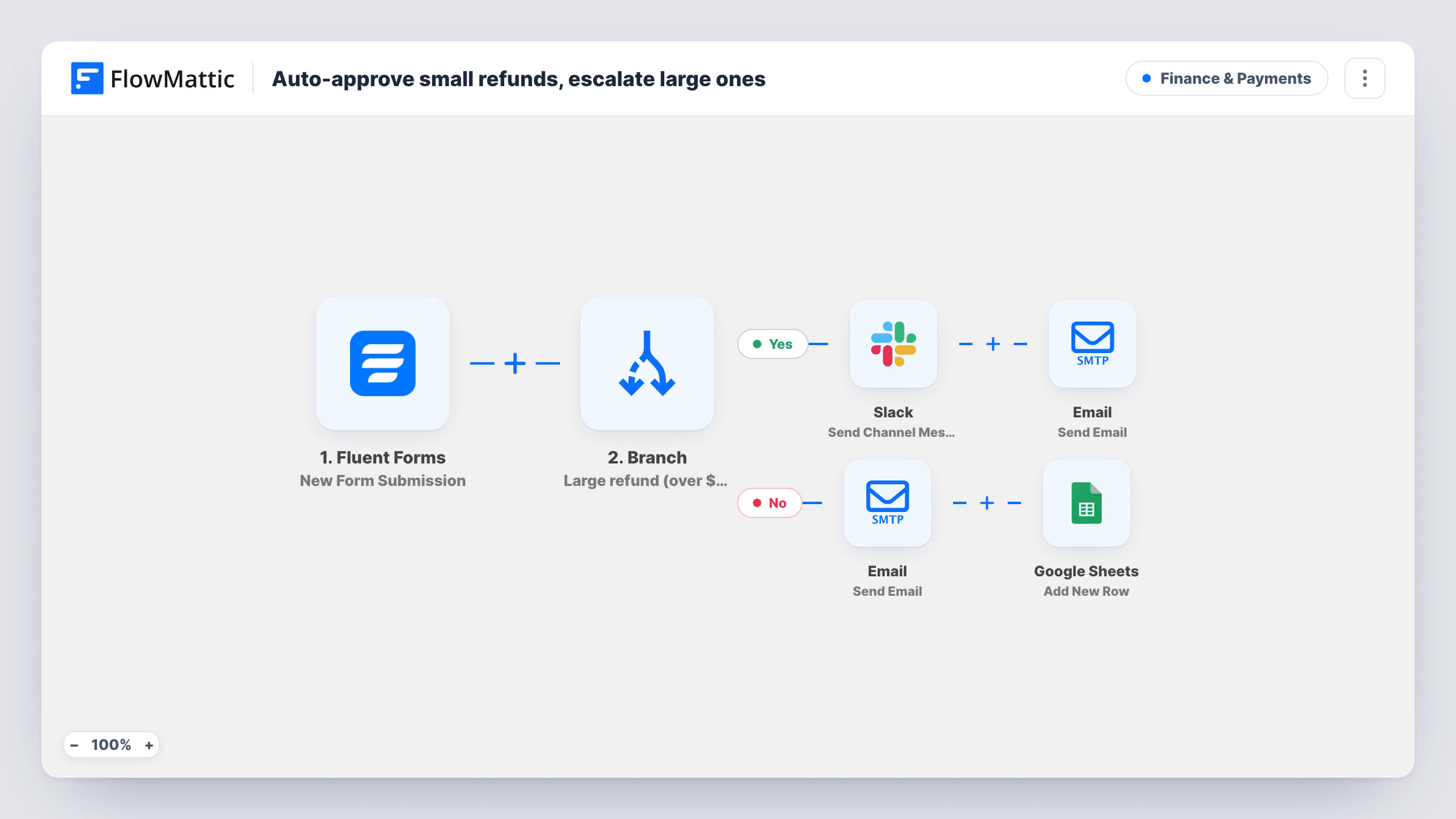
A Branch reads the amount on each Fluent Forms refund request. Requests over 200 alert Slack and email your finance address for approval; smaller ones get a processing email to the customer and a Google Sheets row.
 Fluent Forms
 Branch
 Slack
Slack
 Email
Email
 Google Sheets
6 steps Setup ~12 min Used on 1.4k sites Finance Free to import
What this workflow does
Most refund requests are small and routine, and making each one wait for a manager slows down customers who are owed money. Large refunds are different, because a mistake costs more. This workflow separates the two as soon as the request form is sent.
When a customer submits your Fluent Forms refund form, a Branch checks whether the amount answer is greater than 200. On the yes path, Slack gets a refund approval message with the amount and order number. The Email step then sends finance a review request for that order. The address in the template is [email protected], so change it to your own before going live.
On the no path, the customer gets an email, by name, saying their refund for that amount is being processed. A Google Sheets step then adds a row, giving whoever issues refunds a list to work through.
The workflow doesn't issue any refund itself. Small requests are acknowledged and logged, and someone still processes them in your payment or store system. Large requests are flagged but not paused, so the approval and the refund both happen outside FlowMattic.
Online store with a refund request form
Customers request refunds through a form on your site. Small amounts get a quick reply and land in the sheet your support team clears each day, while large ones go to finance.
Service business with deposits
Clients cancelling a booking ask for their deposit back. Large deposits need an owner's approval in Slack, and smaller ones are acknowledged straight away.
Event ticket refunds
Attendees who can't come request a refund. Single tickets are acknowledged and logged, and group bookings over the limit are flagged to finance.
How this workflow runs
What happens at each step once the workflow is on, and what you need before you import it.
 Fluent Forms New Form Submission
Runs when a customer submits your Fluent Forms refund form. The amount, order number, name and email answers are passed to the Branch and the steps after it.
- Branch Large refund (over $200)?
Checks whether the amount is greater than 200. If yes, the large-refund path runs. Otherwise, including a blank amount, the request takes the small-refund path.
- Slack Send Channel Message
Large-refund path: posts a refund approval message to Slack with the amount and order number. Link Slack and send it to the channel where refunds get signed off.
 Email Send Email
Large-refund path: emails your finance team asking them to review the refund for the order. The template sends to [email protected], so replace it with your own address.
- Email Send Email
Small-refund path: emails the customer, by name, to say their refund for the requested amount is being processed. Make sure your team can live up to that message.
- Google Sheets Add New Row
Small-refund path: adds a row to the Google Sheets spreadsheet you choose, so each acknowledged request is on record. Map the order, amount and customer details to columns.
What you need
- FlowMatticCore
- Fluent Forms PluginPlugin
- Slack AccountAccount
- Google Sheets AccountAccount
After importing, map your own data. To keep the template universal, not every step is pre-filled. Open each step in the builder and connect your accounts and fields (channels, lists, sheets, recipients) before you switch the workflow on.
Make it yours
Changes worth making after you import it.
- Replace [email protected] in the large-refund email with a real inbox before you turn the workflow on.
- The messages put a dollar sign in front of the amount. Edit the Slack and email text if your store uses another currency.
- Add a short email on the large-refund path telling the customer their request is under review, so they hear something either way.
- Change 200 in the Branch to your own limit, and make the amount a required number field in Fluent Forms.
Questions about this workflow
Does this workflow actually refund the customer?
No. It sorts requests, notifies people and keeps a record. The refund itself is still issued in your store or payment system.
Are large refund requests logged in Google Sheets too?
Not as imported. Only the small-refund path adds a row. Add a Google Sheets step to the large-refund path if you want every request in one sheet.
What does my Fluent Forms refund form need?
Fields named amount, order_number, name and email, since the Branch and the messages use them. Submit one sample refund request after import so the real field names are available to map.
Does the large-refund path wait for finance to approve?
No. It sends the Slack message and the email and then ends. Add a Human in the Loop step if you want the run to wait for an approval decision.
More Finance & Payments workflows
Other ready-to-import templates from the same category.




Import this workflow into your WordPress site
Download the JSON, import it from the Workflows screen and connect your accounts. Every run stays on your server, with no per-task fees.
30-day money-back guarantee Unlimited workflows and runs Self-hosted