

AI agent that summarises each paid order into a plain-English receipt
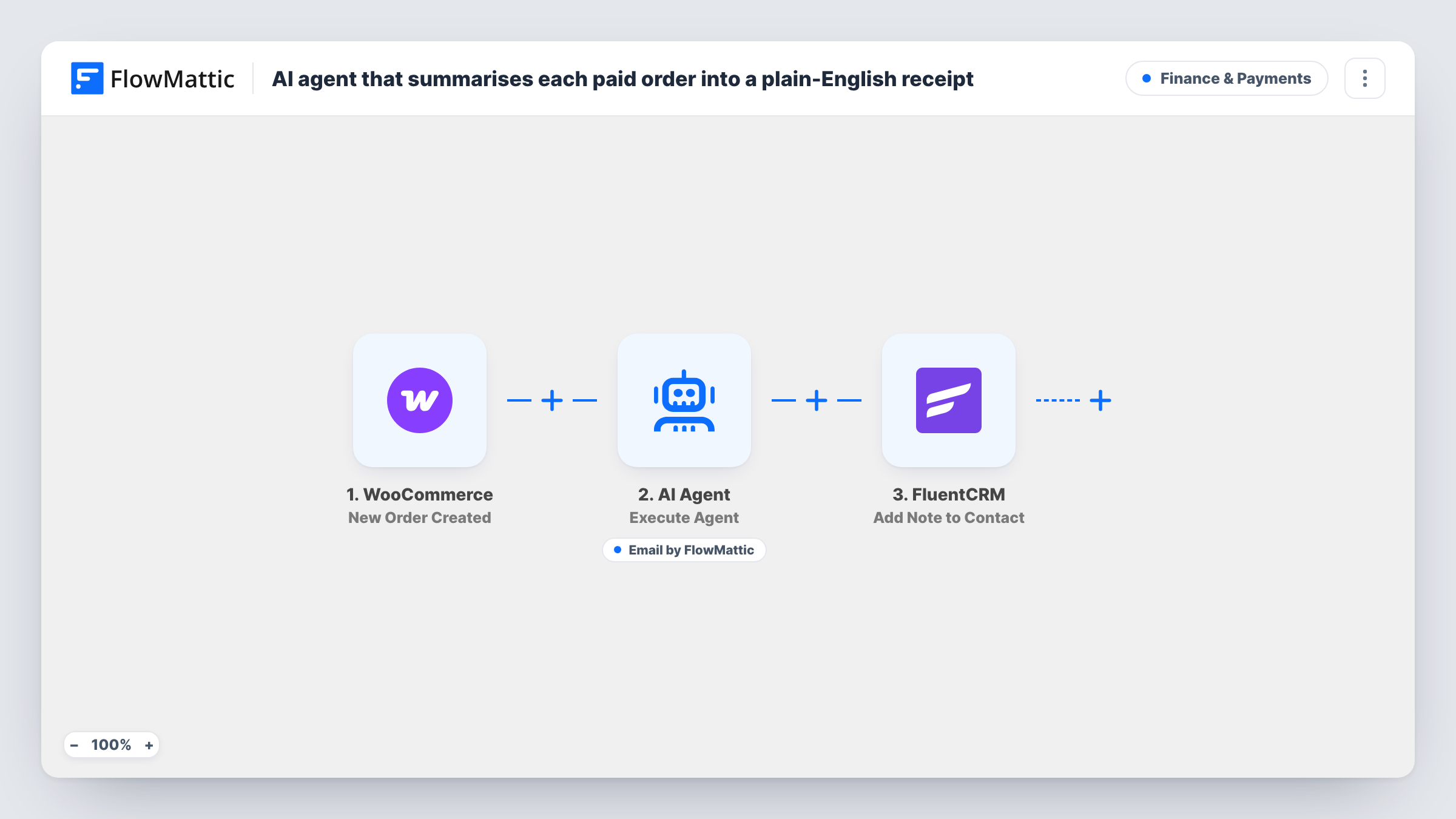
When a WooCommerce order is paid, an AI agent writes a plain-English receipt summary and can email it to the buyer, then FlowMattic adds a note to their FluentCRM contact.
 WooCommerce
 AI Agent
 Email
Email
 FluentCRM
4 steps Setup ~8 min Used on 719 sites Finance Free to import
What this workflow does
Standard order emails list line codes and tax rows that some customers find hard to read. This workflow hands each paid order to an AI agent with one job: explain the purchase in friendly, simple words and send that summary to the buyer. Your CRM then records that a summary went out.
The WooCommerce Order Paid trigger starts a run when an order's payment is completed. The AI Agent step, set to OpenAI GPT-4o, is told to turn the order into a clear receipt summary for a non-technical customer and then email it. As imported, it receives only the billing email, the order total and the order number. It doesn't see the products, so map the line items or other order fields into its input if you want the summary to describe what was bought.
The agent has one tool, Send Email. The recipient is fixed to the billing email, and the agent writes the subject and body. Because the agent decides when to use its tools, check Task History on a test order to confirm it sent the email.
The last step adds a note titled "Receipt summary sent" with the order number to the buyer's FluentCRM contact, found by billing email. That action works only on a contact that already exists, so first-time buyers who aren't in FluentCRM yet get no note unless you add a step that creates them.
Readable summaries for non-technical buyers
A shop selling software licences or subscriptions sends each paying customer a short explanation of what they paid for, in place of a dense invoice table.
A support trail in FluentCRM
When a returning customer asks about a charge, the support team opens their FluentCRM contact and sees a note for each order that got a summary.
Friendlier follow-up for gift orders
A gift store gives buyers a plain note confirming their order number and total, written in the store's tone instead of a system template.
How this workflow runs
What happens at each step once the workflow is on, and what you need before you import it.
 WooCommerce Order Paid
Starts when a WooCommerce order's payment is completed. The billing email, order total and order number are mapped into the later steps.
- AI Agent Execute Agent
The agent step, set to OpenAI GPT-4o. Its instructions ask for a clear, friendly receipt summary and an email to the customer. It receives the billing email, total and order number, and it can use the Send Email tool.
 Email Send Email
The agent's email tool. It sends to the order's billing email, and the agent fills in the subject and the summary text. It runs only when the agent chooses to use it, so confirm on a test order.
- FluentCRM Add Note to Contact
Adds a note titled "Receipt summary sent" with the order number to the FluentCRM contact matching the billing email. The contact must already exist in FluentCRM for the note to be added.
What you need
- FlowMatticCore
- WooCommerce PluginPlugin
- AI ProviderAccount
- FluentCRM PluginPlugin
After importing, map your own data. To keep the template universal, not every step is pre-filled. Open each step in the builder and connect your accounts and fields (channels, lists, sheets, recipients) before you switch the workflow on.
Make it yours
Changes worth making after you import it.
- Map the order's line items, billing name and payment method into the agent's input, so the summary can name what was bought and greet the customer properly.
- Put FluentCRM's Create or Update Contact action between the AI Agent step and the Add Note step, mapped to the billing email, so new buyers have a contact before the note is added.
- Add your store name, refund policy line or support address to the agent's instructions, so every summary includes them in your words.
- Run a few test orders and read the emails in Task History before going live, then tighten the instructions if the tone or length isn't what you want.
Questions about this workflow
Does the AI agent know which products were in the WooCommerce order?
Not as imported. Its input holds only the billing email, the total and the order number. Map the line items or product names into the agent's input to include them in the summary.
Will every paid order get an AI receipt email?
Every paid order starts a run and reaches the agent. The agent is told to email the summary, but it chooses when to use its tools, so check Task History on test orders to confirm it sends each time.
What happens with buyers who aren't FluentCRM contacts yet?
Add Note to Contact only works on an existing contact, so those buyers get no note. Add a Create or Update Contact step before it if every buyer should be recorded.
Which AI provider does this workflow need?
The agent is set to OpenAI GPT-4o, so connect your OpenAI account in FlowMattic before you turn the workflow on.
Does this replace the standard WooCommerce order email?
No. WooCommerce still sends its own emails. The AI summary is an extra message to the buyer.
More Finance & Payments workflows
Other ready-to-import templates from the same category.





Import this workflow into your WordPress site
Download the JSON, import it from the Workflows screen and connect your accounts. Every run stays on your server, with no per-task fees.
30-day money-back guarantee Unlimited workflows and runs Self-hosted