

Route order updates by status into refund, dispute, or fulfilment paths
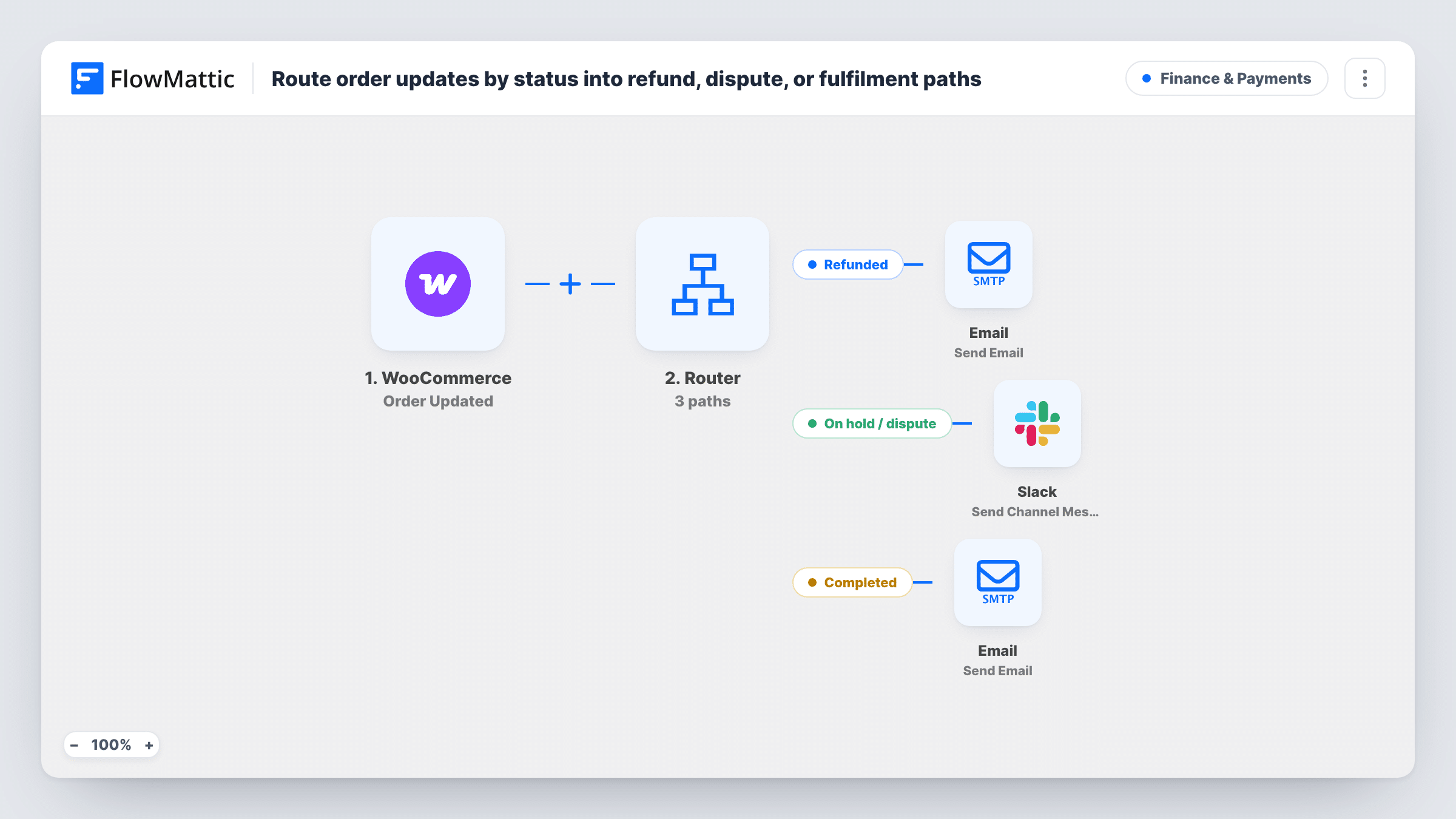
When a WooCommerce order is updated, a Router checks its status: refunded orders get a refund email, on-hold orders raise a Slack alert for finance, and completed orders get a thank-you email.
 WooCommerce
 Router
 Email
Email
 Slack
Slack5 steps Setup ~8 min Used on 2.9k sites Finance Free to import
What this workflow does
An order's status says what should happen next. A refund needs a kind word to the customer, an order put on hold needs someone in finance to look at it, and a completed order deserves a thank-you. Doing each of these by hand means watching the orders screen all day. This workflow reacts to the status for you.
The WooCommerce Order Updated trigger runs when an order changes and passes its status, order ID and billing email. A Router then checks the status on three routes. Refunded continues when the status contains refund and emails the customer that the refund is on its way. On hold / dispute continues when the status contains hold and posts a Slack channel message asking finance to review that order. Completed continues when the status contains completed and emails the customer a thank-you.
Orders in any other status, such as processing or cancelled, match no route, so the run ends without action. The customer emails go out through your FlowMattic SMTP settings and sit alongside the emails WooCommerce already sends, so word them so the two do not repeat each other.
A softer note when a refund goes through
A store owner adds a personal line to the refund route, such as an apology and a discount for next time, on top of the standard WooCommerce refund email.
Finance review of held orders
When a payment gateway or a team member puts an order on hold, the finance channel in Slack hears about it with the order ID, so nothing waits unnoticed.
A thank-you after delivery
A shop that marks orders completed once they ship sends a short thanks at that point, a natural place to add a review link.
How this workflow runs
What happens at each step once the workflow is on, and what you need before you import it.
 WooCommerce Order Updated
Runs when a WooCommerce order is updated on your store. The order status, order ID and billing email are passed to the Router and the later steps.
- Router 3 paths
Checks the order status on three named routes: Refunded if it contains refund, On hold / dispute if it contains hold, and Completed if it contains completed.
 Email Send Email
On the Refunded route, emails the billing address with the subject Your refund is on its way and a short apology. Edit the text to match your store's voice.
- Slack Send Channel Message
On the On hold / dispute route, sends a Slack channel message with the order ID, asking finance to review the order.
- Email Send Email
On the Completed route, emails the customer with the subject Order complete and a thank-you for shopping with you.
What you need
- FlowMatticCore
- WooCommerce PluginPlugin
- Slack AccountAccount
After importing, map your own data. To keep the template universal, not every step is pre-filled. Open each step in the builder and connect your accounts and fields (channels, lists, sheets, recipients) before you switch the workflow on.
Make it yours
Changes worth making after you import it.
- Add the order total and the customer's name to the Slack message so finance can judge how urgent a held order is without opening WooCommerce.
- Add a fourth route for cancelled or failed orders, for example a Slack note to the sales team, if those statuses also need a person to act.
- Put a link to your review page in the Completed email, so customers who are happy with their order have an easy next step.
Questions about this workflow
Does this replace WooCommerce's own order emails?
No. WooCommerce keeps sending its emails as set in its settings. This workflow adds its own messages, so customers on the Refunded and Completed routes receive both.
Does the hold route catch payment disputes?
It catches orders whose status contains hold. Whether a disputed payment puts an order on hold depends on your payment gateway, so check how yours marks disputes.
Could a customer get the same email twice?
The trigger listens for order updates, so if an order is saved again while it keeps the same status, it can match the same route again. Test this on your store and add a condition if it happens.
What happens to processing or pending orders?
None of the three routes match those statuses, so nothing is sent. Add a route with its own condition if you want to act on them.
More Finance & Payments workflows
Other ready-to-import templates from the same category.



Import this workflow into your WordPress site
Download the JSON, import it from the Workflows screen and connect your accounts. Every run stays on your server, with no per-task fees.
30-day money-back guarantee Unlimited workflows and runs Self-hosted