

Route survey responses to the right channel by rating
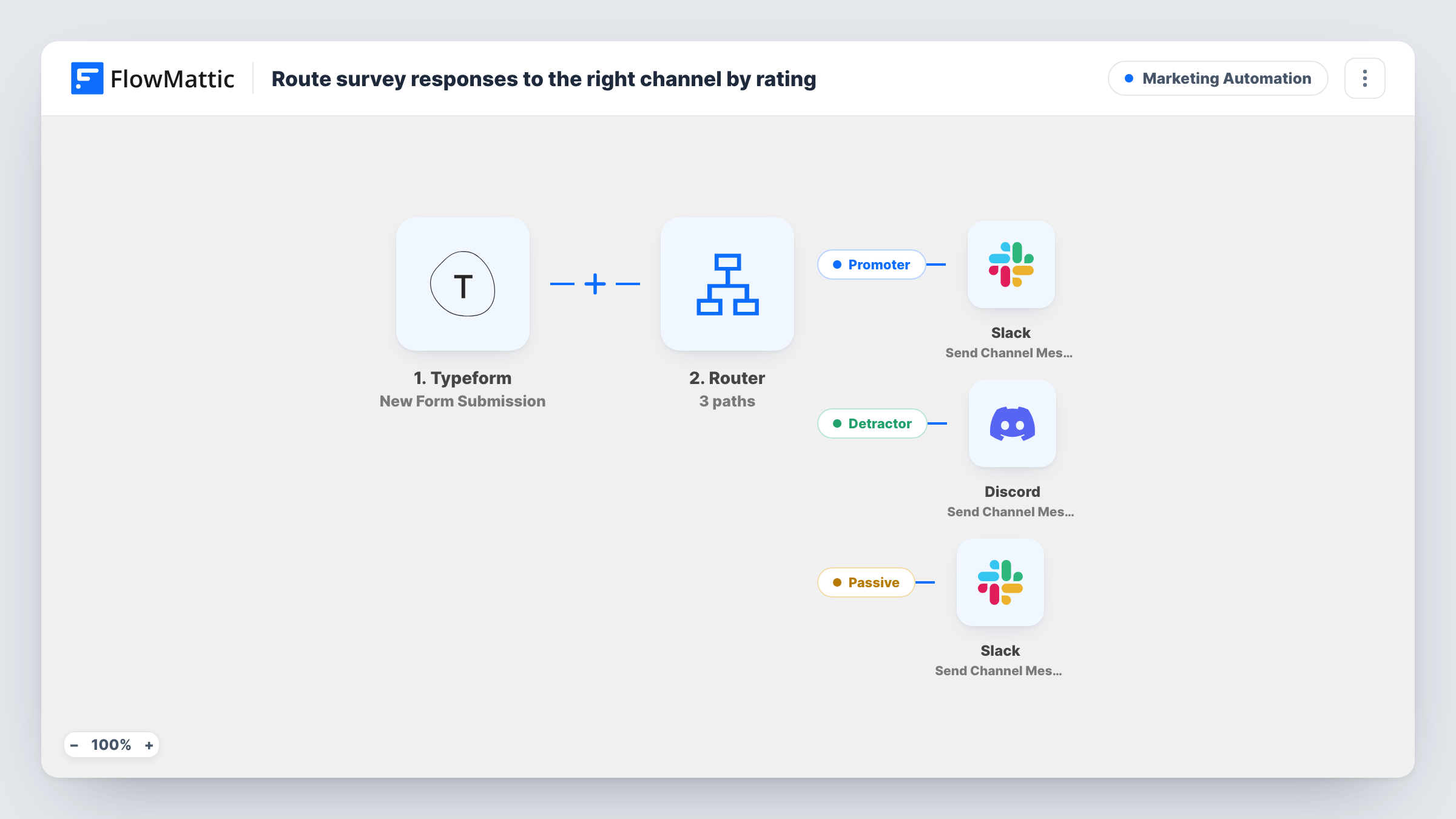
Typeform survey responses are sorted by their rating: 9 and 10 go to a Slack channel, 6 and below raise a Discord alert, and 7 or 8 go to a second Slack channel.
 Typeform
 Router
 Slack
Slack
 Discord
5 steps Setup ~8 min Used on 922 sites Marketing Free to import
What this workflow does
Survey feedback is only useful when it reaches the people who can act on it. Happy customers are material for your marketing team, unhappy ones need support quickly, and the middle group tells product what to fix. This workflow reads the rating on each Typeform response and posts it where the right team will see it.
The Typeform trigger starts a run for each new form submission. A Router with three routes then checks the score. Promoter: a score greater than 8, so 9 or 10, posts the person's name and comment to a Slack channel. Detractor: a score less than 7 sends a Discord channel alert. Passive: a score greater than 6 and less than 9, so 7 or 8, posts to a Slack channel as well.
The Router runs every route whose condition matches, and these three ranges don't overlap, so each response follows exactly one route. The comparisons use whole numbers, and an empty score counts as 0, so a response with no rating goes down the Detractor route.
The template refers to fields named score, name and comment. After import, connect your form, re-map those three to your form's own rating, name and comment answers, and choose a channel in each message step.
NPS survey after onboarding
A SaaS company asks new customers how likely they are to recommend it, and its marketing channel in Slack collects the 9s and 10s for testimonial requests.
Support team sees unhappy guests fast
A hotel group's post-stay Typeform posts any rating of 6 or below to the Discord server its guest-relations team watches, with the guest's comment.
Product feedback from the fence-sitters
An app maker routes 7 and 8 ratings to a product Slack channel, where the comments show what keeps those users from rating higher.
How this workflow runs
What happens at each step once the workflow is on, and what you need before you import it.
 Typeform New Form Submission
Fires for every new Typeform submission on the form you connect. The rating, name and comment answers are passed to the Router for checking.
- Router 3 paths
Holds three routes, Promoter, Detractor and Passive, each with its own condition on the score. Every matching route runs, and because the ranges don't overlap, each response matches one.
- Slack Send Channel Message
Promoter route, for scores above 8. Posts "Promoter feedback from" the person's name, followed by their comment, to the Slack channel you choose.
- Discord Send Channel Message
Detractor route, for scores below 7, including blank ones. Sends a Discord channel message that reads "Detractor alert from" with the name and comment.
- Slack Send Channel Message
Passive route, for scores of 7 or 8. Posts "Passive feedback from" with the name and comment to a Slack channel; pick a different channel from the Promoter one if you want them apart.
What you need
- FlowMatticCore
- Typeform AccountAccount
- Slack AccountAccount
- Discord AccountAccount
After importing, map your own data. To keep the template universal, not every step is pre-filled. Open each step in the builder and connect your accounts and fields (channels, lists, sheets, recipients) before you switch the workflow on.
Make it yours
Changes worth making after you import it.
- If your rating question is required in Typeform, empty scores can't reach the Detractor route. If it is optional, add a second condition on that route so only scores that are filled in post to Discord.
- Change the thresholds on each route if your survey uses a 1-5 scale, and keep the ranges from overlapping so one response never posts to two channels.
- Add the respondent's email to the Discord message on the Detractor route, if your form asks for it, so support can reply to the person directly.
- Use Slack's Send Private Channel Message action on a route instead if that feedback should go to a private channel.
Questions about this workflow
Can one Typeform response post to both Slack and Discord?
Not with the ranges as shipped. The Router runs every route that matches, but above 8, below 7 and 7 to 8 can't overlap, so each response matches one route.
Do I need both a Slack and a Discord account?
Yes, as imported. Promoter and Passive responses post to Slack and Detractors go to Discord. You can swap the Discord step for a Slack step if your team only uses Slack.
What happens to a decimal rating like 8.5?
The Router compares whole numbers and drops the decimal, so 8.5 is read as 8 and goes down the Passive route.
Why do I need to re-map the Typeform score, name and comment fields?
The template refers to fields called score, name and comment, which may not match the answers your form actually sends. Open each route's condition and each message step, and pick your form's rating, name and comment answers from a test submission.
More Marketing Automation workflows
Other ready-to-import templates from the same category.






Import this workflow into your WordPress site
Download the JSON, import it from the Workflows screen and connect your accounts. Every run stays on your server, with no per-task fees.
30-day money-back guarantee Unlimited workflows and runs Self-hosted