

Analyse feedback sentiment with AI and route unhappy customers to your team
OpenAI reads each Fluent Forms feedback entry and labels it POSITIVE or NEGATIVE. Unhappy customers are posted to one Slack channel for follow-up, and happy ones to another.
 Fluent Forms
 OpenAI (ChatGPT)
 Router
 Slack
5 steps Setup ~8 min Used on 500 sites Content Ops Free to import
What this workflow does
Feedback forms collect praise and complaints in one inbox, and the complaints are the ones that can't wait. This workflow uses an OpenAI prompt to sort each response by tone and puts unhappy customers in front of the people who can fix things, while good news goes somewhere the whole team can enjoy it.
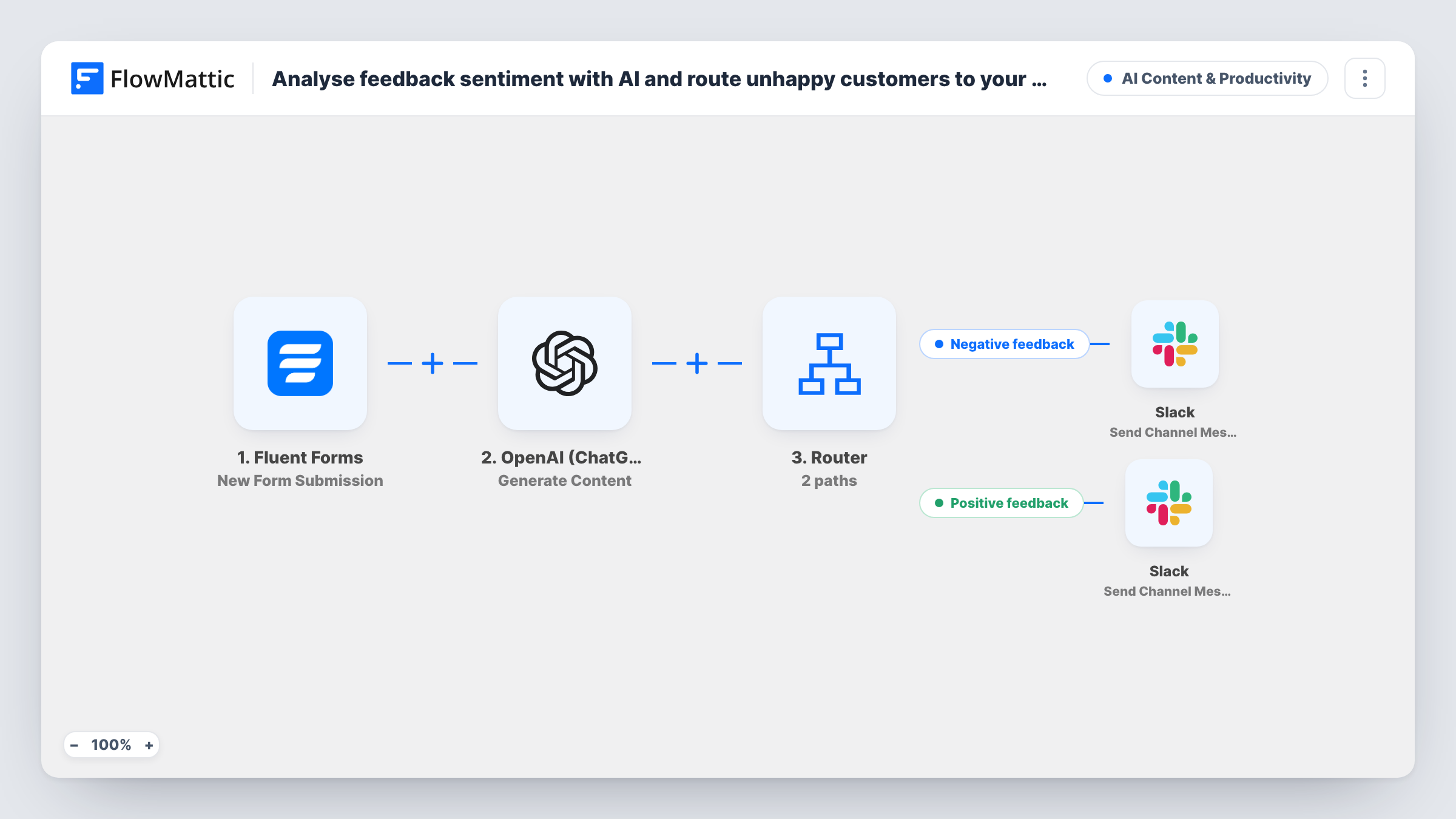
The Fluent Forms trigger starts a run for every submission. The OpenAI (ChatGPT) step sends the feedback answer to GPT-4o and asks it to reply with only one word, POSITIVE or NEGATIVE.
A Router reads the reply. When it contains NEGATIVE, the Negative feedback route posts Unhappy customer with their name and full feedback to Slack. When it contains POSITIVE, the Positive feedback route posts Happy customer with the same details. Pick a different channel for each route, such as a support escalation channel and a team wins channel.
The two words don't contain each other, so a one-word reply runs one route. Capitals don't matter to the route checks, so a reply of Negative or negative still reaches the Negative feedback route. Mixed or neutral feedback still gets one of the two labels, because the prompt allows no third answer.
Service recovery for a restaurant group
Diners leave comments on a Fluent Forms page linked from the receipt. Negative ones land in the managers' Slack channel the same evening so someone can call the guest.
Customer success after onboarding
A software company sends a feedback form after setup. Unhappy responses reach the success team, and positive ones are shared in a channel the sales team uses for testimonials.
Course feedback for an online school
Students rate each module. Complaints go to the instructors' channel, while praise is posted where the whole school sees it.
How this workflow runs
What happens at each step once the workflow is on, and what you need before you import it.
 Fluent Forms New Form Submission
Starts a run for each new Fluent Forms entry. The template uses fields named feedback and name, so map them to your own form's feedback and name questions after import.
- OpenAI (ChatGPT) Generate Content
Sends the feedback text to OpenAI's GPT-4o and asks for one word only, POSITIVE or NEGATIVE. The reply is what the Router reads.
- Router 2 paths
Runs the Negative feedback route when the reply contains NEGATIVE and the Positive feedback route when it contains POSITIVE. Upper and lower case count the same here, and a reply with neither word takes no route.
- Slack Send Channel Message
On the Negative feedback route, posts Unhappy customer with the person's name and their feedback to Slack. Choose the channel your support or success team watches.
- Slack Send Channel Message
On the Positive feedback route, posts Happy customer with the name and feedback to Slack. Point it at a separate channel, such as one for team wins.
What you need
- FlowMatticCore
- Fluent Forms PluginPlugin
- OpenAI (ChatGPT) AccountAccount
- Slack AccountAccount
After importing, map your own data. To keep the template universal, not every step is pre-filled. Open each step in the builder and connect your accounts and fields (channels, lists, sheets, recipients) before you switch the workflow on.
Make it yours
Changes worth making after you import it.
- Map the customer's email or order number into the Negative feedback message, so whoever picks it up can contact the person straight from Slack.
- Add a third label such as NEUTRAL to the prompt and a matching third route with its own Slack step if you don't want lukewarm responses treated as praise or complaints.
- Add a Google Sheets Add New Row step on each route after its Slack step to keep a record of feedback and its label for monthly reviews.
Questions about this workflow
What happens if OpenAI answers in lowercase?
The right route still runs. The Router ignores capitals, so negative matches NEGATIVE. A longer reply is what can go wrong: a sentence that mentions both words would post to both channels, so read the replies in Task History if a post looks off.
Can the same feedback be posted to both Slack channels?
Only if the reply contained both words. The prompt asks for one word, and neither label contains the other, so a normal reply runs one route.
Does the sentiment check need an OpenAI API key of my own?
Yes. The Generate Content step uses the OpenAI (ChatGPT) app, so connect your API key after import. The template sets the model to GPT-4o.
Is the Fluent Forms feedback stored anywhere besides Slack?
Fluent Forms keeps its own entries, so every submission is still there. This workflow only adds the Slack posts, so add a Google Sheets or CRM step if you want the label stored too.
More AI Content & Productivity workflows
Other ready-to-import templates from the same category.






Import this workflow into your WordPress site
Download the JSON, import it from the Workflows screen and connect your accounts. Every run stays on your server, with no per-task fees.
30-day money-back guarantee Unlimited workflows and runs Self-hosted