

Record Fluent Forms payments, alert Slack, and email the customer a receipt
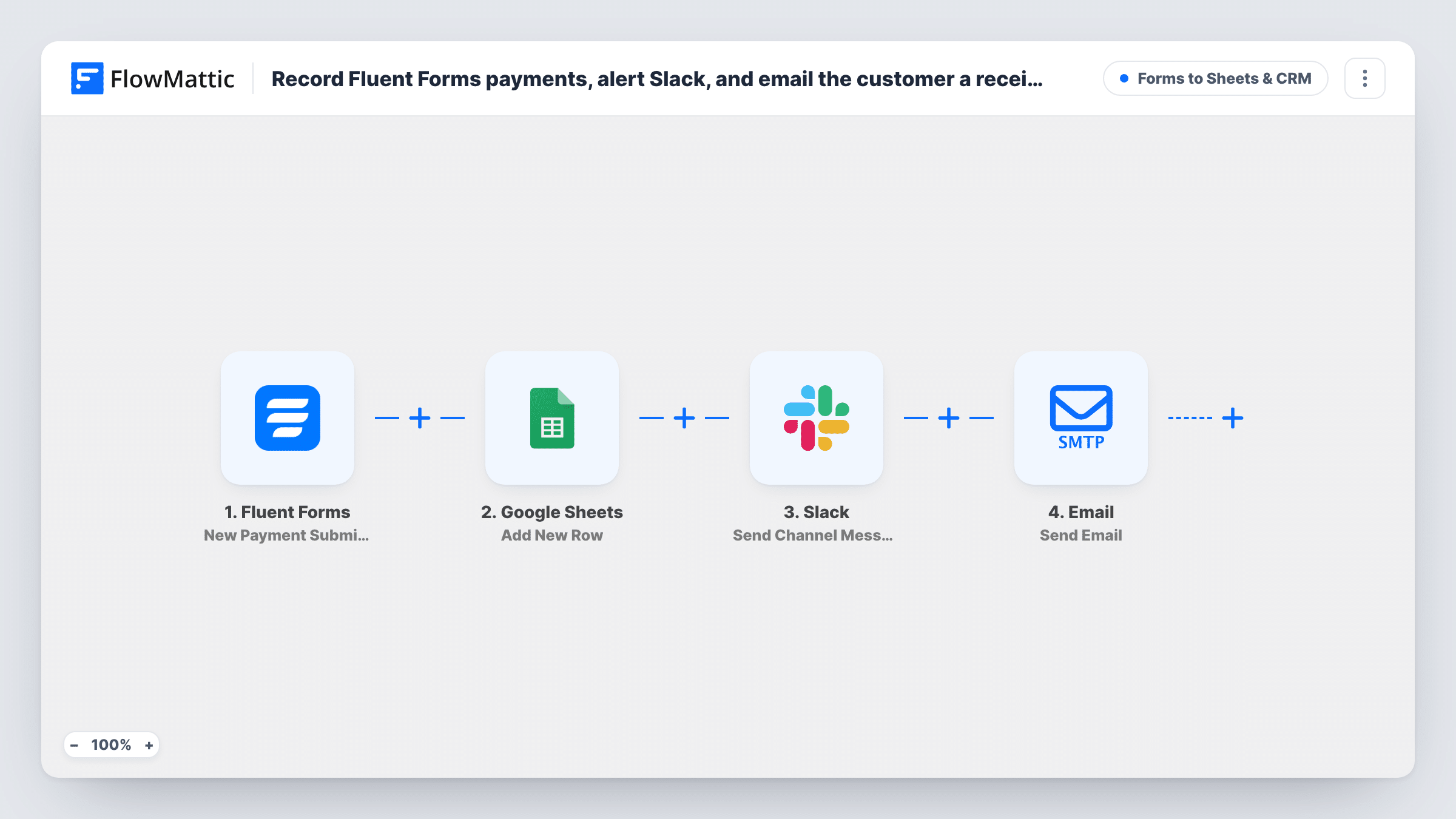
Each Fluent Forms payment submission is logged as a Google Sheets row, announced in Slack with the amount and payer’s name, and confirmed to the customer in a short receipt email.
 Fluent Forms
 Google Sheets
 Slack
 Email
4 steps Setup ~8 min Used on 2.1k sites Lead Capture Free to import
What this workflow does
Taking payments through a form means three small jobs after every sale: noting it somewhere for your books, telling the team, and confirming to the customer. Done by hand, one of them gets missed on a busy day. This workflow handles all three from the payment submission.
The Fluent Forms trigger runs on New Payment Submission. First, FlowMattic adds a row to Google Sheets; that step comes unmapped, so you pick the columns after import. Next, a message goes to a Slack channel with the currency, the payment total and the payer's name.
The last step emails the customer with the subject Your payment receipt. The body greets them by name and confirms the amount and currency received. It is a plain confirmation, not an itemised invoice, so add anything your customers need, such as an order reference. Send a test payment before going live to check when your payment method fires the trigger, because the email says the payment was received. Task History records every run.
Paid workshop or class bookings
Each booking payment lands in a sheet you reconcile against your bank, the organiser sees it in Slack, and the attendee gets a confirmation of what they paid.
Donations through a form
A charity logs every donation in Google Sheets, shares new gifts with staff in Slack, and thanks the donor with an email stating the amount.
Deposits for custom work
A designer takes deposits with Fluent Forms. The sheet tracks who has paid and the client receives an email confirming the deposit amount.
How this workflow runs
What happens at each step once the workflow is on, and what you need before you import it.
 Fluent Forms New Payment Submission
Runs when Fluent Forms records a new payment submission. The payer's name and email, the currency and the payment total are passed on, along with the other form answers.
- Google Sheets Add New Row
Logs the payment as a new spreadsheet row in Google Sheets. Nothing is mapped yet, so after a test payment map the payer, amount and other fields to your columns.
- Slack Send Channel Message
Posts to your Slack channel that a payment was received, with the currency, total and payer's name, in the channel you pick when connecting Slack.
 Email Send Email
Emails the payer with the subject Your payment receipt, greeting them by name and confirming the amount and currency. Set up your SMTP connection on import and add any details your receipts need.
What you need
- FlowMatticCore
- Fluent Forms PluginPlugin
- Google Sheets AccountAccount
- Slack AccountAccount
After importing, map your own data. To keep the template universal, not every step is pre-filled. Open each step in the builder and connect your accounts and fields (channels, lists, sheets, recipients) before you switch the workflow on.
Make it yours
Changes worth making after you import it.
- Make a test payment in your gateway's test mode, if it has one, and check Task History to see the payment fields the trigger sends before mapping your sheet columns.
- Add a column for the payment status or transaction ID in Google Sheets if the trigger provides one, so you can match rows to your payment gateway records.
- Map the form name or product into the receipt email and the Slack message if several payment forms use this workflow, so everyone can tell the payments apart.
Questions about this workflow
Is the receipt email a full invoice for the Fluent Forms payment?
No. As imported, it confirms the payer's name, the amount and the currency. Add an order reference, item list or business details to the email body if your customers need them.
Does Fluent Forms still send its own payment emails?
The workflow does not change Fluent Forms settings, so any email notifications you set up there still go out alongside this one.
When does the receipt email go out for pending payments?
It goes out whenever the New Payment Submission trigger fires. Test with each payment method you offer, especially offline ones, to see when that happens, because the email says the payment was received.
Which Slack channel gets the payment alert?
The one you set in the Send Channel Message step after connecting Slack. Pick one your finance or sales team already reads.
More Forms to Sheets & CRM workflows
Other ready-to-import templates from the same category.





Import this workflow into your WordPress site
Download the JSON, import it from the Workflows screen and connect your accounts. Every run stays on your server, with no per-task fees.
30-day money-back guarantee Unlimited workflows and runs Self-hosted