

Post a Discord notification for every new Bokun booking
When a booking is confirmed in Bokun, this workflow posts a message to a Discord channel, so guides and staff see each new reservation in the server they already use.
 Bokun
 Discord
2 steps Setup ~5 min Used on 1.8k sites Free to import
What this workflow does
Tour and activity operators often coordinate guides, drivers and front-desk staff in a Discord server. Bookings, though, live in Bokun, and checking the dashboard all day is not realistic for people in the field. This workflow puts each confirmed booking in front of them.
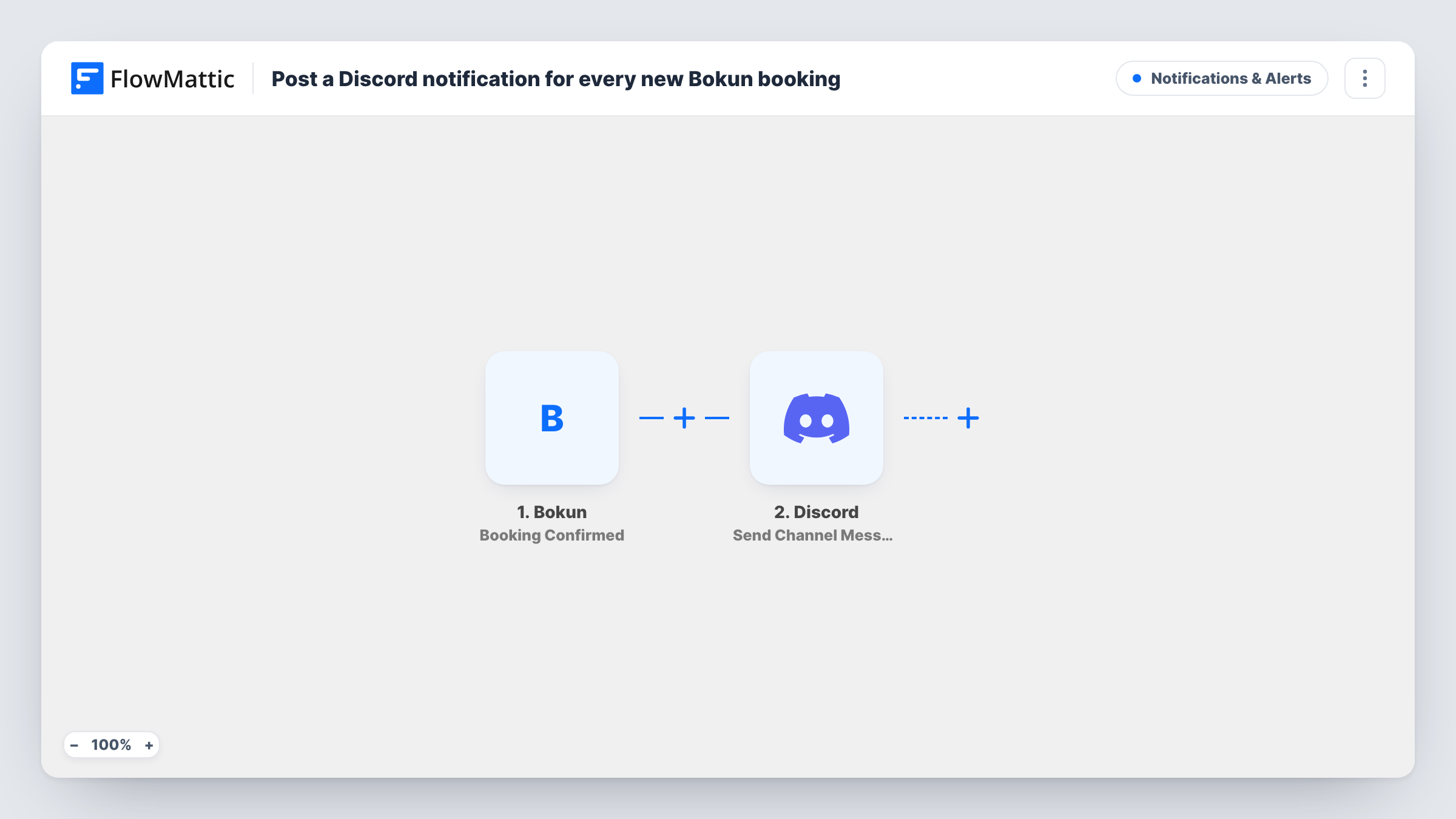
The Bokun trigger is Booking Confirmed, which fires when a new booking is confirmed. FlowMattic passes the booking data to Discord, and the Send Channel Message step posts to the channel you pick. You write the message and fill it with values from the booking, such as the product and the date.
Only confirmations start a run. Changes and cancellations have their own Bokun triggers and don't post here. Task History records each run, so you can check what Bokun sent and whether Discord accepted the message.
A bookings channel for tour guides
Guides follow a #bookings channel on their phones and see each confirmed tour as it comes in, without a Bokun login.
Front desk preparation
Staff at a rental shop watch the channel to know which equipment to set aside for the next day's confirmed bookings.
Owner visibility on busy days
The owner of a small activity company keeps an eye on new confirmations in Discord while away from the office.
How this workflow runs
What happens at each step once the workflow is on, and what you need before you import it.
 Bokun Booking Confirmed
Runs when a new booking is confirmed in Bokun. The booking data is passed on so you can use it in the Discord message.
- Discord Send Channel Message
Announces the confirmed booking in a Discord channel of your choosing. Connect your Discord server, pick the channel and build the message from the Bokun booking values.
What you need
- FlowMatticCore
- Bokun AccountAccount
- Discord AccountAccount
After importing, map your own data. To keep the template universal, not every step is pre-filled. Open each step in the builder and connect your accounts and fields (channels, lists, sheets, recipients) before you switch the workflow on.
Make it yours
Changes worth making after you import it.
- Put the activity name and date first in the Discord message, so staff scanning the channel know at a glance which day is affected.
- Want cancellations announced too? Build a second workflow on Bokun's Booking Cancelled trigger that posts to the same Discord channel.
- Add a Filter after the trigger if one team only needs certain products, and point that copy of the workflow at their own channel.
Questions about this workflow
Will changed or cancelled Bokun bookings post in Discord?
No. Only the Booking Confirmed event from Bokun starts this template. Bokun's Booking Updated and Booking Cancelled triggers can drive separate workflows.
Does every Bokun product post to the same Discord channel?
Yes, as imported. To split by product, add a Filter, or use a Router with one route per product name, each with its own Discord step.
Are past Bokun bookings posted when I turn this on?
No. Only bookings confirmed after the workflow is on reach Discord.
More Notifications & Alerts workflows
Other ready-to-import templates from the same category.



Import this workflow into your WordPress site
Download the JSON, import it from the Workflows screen and connect your accounts. Every run stays on your server, with no per-task fees.
30-day money-back guarantee Unlimited workflows and runs Self-hosted