

When a Keka HR event fires, record it in Airtable and notify HR in Slack
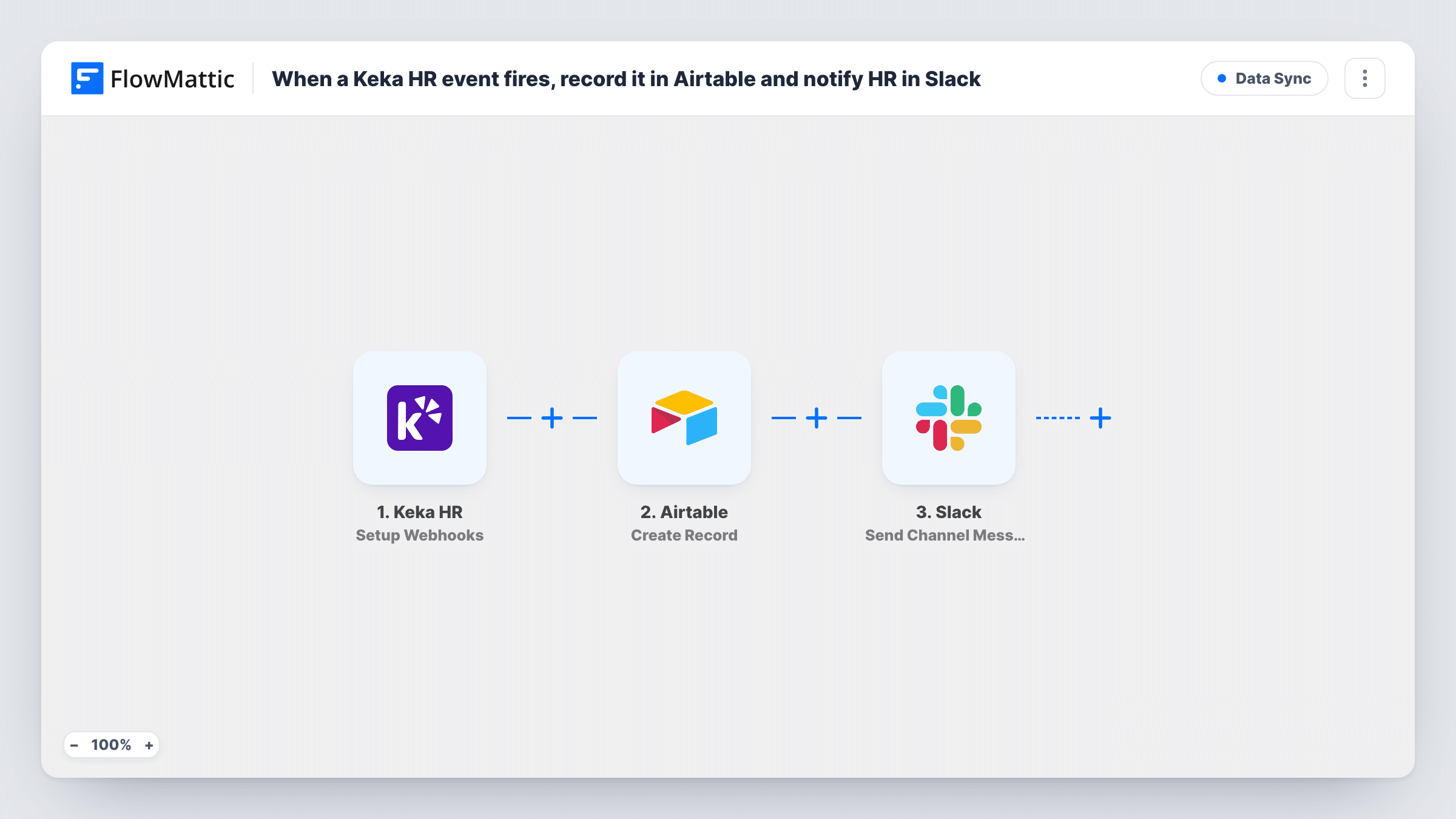
Each event Keka HR sends to FlowMattic is stored as a new Airtable record and then announced in a Slack channel, so HR has a running log of employee changes and a heads-up as each one arrives.
 Keka HR
 Airtable
 Slack
Slack3 steps Setup ~5 min Used on 2.7k sites Free to import
What this workflow does
Keka holds your employee records, but it doesn't keep a simple, shareable log of what changed and when. HR teams end up asking each other whether someone's onboarding or exit has been handled. This workflow gives you two things for every Keka event: a row in Airtable you can sort and filter, and a message in Slack.
The Keka HR trigger provides a webhook URL. In Keka you set up the webhook and pick which events it sends. Each event starts a run. FlowMattic first adds a record to the Airtable base and table you choose, with the event's data mapped into your fields. Then the Send Channel Message step posts to your HR channel in Slack, using details from the event and, if you like, values Airtable returns for the new record.
Every subscribed event creates a record and a message, so pick only the events HR needs. Each event becomes a separate record; the template doesn't look up or update earlier ones.
Onboarding and exit log
Subscribe the webhook to Keka's events for people joining and leaving. HR sees each one in Slack and keeps an Airtable table to track laptops, accounts and paperwork against each person.
Audit trail for a growing company
An Airtable table records every Keka event you choose, with a timestamp column, so you can answer when a change was made without digging through Keka.
HR updates for a remote team
A distributed HR team watches one Slack channel. Each Keka event appears there, and the Airtable base gives them a shared view to assign follow-ups.
How this workflow runs
What happens at each step once the workflow is on, and what you need before you import it.
 Keka HR Setup Webhooks
Provides a webhook URL to add in Keka HR, where you choose which events to send. Each event that arrives starts a run with its employee data.
- Airtable Create Record
Creates a new record in the Airtable table you pick. Map Keka's event fields, such as the employee's name and the event type, into your table's columns.
- Slack Send Channel Message
Posts a message to your HR channel in Slack. Write the text and map in details from the Keka event, such as the employee and what changed.
What you need
- FlowMatticCore
- Keka HR AccountAccount
- Airtable AccountAccount
- Slack AccountAccount
After importing, map your own data. To keep the template universal, not every step is pre-filled. Open each step in the builder and connect your accounts and fields (channels, lists, sheets, recipients) before you switch the workflow on.
Make it yours
Changes worth making after you import it.
- Add a column in Airtable for the event type and map it from Keka, so you can group or filter the table by kind of change.
- If Slack should only hear about some events while Airtable logs all of them, put a Filter between the Airtable and Slack steps.
- Send a test event from Keka before mapping, so FlowMattic captures the real payload and you can see which fields it carries.
Questions about this workflow
Which Keka HR events reach Airtable and Slack?
The ones you select when setting up the webhook in Keka. Every event sent to the URL creates a record and a Slack message, because there is no Filter in the template.
Does a second event for the same employee update their Airtable record?
No. Create Record always adds a new row, so each event is its own entry. That suits a log; if you want one row per person, add Airtable's Search Record step and Update Record instead.
Can the Keka alerts go to a private HR channel in Slack?
Swap the step for Slack's Send Private Channel Message action, which posts to a private channel you choose.
More Data Sync workflows
Other ready-to-import templates from the same category.


Import this workflow into your WordPress site
Download the JSON, import it from the Workflows screen and connect your accounts. Every run stays on your server, with no per-task fees.
30-day money-back guarantee Unlimited workflows and runs Self-hosted