

When a Qlik user is created or deleted, log it in Google Sheets and notify admins in Slack
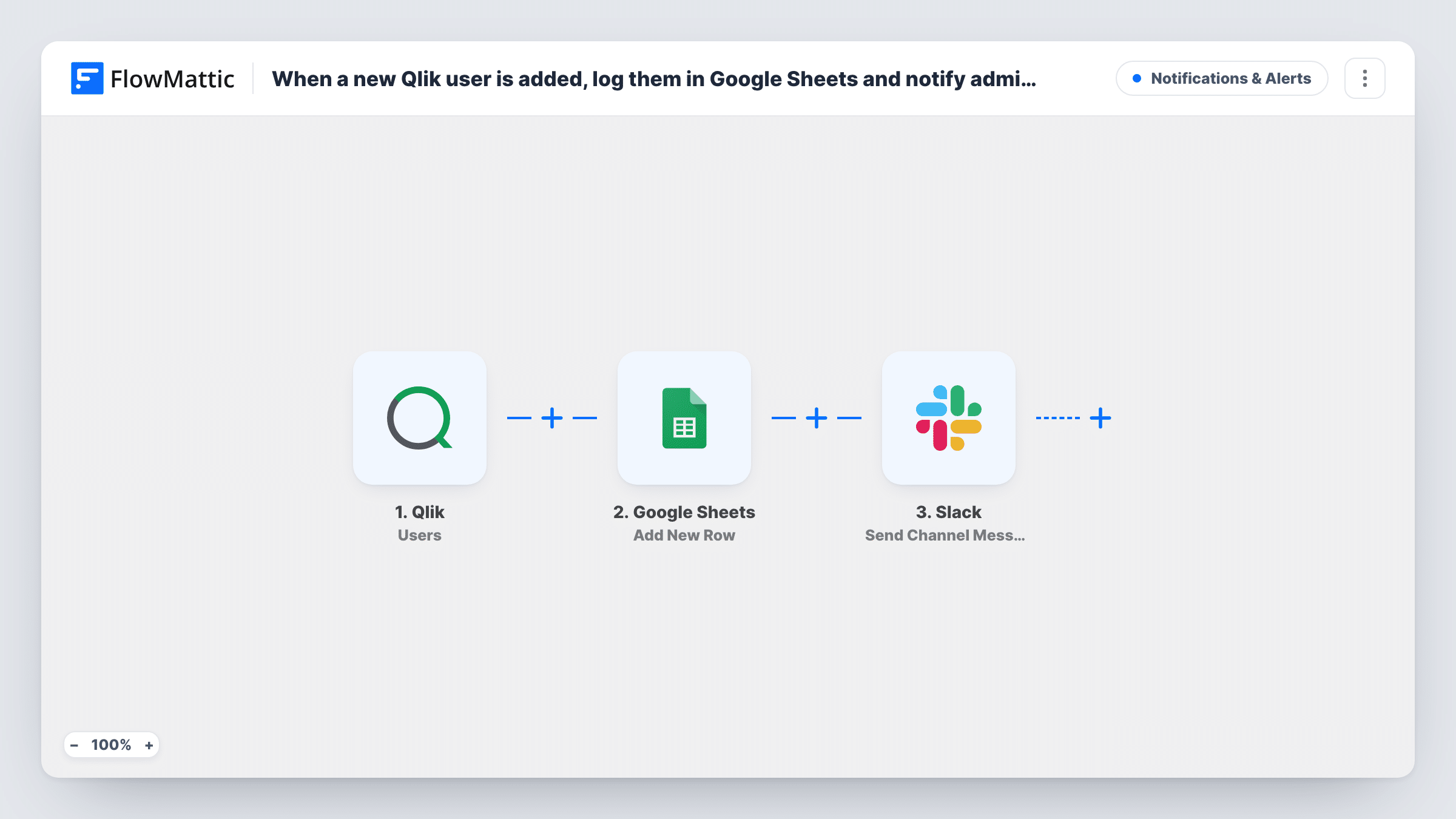
Whenever a Qlik user is created or deleted, FlowMattic adds a row to your Google Sheets log and posts a message in a Slack channel, giving admins both a record and a live alert.
 Qlik
 Google Sheets
 Slack
3 steps Setup ~5 min Used on 1.4k sites Free to import
What this workflow does
Account changes in Qlik are worth two things: a durable log you can show an auditor, and a heads-up for the people who look after access. This workflow handles both from one Qlik event, writing the change to a spreadsheet and announcing it in Slack.
The Qlik Users trigger fires when a user is created or deleted. Leave both events selected on the Qlik webhook so the log is complete. Each event's data, such as the user's name, email and the type of change, is passed to the next two steps.
First, the Google Sheets Add New Row step writes one row per event to the sheet you pick. Then the Slack step posts a message to a channel of your choice. Neither action is mapped in the template, so after import you connect both accounts, choose the spreadsheet and the channel, and map the Qlik fields into columns and into the message text.
Every created or deleted user adds one row and one Slack message. Map the event type into a column and into the message, or a new account and a removed one will look the same. If your Qlik admins talk in a private channel, note that FlowMattic's Slack integration also has a Send Private Channel Message action.
Audit trail for Qlik access
An IT manager keeps the Google Sheet as the record of every Qlik account added or removed, and shares it with the auditor at year end.
Admin channel heads-up
The analytics team's #qlik-admins channel gets a message for each account change, so a colleague can query an unexpected new user the same day.
Licence count over time
Finance sorts the sheet by event type and month to compare how many Qlik accounts were created against how many were removed.
How this workflow runs
What happens at each step once the workflow is on, and what you need before you import it.
 Qlik Users
Fires when Qlik reports a user created or deleted. Keep both events selected on the Qlik webhook so the sheet and Slack hear about each, and check a test run for the field that names the event.
- Google Sheets Add New Row
Adds a row to the Google Sheet you choose for every Qlik user event. Columns aren't matched yet, so pick the spreadsheet and sheet, then map the user's details and the event type into your columns.
- Slack Send Channel Message
Announces the Qlik account change in the Slack channel you pick. Write the text after import and map the user's name and the event type from the Qlik trigger, so readers see what changed at a glance.
What you need
- FlowMatticCore
- Qlik AccountAccount
- Google Sheets AccountAccount
- Slack AccountAccount
After importing, map your own data. To keep the template universal, not every step is pre-filled. Open each step in the builder and connect your accounts and fields (channels, lists, sheets, recipients) before you switch the workflow on.
Make it yours
Changes worth making after you import it.
- Give the sheet columns for timestamp, event type, user name and email before you map, so each Qlik event lands in a predictable place.
- If Slack should only hear about deletions while the sheet keeps everything, put a Filter between the Google Sheets step and the Slack step that continues when the event type names a deletion.
- Swap Send Channel Message for Slack's Send Private Channel Message action if your admin channel is private.
Questions about this workflow
Does the Qlik log in Google Sheets include deleted users?
Yes, as long as the Qlik webhook sends deletion events as well as creations. Each event adds its own row, so a user who is removed shows up twice: once when created, once when deleted.
Can the Slack alert go to a private admin channel?
The imported action targets public channels. Replace it with FlowMattic's Send Private Channel Message action for Slack, or with Send Direct Message to alert one person.
Will users that already exist in Qlik be logged?
No. Only users created or deleted after the webhook is set up start a run. Add any existing accounts to the sheet yourself if you want a full starting list.
Does the workflow update a row when a logged Qlik user is deleted?
No. It always adds a new row, so the sheet reads as a history of events rather than a current list of users. Sort or filter by email in Sheets to see a person's full history.
More Notifications & Alerts workflows
Other ready-to-import templates from the same category.




Import this workflow into your WordPress site
Download the JSON, import it from the Workflows screen and connect your accounts. Every run stays on your server, with no per-task fees.
30-day money-back guarantee Unlimited workflows and runs Self-hosted