

When new listing is added to Voxel, email all the members of a membership level
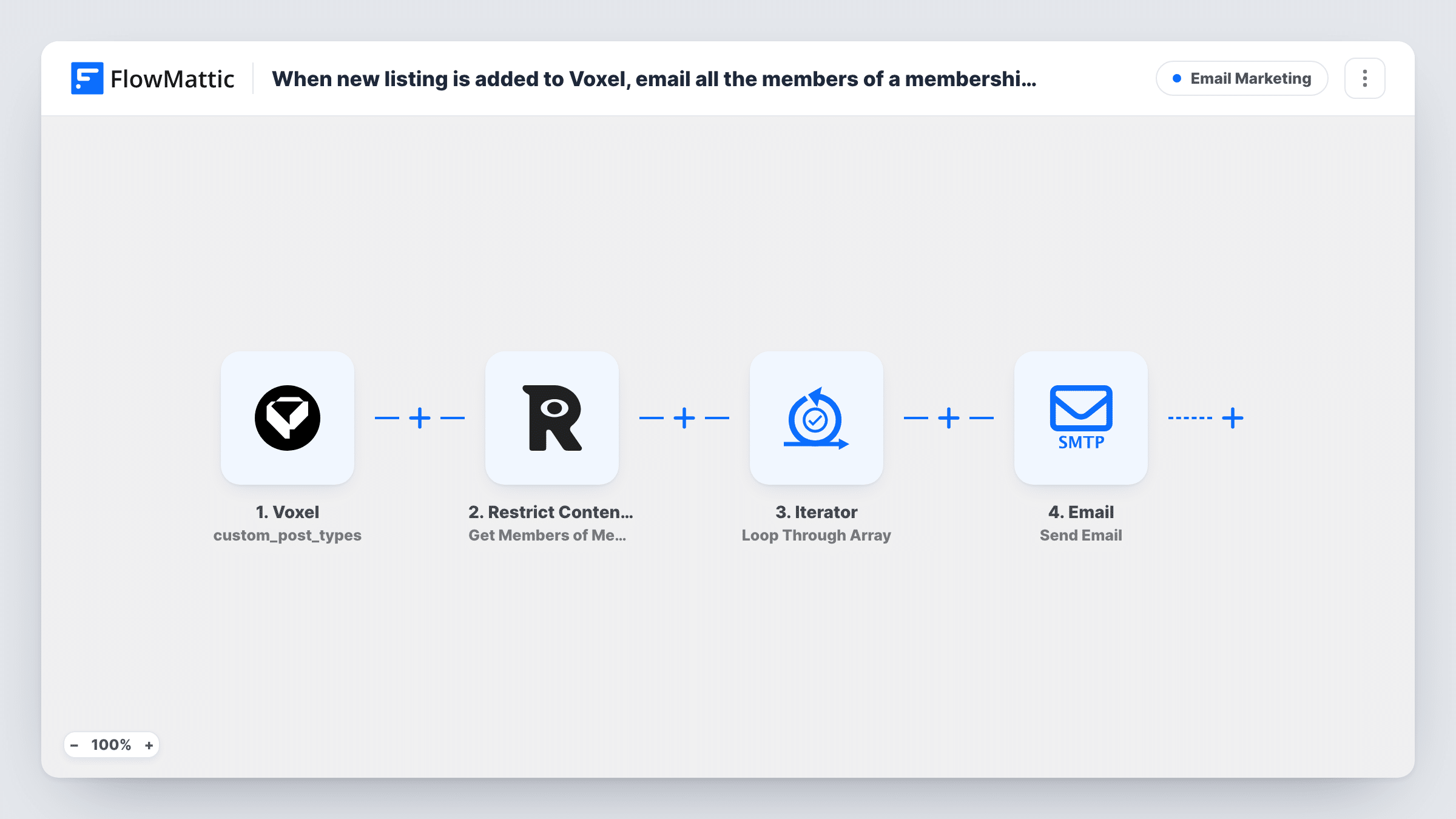
When a new listing is created in Voxel, FlowMattic fetches every member of the Restrict Content Pro membership level you choose and sends each of them an email about it.
 Voxel
 Restrict Content Pro
 Iterator
 Email
4 steps Setup ~8 min Used on 1.7k sites Free to import
What this workflow does
Directory and marketplace sites often promise members first look at new listings. Sending that notice by hand means exporting a member list and writing an email each time. This workflow does it as soon as a listing is created, using the membership data already on your WordPress site.
The Voxel trigger starts a run when a post is created in the post type you select, such as your listings. FlowMattic describes this event as firing before moderation, so a listing that is still waiting for review also starts a run. The next step asks Restrict Content Pro for all members of one membership level, which you choose after import.
An Iterator then goes through that member list one person at a time. For each member, the Email step sends a message to their user email, which is already mapped. The subject and body are left for you to write, and you can map the listing's title or link from the Voxel step into them.
Every new listing emails the whole level, so a busy site sends many messages. Check the size of the level and your mail setup before you turn it on, and use Task History to confirm each email went out.
Early access for premium directory members
A local business directory emails its Gold members whenever a new business listing is created, so they see it before it is promoted to everyone else.
New rentals for paying subscribers
A property site built on Voxel tells members of its paid plan about each new rental listing, with the title and link in the email.
Job board alerts for a member tier
A niche job board sends members of its job seeker level an email each time an employer posts a new vacancy in the jobs post type.
How this workflow runs
What happens at each step once the workflow is on, and what you need before you import it.
 Voxel Post Created
Starts a run when a post is created in the Voxel post type you select. It fires before moderation, so pending listings count too. FlowMattic hands the new listing's data to the next step.
 Restrict Content Pro Get Members of Membership Level
Gets all members of the Restrict Content Pro membership level you pick after import. The list of members is passed to the Iterator.
- Iterator Loop Through Array
Loops through the member list from Restrict Content Pro and runs the email step once for each member. It is already set to read the members returned by step 2.
- Email Send Email
Sends an email to the current member's user email, which is already mapped. Write the subject and body, and map the listing title or link from the Voxel trigger into them.
What you need
- FlowMatticCore
- Voxel AccountAccount
- Restrict Content Pro PluginPlugin
After importing, map your own data. To keep the template universal, not every step is pre-filled. Open each step in the builder and connect your accounts and fields (channels, lists, sheets, recipients) before you switch the workflow on.
Make it yours
Changes worth making after you import it.
- Add a Filter between the Voxel trigger and the Restrict Content Pro step that continues only when the post status is publish, if pending listings shouldn't be announced. Set the field and value to match what your test run shows.
- Include the listing's link in the email body so members can open it in one click. Map it from the Voxel trigger data.
- Send through your own SMTP account in the Email step rather than default WordPress mail if the membership level is large.
Questions about this workflow
Will members get an email for listings that are still pending review in Voxel?
Yes, as imported. The Post Created trigger fires before moderation. Add a Filter on the post status between the trigger and the Restrict Content Pro step if you only want published listings announced.
Can I email more than one Restrict Content Pro membership level?
The template reads one level. Duplicate the Get Members step, the Iterator and the Email step for a second level, or run a copy of the workflow set to that level.
Does each member get a separate email?
Yes. The Iterator runs the Email step once per member, sending to that member's own address, so members don't see each other's emails.
Do I need Restrict Content Pro on the same site as Voxel?
Yes. Both are WordPress plugins, and FlowMattic reads the trigger and the member list from the site where the workflow runs.
More Email Marketing workflows
Other ready-to-import templates from the same category.







Import this workflow into your WordPress site
Download the JSON, import it from the Workflows screen and connect your accounts. Every run stays on your server, with no per-task fees.
30-day money-back guarantee Unlimited workflows and runs Self-hosted