

Every month, list WP Travel Engine bookings and add a row per booking in Google Sheets
Once a month, FlowMattic lists your WP Travel Engine bookings and adds one Google Sheets row for each, giving you a monthly booking snapshot to sort, total and share outside WordPress.
 Schedule
 WP Travel Engine
 Iterator
 Google Sheets
4 steps Setup ~8 min Used on 2.3k sites Free to import
What this workflow does
Monthly reviews of a tour business usually start with a spreadsheet: which trips sold, how many travellers, what was paid. This workflow pulls the bookings from WP Travel Engine on a schedule and writes them to Google Sheets, one row each, so the numbers are there when you sit down to look.
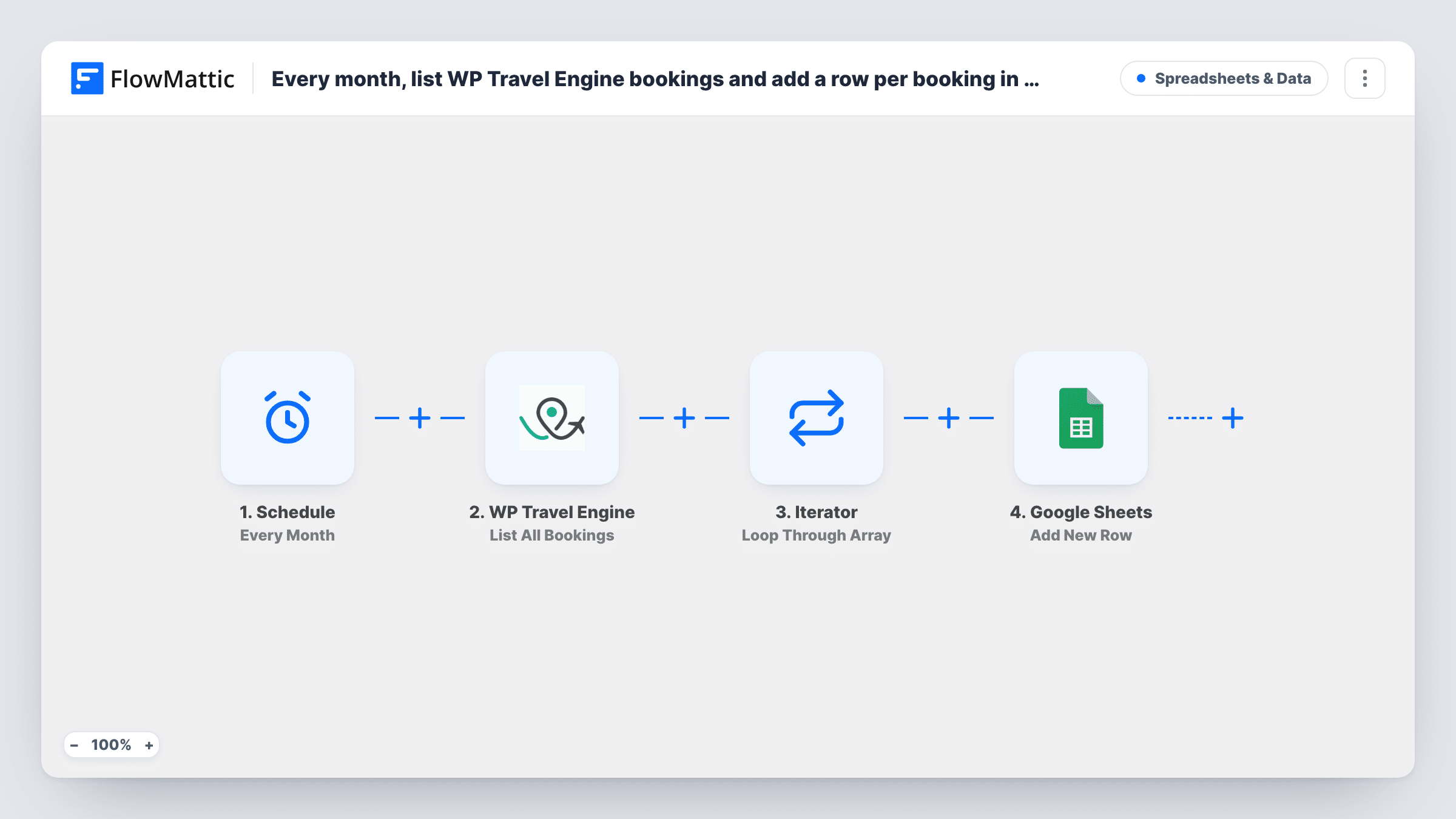
A Schedule trigger starts the run every month. The WP Travel Engine List All Bookings step then retrieves bookings with the status set to all and up to 100 per run, as set in the template. An Iterator goes through the returned list one booking at a time.
For each booking, Google Sheets adds a new row. That step ships unmapped, so after import you choose the spreadsheet and map the booking fields you want, such as the trip, the traveller and the total.
There is no check for bookings already in the sheet. Each monthly run lists bookings again and adds a row for every one returned, so the same booking can appear in several months' rows. Point each run at a new tab, or clear the sheet first, if you want a clean snapshot.
Month-end booking report
A tour operator opens a fresh tab each month and sorts the bookings by trip to see which departures filled up.
Sharing numbers with an accountant
A travel agency shares the Google Sheet with its bookkeeper, who reads totals from the rows without needing a WordPress login.
Status check across all bookings
Because the template lists every status, the owner can filter the sheet to spot bookings still pending or unpaid at month end.
How this workflow runs
What happens at each step once the workflow is on, and what you need before you import it.
 Schedule Every Month
Starts the workflow once a month on the schedule you set after import. No booking event is involved; the run simply begins at that time.
- WP Travel Engine List All Bookings
Retrieves a list of WP Travel Engine bookings. The template sets the status to all and asks for up to 100 bookings per run; you can change both in the step.
- Iterator Loop Through Array
Loops through the bookings list from the previous step, so the Google Sheets step runs once for each booking returned.
- Google Sheets Add New Row
Adds one row to your spreadsheet for each booking. The template maps no columns, so pick the sheet and map the booking fields to your headers.
What you need
- FlowMatticCore
- WP Travel Engine PluginPlugin
- Google Sheets AccountAccount
After importing, map your own data. To keep the template universal, not every step is pre-filled. Open each step in the builder and connect your accounts and fields (channels, lists, sheets, recipients) before you switch the workflow on.
Make it yours
Changes worth making after you import it.
- Change the status in the List All Bookings step from all to a single status if you only want, for example, completed bookings in the report.
- Use a new tab for each month and map the run date into a column, so rows from different months stay apart.
- If you have more than 100 bookings, raise the per-page number in the List All Bookings step and run a test to see how many come back.
Questions about this workflow
Does each monthly run add only that month's bookings?
No. The step lists bookings without a date limit, up to the per-page number, so each run adds rows for every booking it returns, including ones already in the sheet.
How many WP Travel Engine bookings does one run cover?
Up to 100, as set in the template. A site with more bookings than that gets the first 100 the step returns; change the number in the step and test if you need more.
Which booking details end up in Google Sheets?
The ones you map in the Add New Row step. After the first run, open one Iterator item in Task History and match the booking fields shown there to your columns.
Can I run it weekly instead of monthly?
Yes. Change the Schedule trigger's interval after import. Each run still lists all bookings, so a weekly run fills the sheet faster with repeat rows.
More Spreadsheets & Data workflows
Other ready-to-import templates from the same category.




Import this workflow into your WordPress site
Download the JSON, import it from the Workflows screen and connect your accounts. Every run stays on your server, with no per-task fees.
30-day money-back guarantee Unlimited workflows and runs Self-hosted