

Let an AI agent draft a proposal, render it as a PDF and share it
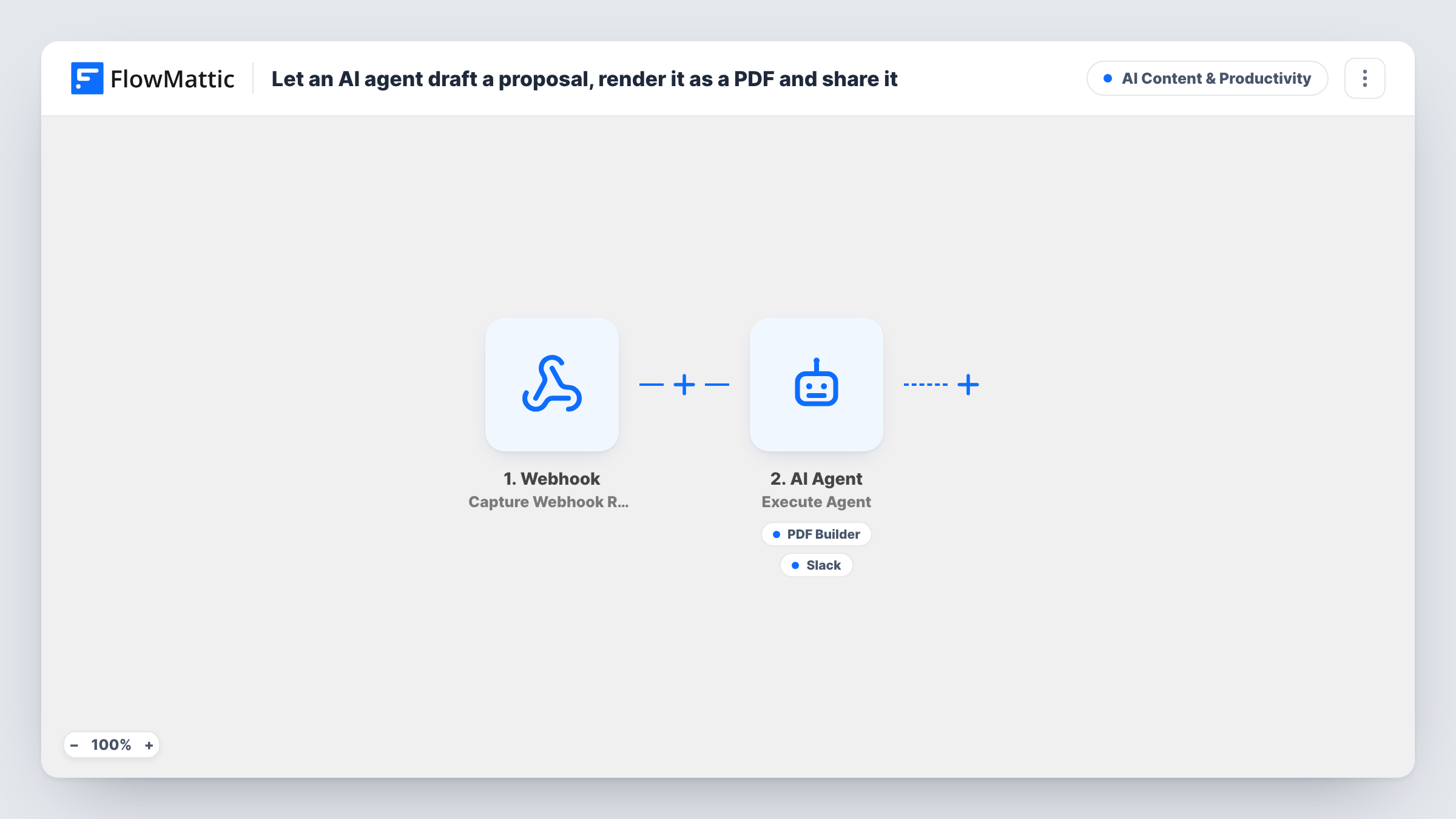
Post a company name, budget and need to a FlowMattic webhook, and an AI agent drafts the proposal copy, can render it through your PDF Builder template and can share the link in a Slack channel.
 Webhook
 AI Agent
 PDF Builder
 Slack
4 steps Setup ~8 min Used on 1.8k sites Content Ops Free to import
What this workflow does
Writing a first-draft proposal for every inbound deal takes time your team would rather spend on the call. This workflow lets a CRM, form or script send the deal basics to a webhook and hands the drafting to an AI agent.
The Webhook trigger gives you a URL to post to. The agent's input is built from three fields in that payload: company, budget and need. So whatever sends the request must use those keys, or you edit the input line to match. Unless you switch on the trigger's "Require authentication on incoming requests" setting, any caller holding the URL can start a proposal.
The AI Agent, set to OpenAI's GPT-4o, is told to write concise, persuasive proposal copy, generate the PDF from the template, then share it with the team. Its first tool is PDF Builder's Generate PDF from Template, pointing at template ID 12, with the agent supplying the data as JSON. Its second tool posts a Slack channel message that the agent writes. The agent decides which tools to call, so Task History is where you confirm a PDF was made and shared.
Agency quoting from a discovery form
A web agency's project form posts company, budget and need to the webhook, and the team finds a draft proposal PDF linked in Slack before the follow-up call.
Sales team drafting from CRM deals
A CRM automation sends deal details to the webhook when a deal reaches the proposal stage, so a rep starts from a draft instead of a blank page.
Freelancer turning enquiries into quotes
A consultant connects their enquiry form to the webhook and reviews each AI-drafted proposal in Slack before sending it to the client.
How this workflow runs
What happens at each step once the workflow is on, and what you need before you import it.
 Webhook Capture Webhook Response
Gives you a webhook URL. Send a POST with company, budget and need fields, and FlowMattic passes them to the agent. Turn on authentication if only your own systems should call it.
- AI Agent Execute Agent
Runs an AI agent on GPT-4o with a line built from company, budget and need. It is told to draft concise proposal copy, generate the PDF from your template, and share it with the team.
- PDF Builder Generate PDF from Template
Agent tool that renders a PDF Builder template with JSON data the agent provides and saves it to your Media Library. Swap template ID 12 for your own proposal template.
- Slack Send Channel Message
Agent tool that posts a message to a Slack channel, with text the agent writes, such as the proposal summary and the PDF link. Choose the channel and connect Slack.
What you need
- FlowMatticCore
- AI ProviderAccount
- Slack AccountAccount
After importing, map your own data. To keep the template universal, not every step is pre-filled. Open each step in the builder and connect your accounts and fields (channels, lists, sheets, recipients) before you switch the workflow on.
Make it yours
Changes worth making after you import it.
- Describe your PDF template's parameters in the system prompt, such as title, scope and price, so the JSON the agent sends matches what the template expects.
- Add a Filter between the webhook and the agent that continues only when company and need are not empty, so half-filled requests don't produce a proposal.
- Send a test payload with sample company, budget and need values, then check Task History to see which tools the agent called and what it sent.
Questions about this workflow
What must the webhook request contain for the proposal agent?
Fields named company, budget and need, because the agent's input is built from them. Other fields are captured but not given to the agent unless you add them to its input line.
Does the AI agent always create the PDF and post to Slack?
It is instructed to, but the agent chooses when to use its tools. Check Task History on a few test runs to confirm it calls both and includes the PDF link in the Slack message.
Do I need my own PDF Builder template for proposals?
Yes. The tool points at template ID 12, which won't exist on your site. Build or pick a proposal template in PDF Builder and select it in the tool.
Where is the proposal PDF stored?
PDF Builder saves the rendered file to your WordPress Media Library. The agent can then share its link in Slack.
More AI Content & Productivity workflows
Other ready-to-import templates from the same category.






Import this workflow into your WordPress site
Download the JSON, import it from the Workflows screen and connect your accounts. Every run stays on your server, with no per-task fees.
30-day money-back guarantee Unlimited workflows and runs Self-hosted