

Fast-track big deals and self-serve the small ones
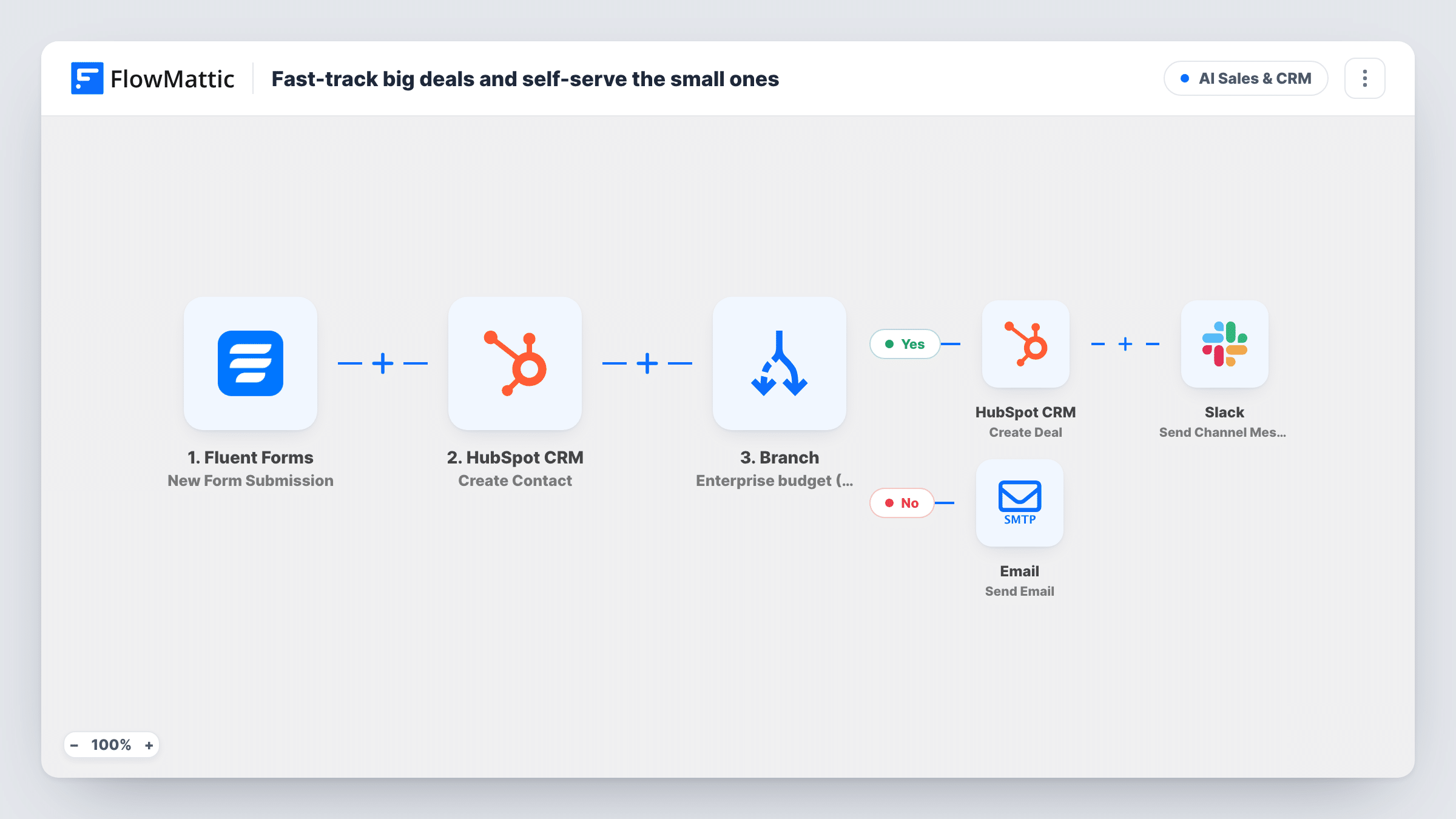
Every Fluent Forms enquiry becomes a HubSpot contact. A Branch then checks the stated budget: above 10000 creates a HubSpot deal and a Slack alert, and anything lower gets a pricing email so the lead can start on their own.
 Fluent Forms
 HubSpot CRM
 Branch
 Slack
Slack
 Email
Email6 steps Setup ~12 min Used on 2.5k sites Revenue Ops Free to import
What this workflow does
Enterprise prospects and small buyers often fill in the same enquiry form, yet they need very different handling. A large opportunity deserves a deal in your pipeline and a salesperson on it quickly. A small one is usually best served by clear pricing and a way to start alone. This workflow sorts them by the budget they give you.
When someone submits your Fluent Forms enquiry form, FlowMattic first creates a contact in HubSpot CRM from their email and name, whatever their budget. A Branch then asks whether the budget field is greater than 10000. If yes, HubSpot gets a new deal named Enterprise followed by the company name, with the budget as the amount, and Slack receives an alert naming the company and budget. If no, the lead gets an email with the subject Your pricing details and a short note about getting started.
The budget is compared as a whole number. A blank budget counts as 0, and an answer of exactly 10000 is not greater than the threshold, so both take the self-serve path.
SaaS company with an enterprise tier
Prospects state an annual budget on the contact form. Enterprise-sized answers become HubSpot deals your account executives see straight away, and smaller teams get pricing in their inbox.
Agency quoting custom builds
Large website projects go into the HubSpot pipeline with an estimated amount, while small requests are pointed to your fixed-price packages by email.
Keeping every lead in HubSpot
Even the self-serve leads become HubSpot contacts, so marketing can follow up with them later while sales focuses on the deals.
How this workflow runs
What happens at each step once the workflow is on, and what you need before you import it.
 Fluent Forms New Form Submission
Fires whenever a prospect sends in your Fluent Forms enquiry. Their email, name, company and budget answers are passed to the steps that follow.
- HubSpot CRM Create Contact
Creates a contact in HubSpot CRM from the submitted email and name. This runs for every submission, before the budget is checked.
- Branch Branch
Checks whether the budget field is greater than 10000. Yes leads to the HubSpot deal and the Slack alert. No leads to the pricing email.
- HubSpot CRM Create Deal
On the Yes path, creates a HubSpot deal named Enterprise followed by the company name, with the stated budget as the deal amount.
- Slack Send Channel Message
Still on the Yes path, posts to your Slack channel that there is an enterprise opportunity, with the company name and the budget, so an account executive can pick it up.
 Email Send Email
On the No path, emails the lead with the subject Your pricing details and a note on getting started on their own. Add your pricing page link to the body before going live.
What you need
- FlowMatticCore
- Fluent Forms PluginPlugin
- HubSpot CRM AccountAccount
- Slack AccountAccount
After importing, map your own data. To keep the template universal, not every step is pre-filled. Open each step in the builder and connect your accounts and fields (channels, lists, sheets, recipients) before you switch the workflow on.
Make it yours
Changes worth making after you import it.
- Set the Branch value to the deal size where your sales team wants to get involved. Because the check is strictly greater than, enter one less than your cut-off if that exact amount should qualify.
- Use a number field for the budget in Fluent Forms, without currency signs or separators, and send a test entry to confirm the Branch reads it as you expect.
- Add the lead's name and email to the Slack alert text, so the account executive can reply to the enterprise prospect without opening HubSpot first.
Questions about this workflow
What happens if the lead is already a HubSpot contact?
The step is Create Contact, not create or update. Send a test with an email that already exists in HubSpot and check Task History to see how the step responds before you go live.
Which path does a Fluent Forms lead with no budget take?
The self-serve path. A blank budget counts as 0, so the lead gets the pricing email and no HubSpot deal is created. They are still added as a HubSpot contact.
Are decimal budgets rounded when compared to 10000?
They are cut off, not rounded. 10000.75 is read as 10000, which is not greater than 10000, so that lead gets the pricing email.
Can small leads get a HubSpot deal too?
Not as imported. Add a Create Deal step to the No path with a different name, such as Self-serve, if you want every lead tracked in your pipeline.
More AI Sales & CRM workflows
Other ready-to-import templates from the same category.






Import this workflow into your WordPress site
Download the JSON, import it from the Workflows screen and connect your accounts. Every run stays on your server, with no per-task fees.
30-day money-back guarantee Unlimited workflows and runs Self-hosted