

Welcome new Mailchimp subscribers with a three-part email series
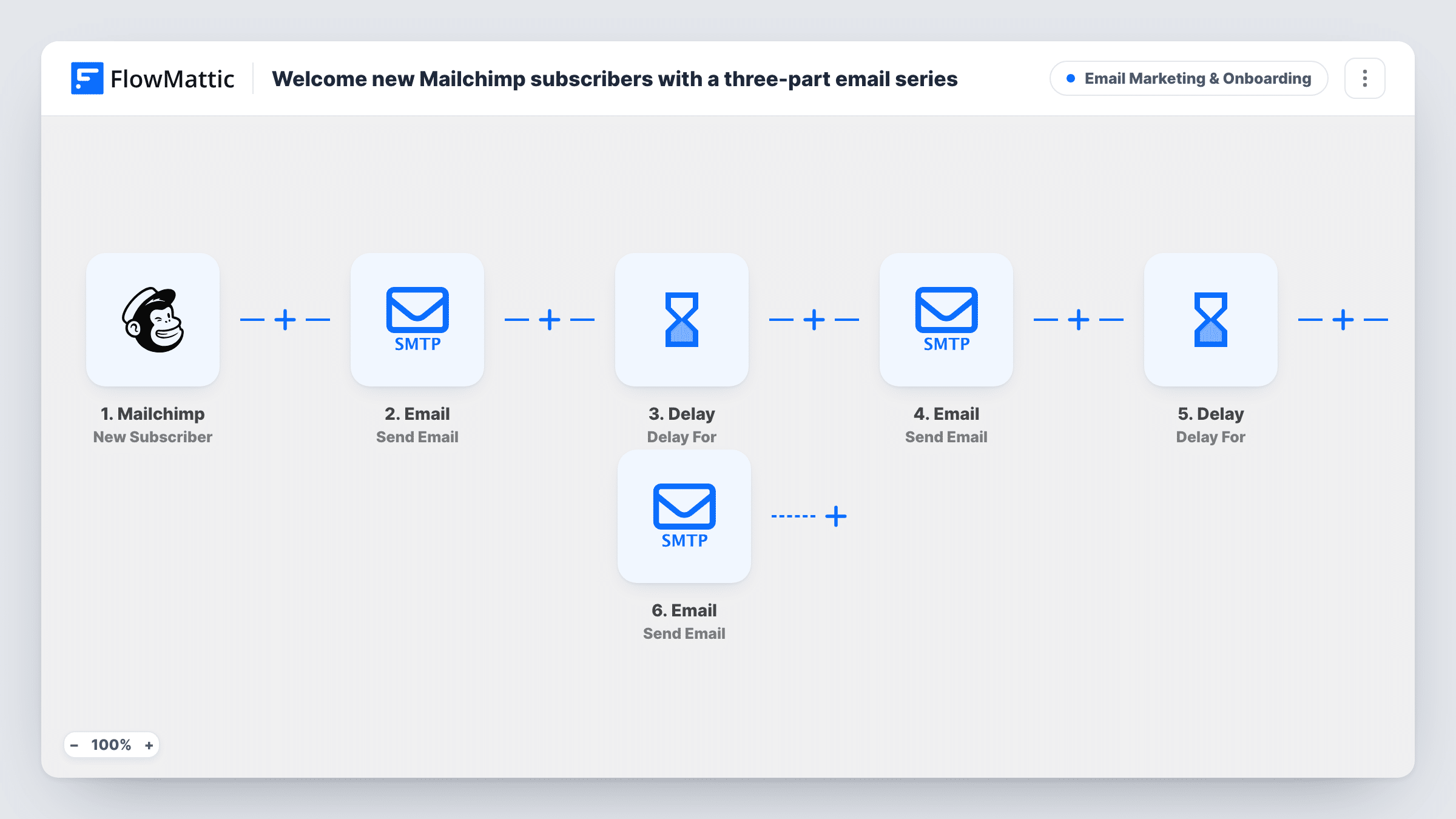
Each new Mailchimp subscriber gets three emails from FlowMattic: a welcome straight away, a quick tip two days later, and an offer of help three days after that.
 Mailchimp
 Email
Email
 Delay
Delay6 steps Setup ~12 min Used on 886 sites Marketing Free to import
What this workflow does
People are most interested in your emails right after they subscribe. A short series in that first week turns a new address into a reader. This workflow sends one, timed with Delays, from your own email address.
The Mailchimp trigger fires when someone new subscribes to your audience. FlowMattic emails them a welcome that greets them by first name. A Delay waits two days, then a second email offers one tip to get started. Another Delay waits three more days before the last email, which invites them to reply with any questions. The series lands on days 1, 3 and 6.
All three emails go out through the SMTP account connected to FlowMattic's Email module, not through Mailchimp. That has two effects: they won't appear in Mailchimp reports, and an unsubscribe in Mailchimp halfway through doesn't stop the later emails in a run that has already started. The template bodies are one-line placeholders, so write your own before you turn it on.
Newsletter writer onboarding readers
Each new reader gets your best post on day one, a favourite archive pick on day three, and a personal note asking what they'd like to read on day six.
Software trial sign-ups
Trial users who join your Mailchimp list get a setup guide, a quick-win tip, and an offer of help, spaced out over the first week of their trial.
Online shop subscriber discount
The first email carries the sign-up discount, the second shows a bestseller, and the third asks if they have any questions before buying.
How this workflow runs
What happens at each step once the workflow is on, and what you need before you import it.
 Mailchimp New Subscriber
Starts the series as soon as Mailchimp reports a new subscriber on your audience. Their email and first name are passed to all three emails.
 Email Send Email
Sends the day one email straight away, greeting the subscriber by first name. Replace the placeholder body with what you want new readers to know first.
- Delay Delay For
Waits 2 days before the next email. Each subscriber's run waits on its own, so people who join on different days stay on their own schedule.
- Email Send Email
Sends the day three email with one tip to get started. Rewrite the subject and body with a real, specific tip for your audience.
- Delay Delay For
Waits 3 more days, so the last email arrives on day six after the subscriber joined.
- Email Send Email
Sends the day six email inviting the subscriber to reply with questions. Make sure replies to your SMTP sending address reach someone who will answer.
What you need
- FlowMatticCore
- Mailchimp AccountAccount
After importing, map your own data. To keep the template universal, not every step is pre-filled. Open each step in the builder and connect your accounts and fields (channels, lists, sheets, recipients) before you switch the workflow on.
Make it yours
Changes worth making after you import it.
- Write real content for all three emails before you switch the workflow on. The template's bodies are single placeholder lines.
- Add an unsubscribe line to each email, since these are sent through SMTP and don't carry Mailchimp's footer. Link it to your Mailchimp preferences page.
- Change the Delay lengths to fit your audience. A daily series works for a short course, while a weekly gap suits a slower newsletter.
- Add a Filter after the trigger if only some subscribers should get this series. Run a test sign-up first to see which Mailchimp subscriber fields you can check.
Questions about this workflow
Are these emails sent from Mailchimp?
No. FlowMattic sends them through the SMTP account you connect to the Email module. Mailchimp only provides the new subscriber, so its campaign reports won't include these emails.
If a subscriber leaves my Mailchimp list mid-series, do the emails stop?
No. Once a run starts, the Delays and emails carry on as set. Nothing checks the subscriber's Mailchimp status before the later emails.
Will my existing Mailchimp subscribers get this welcome series?
No. Only people who subscribe after the workflow is turned on start a run. Your current audience is left alone.
More Email Marketing & Onboarding workflows
Other ready-to-import templates from the same category.






Import this workflow into your WordPress site
Download the JSON, import it from the Workflows screen and connect your accounts. Every run stays on your server, with no per-task fees.
30-day money-back guarantee Unlimited workflows and runs Self-hosted