

When a submission is received in Contact Form 7, Create a new user in WordPress and send data with form submission and user id to n8n.io
When someone submits a Contact Form 7 form, this workflow creates a WordPress user from their answers and then sends the form data and the new user ID to n8n.io for whatever your n8n workflow does next.
 Contact Form 7
 WordPress
 n8n.io
3 steps Setup ~5 min Used on 3.1k sites Free to import
What this workflow does
Some sites use a plain Contact Form 7 form as a sign-up form. The visitor fills it in, and you still need to make the account and tell your other systems about it. This workflow makes the account in WordPress and passes everything on to n8n.io, so the rest of your process can run there.
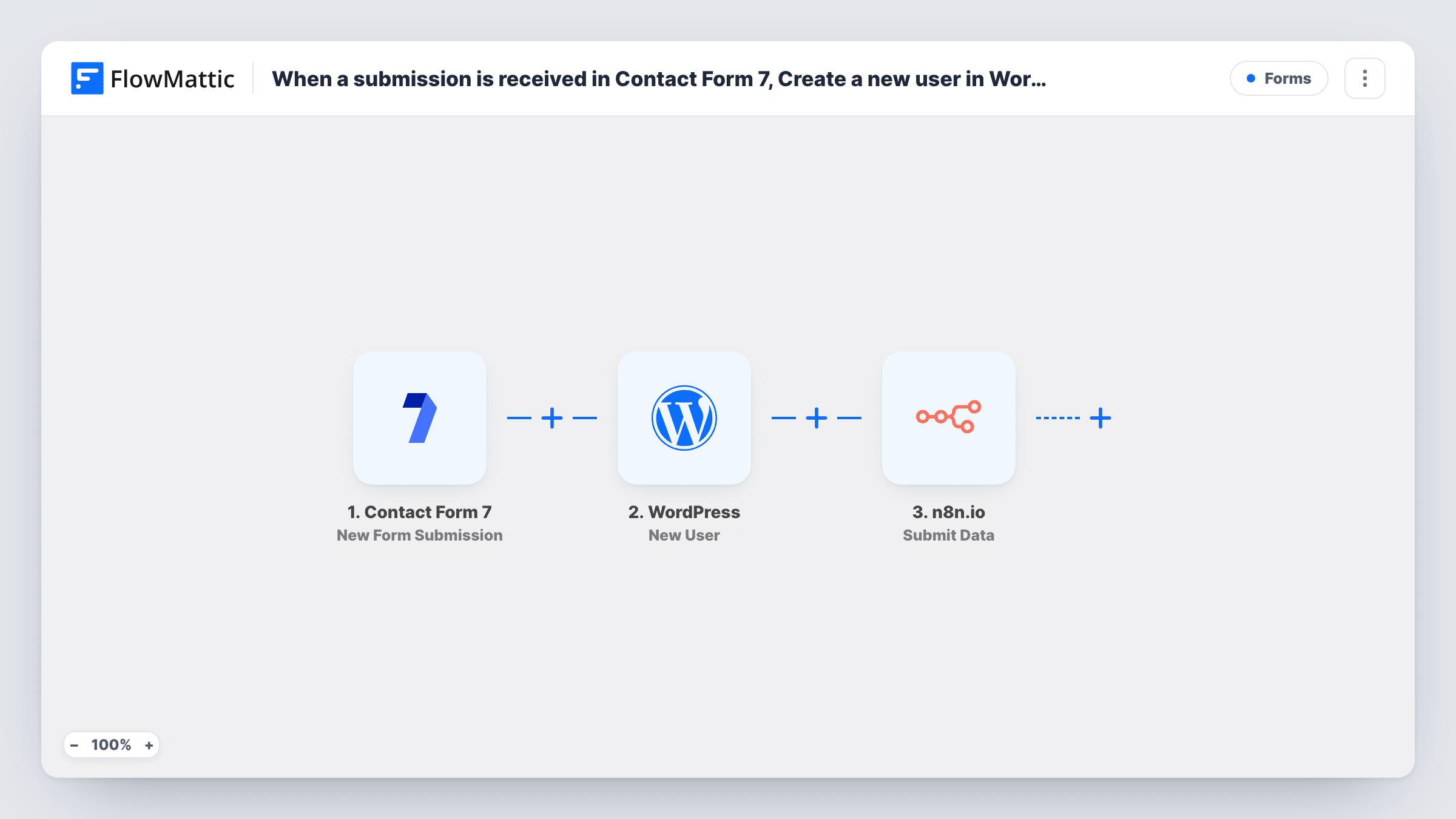
Each new entry in your form starts a run through the Contact Form 7 trigger. FlowMattic then uses the WordPress New User action to create an account, with the form fields mapped into it. The WordPress step returns the new user's ID. The last step, Submit Data, sends the form answers together with that user ID to n8n.io, where a webhook in your n8n workflow receives them.
Every submission runs every step, since the template has no Filter. WordPress will not make two accounts with the same email, so a repeat visitor gets no new user; the step returns their existing user ID, and that is the ID n8n.io receives.
Member sign-ups handled in n8n
A Contact Form 7 form collects name and email. WordPress gets the account, and your n8n.io workflow uses the user ID to set up the member in the other tools you run there.
Client portal requests
A form on your services page creates a login for each new client, then n8n.io receives the ID so it can open a matching record in your project tracker.
Course or community waitlist
People join through a simple form. Each gets a WordPress account right away, and n8n.io logs the user ID with their answers for later onboarding emails.
How this workflow runs
What happens at each step once the workflow is on, and what you need before you import it.
 Contact Form 7 New Form Submission
Starts when someone sends your Contact Form 7 sign-up form. Each form field can be mapped into the WordPress user and the data sent to n8n.io.
- WordPress New User
Makes a WordPress account from the form answers. Map the form's email field and any name fields into the step, then use a test run to confirm the account is created the way you want.
 n8n.io Submit Data
Sends data to n8n.io. Map the form answers and the user ID returned by the WordPress step, and point the step at the webhook your n8n workflow listens on.
What you need
- FlowMatticCore
- Contact Form 7 PluginPlugin
- n8n.io AccountAccount
After importing, map your own data. To keep the template universal, not every step is pre-filled. Open each step in the builder and connect your accounts and fields (channels, lists, sheets, recipients) before you switch the workflow on.
Make it yours
Changes worth making after you import it.
- Make the email field required in the form with an email* tag, since the WordPress account and the user ID that n8n.io receives both depend on it.
- Add a Filter between the Contact Form 7 trigger and the WordPress step that continues only when a sign-up or consent checkbox is ticked, if the same form also takes plain enquiries that shouldn't become accounts.
- Send one test submission after import, then open Task History to copy the exact field names n8n.io will receive. Use them when building the n8n side.
Questions about this workflow
What if the form email is already used by a WordPress account?
WordPress won't add a second account for that email. The New User step returns the ID of the user who already has it, and the n8n.io step sends that ID with the form answers. Task History shows the ID for each run.
Which role does the new WordPress user get?
Check the New User step after import and use a test run to confirm the role it assigns. Pick the lowest role that fits, such as Subscriber, for accounts made from a public form.
Do I need my own n8n.io instance?
You need an n8n workflow that starts with a webhook, either on n8n's cloud service or on a server you run. FlowMattic sends the data to that webhook address.
Does Contact Form 7 still send its own email?
Yes. This workflow doesn't change the Mail tab of your form, so Contact Form 7 keeps sending whatever email it is set up to send.
More Forms workflows
Other ready-to-import templates from the same category.





Import this workflow into your WordPress site
Download the JSON, import it from the Workflows screen and connect your accounts. Every run stays on your server, with no per-task fees.
30-day money-back guarantee Unlimited workflows and runs Self-hosted