

When data is received from webhook, loop through the JSON array in response using Iterator, check if email field has a valid email using Email List Validation and add a new member to Mailchimp List
Receive a batch of contacts at a FlowMattic webhook, loop through them with an Iterator, check each email address with Email List Validation, and add or update each person on your Mailchimp list.
 Webhook
 Iterator
 Email List Validation
 Mailchimp
4 steps Setup ~8 min Used on 1.1k sites Free to import
What this workflow does
When another system sends you contacts in bulk, such as an export, an event platform or your own script, they usually arrive as one JSON array. FlowMattic's Mailchimp step adds one person at a time, and you may want to know which addresses are real before they reach your list. This workflow splits the batch and runs a check on every address before Mailchimp sees it.
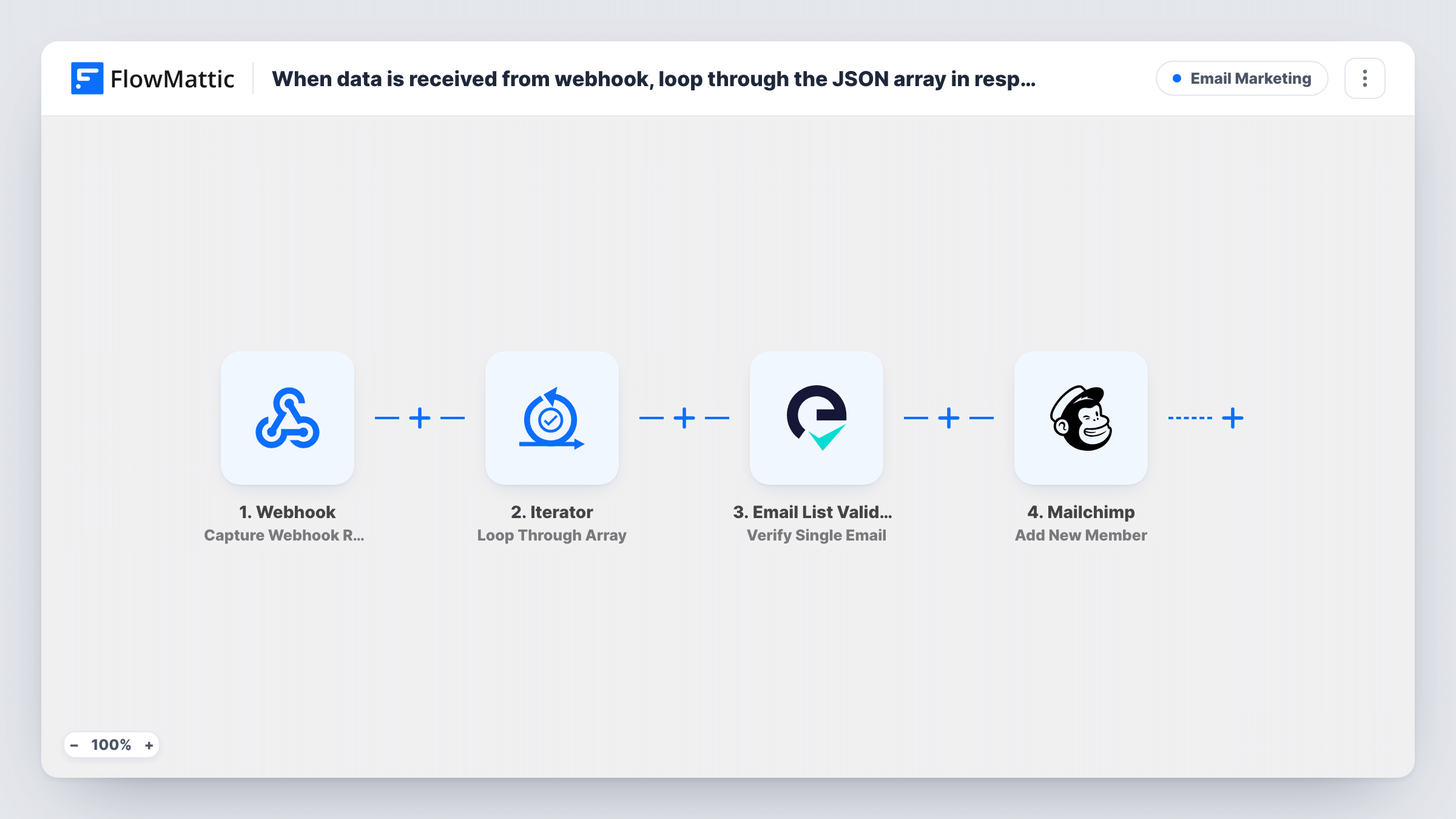
The Webhook trigger receives the payload at a URL FlowMattic gives you. An Iterator then loops through the array, and the next two steps run once for each item. Email List Validation checks that item's email address, then Mailchimp's Add New Member adds the person to your list, or updates them if they already exist.
As imported, every item goes to Mailchimp whatever the validation result. To add only valid addresses, place a Filter between the check and Mailchimp, as the tips explain. Open Task History to see how each item in a batch fared.
Event attendee export
After an event, your registration tool posts the attendee array to the webhook, and each attendee is checked and added to Mailchimp.
Nightly sync from your own app
A script sends the day's new sign-ups as one JSON array, so you don't call Mailchimp once per person from your code.
Partner lead handover
A partner posts a batch of opted-in leads. The validation result shows which addresses look bad before you email them.
How this workflow runs
What happens at each step once the workflow is on, and what you need before you import it.
 Webhook Capture Webhook Response
Receives data posted to your FlowMattic webhook URL. Send a sample payload with the contact array after import so the fields can be mapped.
- Iterator Loop Through Array
Loops through the array from the webhook payload and runs the following steps once for each item. Point it at the array that holds your contacts.
- Email List Validation Verify Single Email
Sends the current item's email address to Email List Validation for a check. Map the email from the Iterator item; the result is available to later steps.
- Mailchimp Add New Member
Adds the current item to your Mailchimp list, or updates the member if the address is already there. Map the email and any name values from the Iterator item.
What you need
- FlowMatticCore
- Email List Validation AccountAccount
- Mailchimp AccountAccount
After importing, map your own data. To keep the template universal, not every step is pre-filled. Open each step in the builder and connect your accounts and fields (channels, lists, sheets, recipients) before you switch the workflow on.
Make it yours
Changes worth making after you import it.
- Add a Filter between Email List Validation and Mailchimp that continues only when the result matches a valid address. Test with one good and one bad email to confirm the rule.
- Turn on the Webhook trigger's Require authentication on incoming requests setting, so only a sender with your key can post contacts.
- Include a name for each contact in the array, and map it in the Mailchimp step, so your list has more than bare addresses.
Questions about this workflow
Are invalid addresses kept out of Mailchimp?
Not as imported. Every item continues to Mailchimp whatever Email List Validation returns. Add a Filter on the validation result to stop invalid ones.
What happens if someone in the array is already on the Mailchimp list?
Mailchimp's Add New Member action works as an upsert, so a known address is updated rather than duplicated. Fields you map with blank values may overwrite what was there, so send complete data.
Can anyone post to the webhook URL?
Until you enable Require authentication on incoming requests, any sender holding the URL can post a batch. With it on, the sender must include your key.
Is each contact in the webhook array verified separately?
Yes. The Iterator runs the Email List Validation and Mailchimp steps once per item, so each address gets its own check.
More Email Marketing workflows
Other ready-to-import templates from the same category.







Import this workflow into your WordPress site
Download the JSON, import it from the Workflows screen and connect your accounts. Every run stays on your server, with no per-task fees.
30-day money-back guarantee Unlimited workflows and runs Self-hosted