

When a Userpilot form is submitted, log it in Airtable, notify the team in Slack, then update the Airtable row
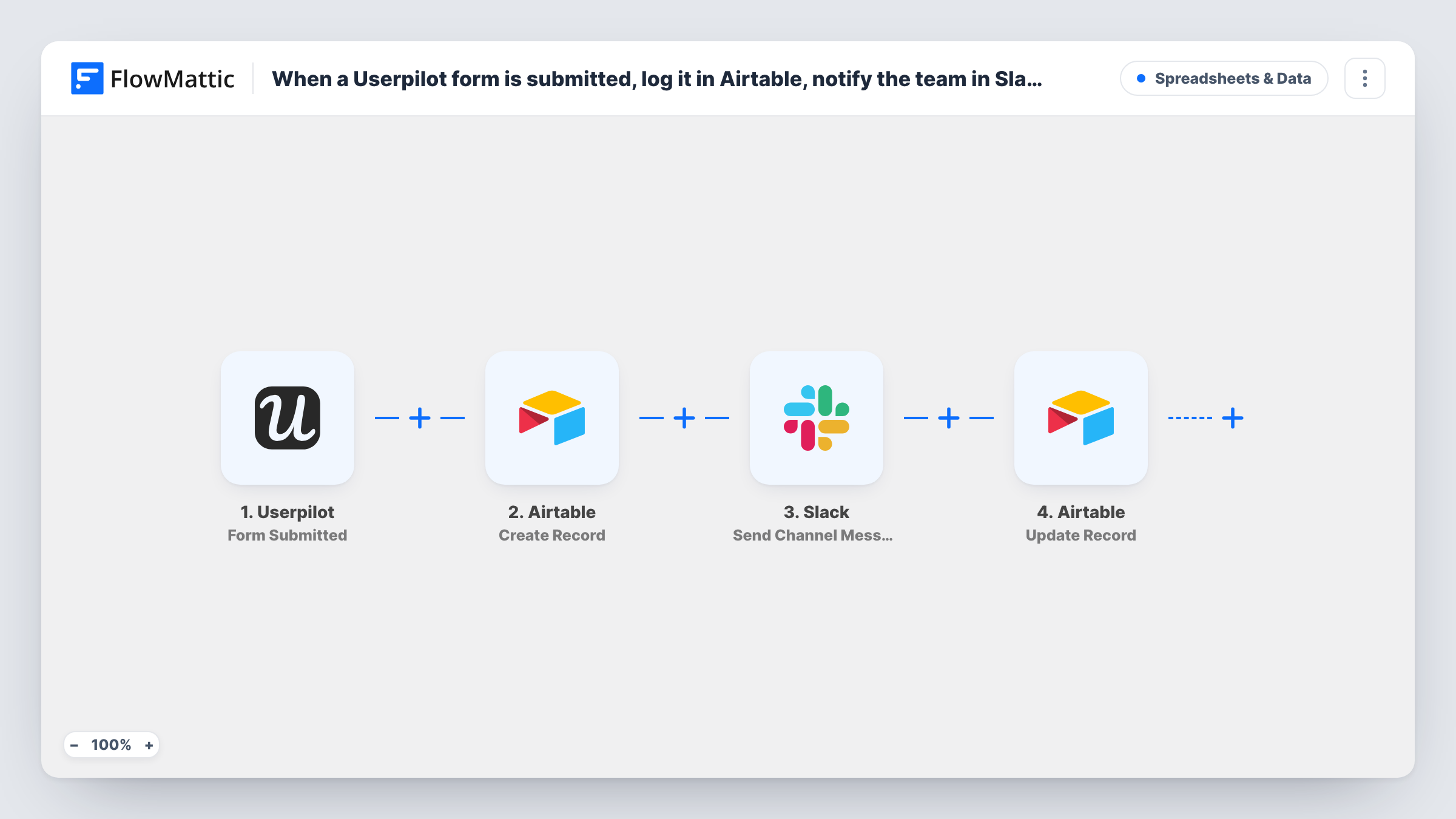
Each Userpilot form submission becomes a new Airtable record, your team gets a Slack channel message about it, and the workflow then writes back to that same record so you can mark it as shared.
 Userpilot
 Airtable
 Slack
Slack4 steps Setup ~8 min Used on 2.3k sites Free to import
What this workflow does
Userpilot forms collect answers from people inside your product: feedback, survey replies, feature requests. Those answers are more useful in a base your team already sorts and reports on, and more likely to get a response when someone sees them right away. This workflow handles the storing, the alert and a follow-up edit in one run.
The Userpilot trigger fires whenever a form is submitted. FlowMattic then creates a record in Airtable in the base and table you pick, with the form answers you map to its fields. Next, a message goes to the Slack channel you choose, built from the same answers. The last step updates the Airtable record that step two created.
That final update is where you record what just happened. Typical choices are a Notified checkbox, a status field set to New, or the time the Slack message was posted. To aim it at the right record, map the record ID returned by the Create Record step; a test run shows that value. Each run, with what every step sent and received, appears in Task History.
In-app feedback triage
A product manager reviews every Userpilot feedback form in Airtable, while the product channel in Slack sees each new reply as it lands, and the record is marked as posted.
Feature request log
Requests gathered by a Userpilot form become Airtable records your team can vote on and group, and the update step sets their status to Open.
Onboarding survey answers
New users answer a Userpilot onboarding form. Customer success reads the answers in Slack and later filters the Airtable table by role or company size.
How this workflow runs
What happens at each step once the workflow is on, and what you need before you import it.
 Userpilot Form Submitted
Fires whenever someone submits a Userpilot form. The submitted answers and the details Userpilot sends with them are available to map in the steps that follow.
- Airtable Create Record
Adds a fresh record to an Airtable table in the base you select. Map each form answer to a field. Airtable returns the new record's ID, which step four needs.
- Slack Send Channel Message
Sends your team a message in one Slack channel of your choice. Write the text and drop in form answers, such as the question asked and the reply given, so the team can read it without opening Airtable.
- Airtable Update Record
Changes the same Airtable record that step two just added. Map that step's record ID so the change lands on the right record, then set the fields to change, for example a Notified checkbox.
What you need
- FlowMatticCore
- Userpilot AccountAccount
- Airtable AccountAccount
- Slack AccountAccount
After importing, map your own data. To keep the template universal, not every step is pre-filled. Open each step in the builder and connect your accounts and fields (channels, lists, sheets, recipients) before you switch the workflow on.
Make it yours
Changes worth making after you import it.
- If you run several Userpilot forms, add a Filter after the trigger that continues only for the form you care about. A test submission shows which value identifies each form.
- To post into a private Slack channel, swap step three for Slack's Send Private Channel Message action, and use Send Direct Message to alert one person instead.
- Map the Slack step's response, such as the message timestamp, into the Airtable update so each record shows when the team was told.
Questions about this workflow
Why does the workflow update the Airtable record it just created?
So the record can show what happened after it was saved. Step four can set a status, tick a box or store data from the Slack step, none of which exists when the record is first created.
Where does the Update Record step get the Airtable record ID?
From the output of the Create Record step. Run a test submission, then pick the record ID from step two's data in step four. Without it, the update has no record to change.
Which Userpilot forms start this workflow?
FlowMattic describes this trigger as firing when a form is submitted, so any Userpilot form connected to it starts a run. Add a Filter after the trigger if only one form should.
Can the Slack alert include a link back to the Userpilot answer's Airtable record?
You can build a link in the message text using the record ID from step two. Check a test run for the ID value and the format of your base's record URLs.
More Spreadsheets & Data workflows
Other ready-to-import templates from the same category.




Import this workflow into your WordPress site
Download the JSON, import it from the Workflows screen and connect your accounts. Every run stays on your server, with no per-task fees.
30-day money-back guarantee Unlimited workflows and runs Self-hosted