

Route new Supabase rows by status to the right follow-up
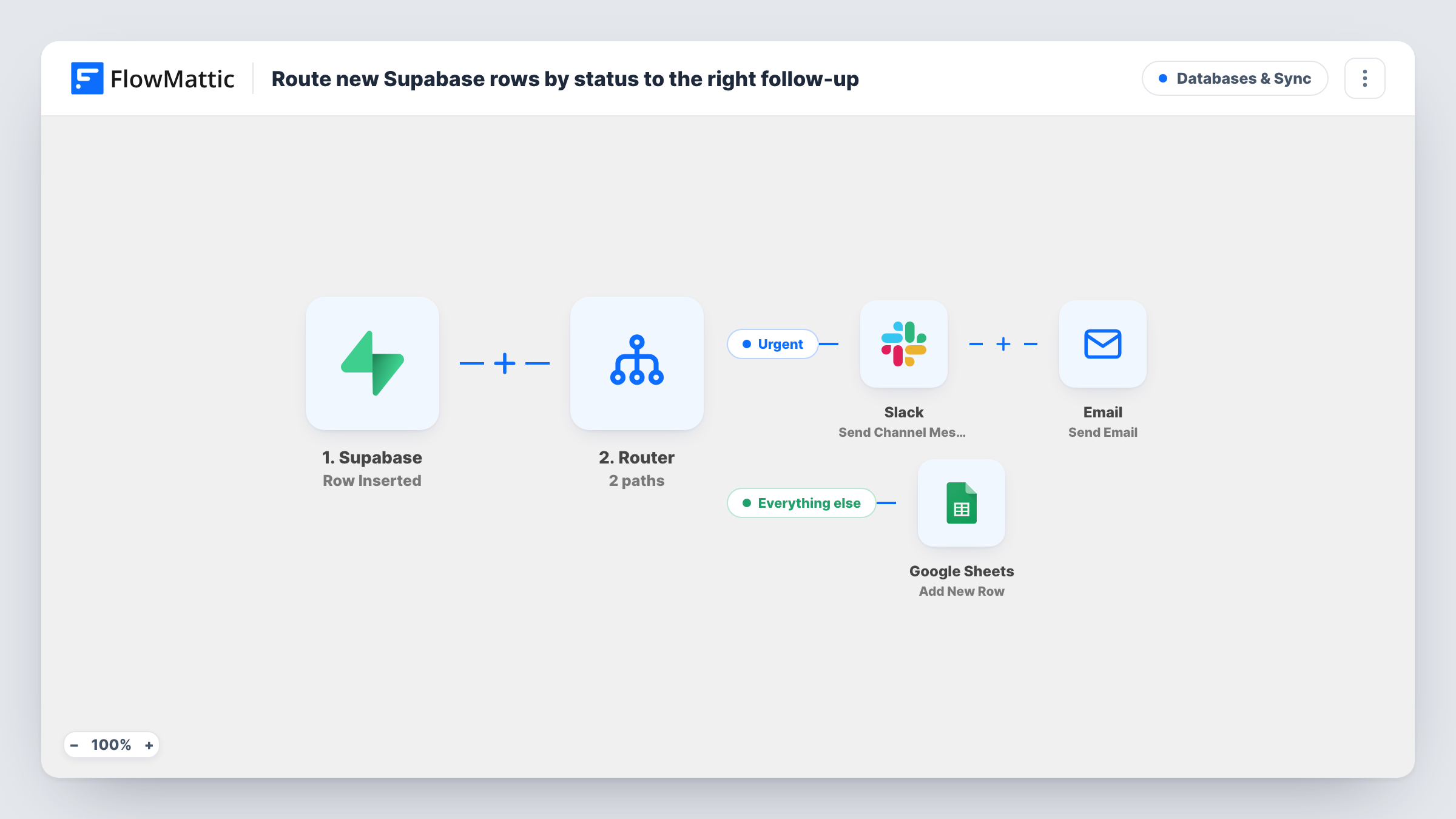
A Router reads the status of each new Supabase row: urgent rows post to Slack and email the owner, normal rows are logged in Google Sheets, and rows with any other status are left alone.
 Supabase
 Router
 Slack
Slack
 Email
Email
 Google Sheets
5 steps Setup ~8 min Used on 1.2k sites Databases & Sync Free to import
What this workflow does
Not every new record deserves the same attention. A high-priority request should reach a person now, while routine ones only need a record. This workflow sorts new rows from a Supabase table by their status column and sends each one down the matching path.
The Supabase trigger, Row Inserted, fires when a row is added to the table you select. A Router then checks the row's status value. The Urgent route runs when status exactly matches urgent, and the Normal route when it exactly matches normal. Both checks ignore upper and lower case, and since one value can't be both words, each row follows at most one route. Rows with any other status, or none, run neither.
On the Urgent route, a Slack message names the table and shows the row's name and amount, then an email goes to the owner with the same name in the subject and the amount in the body. The email is addressed to a placeholder, [email protected], so change it after import. On the Normal route, the Google Sheets step adds a row, with columns left for you to map.
The messages expect name, amount and status columns in your table. If yours differ, edit the mapped fields. Insert one test row with each status to check both routes in Task History.
Priority support requests
A support app writes each new request to Supabase with a status; urgent ones reach the on-call channel and the support lead's inbox, normal ones are logged for the weekly review.
Large orders flagged by the backend
An ordering system marks big orders as urgent when it inserts them, so the sales manager hears about them on Slack and by email, while normal orders go into a sheet.
Incident and event logging
An internal tool records events in Supabase, sending urgent incidents to the team straight away and keeping normal events in a Google Sheet.
How this workflow runs
What happens at each step once the workflow is on, and what you need before you import it.
 Supabase Row Inserted
Starts a run for each row added to the chosen Supabase table. The row's columns, such as status, name and amount, are passed to the Router.
- Router 2 paths
Checks the new row's status. The Urgent route runs when it exactly matches urgent, the Normal route when it exactly matches normal, ignoring case. Any other status runs neither route.
- Slack Send Channel Message
On the Urgent route, posts a Slack message naming the table, with the row's name and amount. The Slack channel is yours to pick once imported.
 Email Send Email
Also on the Urgent route, emails an owner address with the row's name in the subject and its amount in the body. Replace the placeholder [email protected] with a real address.
- Google Sheets Add New Row
On the Normal route, adds a row to the Google Sheet you choose. Columns aren't mapped in the template, so pick the sheet and map the Supabase values you want to keep.
What you need
- FlowMatticCore
- Supabase AccountAccount
- Slack AccountAccount
- Google Sheets AccountAccount
After importing, map your own data. To keep the template universal, not every step is pre-filled. Open each step in the builder and connect your accounts and fields (channels, lists, sheets, recipients) before you switch the workflow on.
Make it yours
Changes worth making after you import it.
- Use the same status values in your app that the routes check, urgent and normal, or edit the route conditions to the words your table already uses.
- To log urgent rows in the sheet as well, add a Google Sheets step at the end of the Urgent route, after the Email step, so both routes keep a record.
- The Router sits between the Supabase trigger and the route steps. Add a third route to it for another status, such as low, with its own exact-match condition and its own action at the end.
Questions about this workflow
What happens to Supabase rows with a status other than urgent or normal?
Neither route's condition matches, so no Slack message, email or sheet row is created for them. Task History shows the run ending at the Router.
Does the status need to be in lowercase in Supabase?
No. The route checks ignore case, so Urgent and URGENT also match. The value does need to be the whole word, since the condition is an exact match.
Can one Supabase row trigger both routes?
No. Each route needs the status to exactly match a different word, so a row can match one route at most.
My Supabase table doesn't have name or amount columns. Will this still work?
The routing only needs a status column. Edit the Slack message and the email to map columns your table does have; otherwise those parts of the message arrive blank.
More Databases & Sync workflows
Other ready-to-import templates from the same category.


Import this workflow into your WordPress site
Download the JSON, import it from the Workflows screen and connect your accounts. Every run stays on your server, with no per-task fees.
30-day money-back guarantee Unlimited workflows and runs Self-hosted