

Send a Calendly booking link when someone types !book in Discord
When a member posts a message containing !book in your Discord channel, FlowMattic creates a single-use Calendly meeting open for the next two weeks and sends the link to them by direct message. Ideal for coaching communities and office hours. After import, pick the server and channel to watch, and set the meeting name, length and time zone in the Calendly step.
 Discord
 Filter
 Date/Time Formatter
 Calendly
6 steps Setup ~12 min Used on 2.0k sites Community Free to import
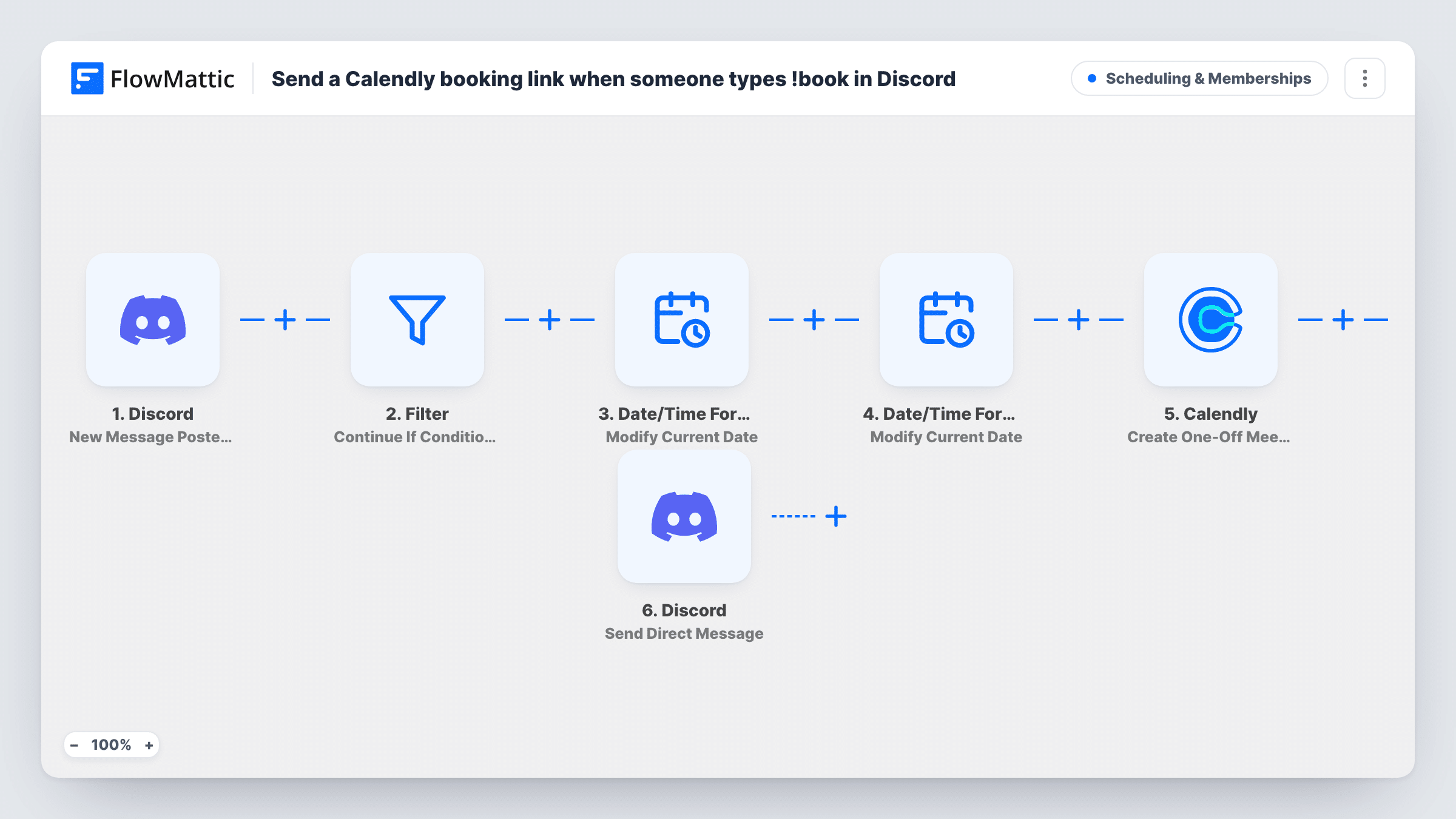
How this workflow runs
What happens at each step once the workflow is on, and what you need before you import it.
 Discord New Message Posted to Channel
The workflow starts automatically when a new message is posted to a specific text channel in Discord. FlowMattic captures that data for the steps below.
- Filter Continue If
The Filter only lets a run continue when your conditions are met, stopping everything else before it goes any further.
- Date/Time Formatter Modify Current Date
Date/Time Formatter — get the modified current date/time. Data is mapped from earlier steps; connect your Date/Time Formatter account on import.
- Date/Time Formatter Modify Current Date
Date/Time Formatter — get the modified current date/time. Data is mapped from earlier steps; connect your Date/Time Formatter account on import.
- Calendly Create One-Off Meeting
Calendly — creates a new one-off event type in Calendly (Note: Creates event type structure, not scheduled meeting). Data is mapped from earlier steps; connect your Calendly account on import.
- Discord Send Direct Message
Discord — send a direct message to a specific user. Data is mapped from earlier steps; connect your Discord account on import.
What you need
- FlowMatticCore
- Discord AccountAccount
- Calendly AccountAccount
After importing, map your own data. To keep the template universal, not every step is pre-filled. Open each step in the builder and connect your accounts and fields (channels, lists, sheets, recipients) before you switch the workflow on.
More Scheduling & Memberships workflows
Other ready-to-import templates from the same category.






Import this workflow into your WordPress site
Download the JSON, import it from the Workflows screen and connect your accounts. Every run stays on your server, with no per-task fees.
30-day money-back guarantee Unlimited workflows and runs Self-hosted