

Convert any URL sent to a webhook into a PDF in Google Drive
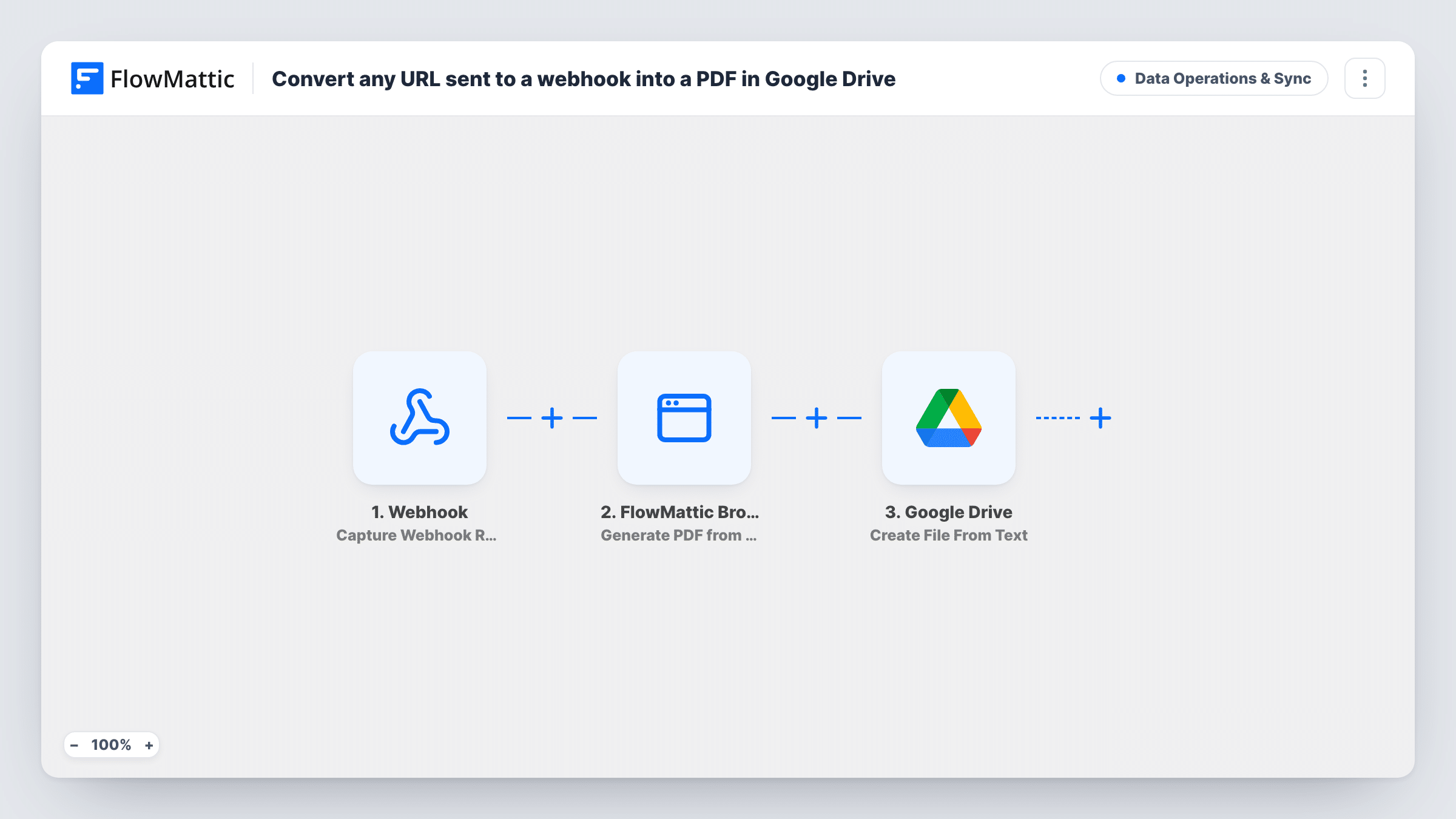
Send a web address and a name to a FlowMattic webhook, and FlowMattic Browser renders that page as an A4 PDF and uploads it to Google Drive under the name you sent.
 Webhook
 FlowMattic Browser
 Google Drive
3 steps Setup ~5 min Used on 891 sites Data Ops Free to import
What this workflow does
Saving web pages as PDFs by hand, through a browser's print dialog, gets old quickly when you need to keep many of them: receipts, terms pages, articles, competitor pages. This workflow gives you one webhook address. Post a URL to it from another app, a script or a form, and a PDF of that page lands in Google Drive.
The Webhook trigger receives the request. The template reads two values from it: url, the page to capture, and name, used for the file name. Whatever sends to the webhook must include both under those keys. Turn on the trigger's Require authentication on incoming requests setting if you don't want anyone who finds the URL to start runs.
Next, FlowMattic Browser opens the page in a headless browser, waits for it to finish loading and prints it to an A4 portrait PDF with backgrounds included. It needs Cloudflare Browser Rendering credentials in FlowMattic's settings, and it sees the page as a visitor who isn't signed in, so pages behind a login won't come out as you see them.
Finally, Google Drive uploads the PDF from its link on your site, naming it after the name value with .pdf added. Connect your Google account and pick the folder after import.
Keeping copies of supplier terms
A procurement team posts the URL of each supplier's terms page to the webhook when they sign, so a PDF of those terms sits in a shared Drive folder.
Research clippings
A writer sends article links to the webhook from a phone shortcut and reads the PDFs later from Google Drive.
Evidence of published claims
A compliance team captures landing pages as PDFs before campaigns go live, posting each URL with a name that includes the campaign code.
How this workflow runs
What happens at each step once the workflow is on, and what you need before you import it.
 Webhook Capture Webhook Response
Receives an incoming request at your FlowMattic webhook URL. The sender must include url, the page to capture, and name, the file name for the PDF. Use the authentication setting to limit who can call it.
- FlowMattic Browser Generate PDF from URL
Opens the URL in a headless browser and renders it to an A4 portrait PDF with page backgrounds, using the name value as the file name. Requires Cloudflare Browser Rendering details in FlowMattic's settings.
- Google Drive Upload a File
Uploads the PDF to Google Drive from the link returned by the Browser step, naming it after the name value with .pdf added. Connect your Google account and choose the destination folder.
What you need
- FlowMatticCore
- Google Drive AccountAccount
After importing, map your own data. To keep the template universal, not every step is pre-filled. Open each step in the builder and connect your accounts and fields (channels, lists, sheets, recipients) before you switch the workflow on.
Make it yours
Changes worth making after you import it.
- Change page_size to letter or orientation to landscape in the Generate PDF from URL step if the pages you capture are wide or your team prints on US paper.
- Ask the sender to put a date in the name value, such as acme-terms-2026-05-01, so captures of the same page over time don't share a file name in Drive.
- Test the webhook with a simple request that includes url and name, then open Task History to confirm both values arrived before you connect your real sender.
Questions about this workflow
What does my app need to send to the PDF webhook?
A request with two values: url, the full address of the page, and name, the file name you want. The template maps those exact keys, so a sender that uses different names needs the steps remapped.
Can this capture a page that needs a login?
Not reliably. FlowMattic Browser opens the page as a visitor who isn't signed in, so the PDF shows whatever a signed-out visitor would see, often a login page. It works best on public pages.
Does anyone with the webhook URL get to create PDFs?
Yes, unless you turn authentication on. FlowMattic's Webhook trigger has a Require authentication on incoming requests setting that takes a key the caller must send. Turn it on if the URL could leak.
Is a copy of the PDF kept on my WordPress site as well?
Yes. The Browser step saves the PDF on your site first, and Google Drive uploads it from there. Check your Media Library after a test run to see where it was stored.
More Data Operations & Sync workflows
Other ready-to-import templates from the same category.






Import this workflow into your WordPress site
Download the JSON, import it from the Workflows screen and connect your accounts. Every run stays on your server, with no per-task fees.
30-day money-back guarantee Unlimited workflows and runs Self-hosted