

Alert only when a metric crosses its threshold
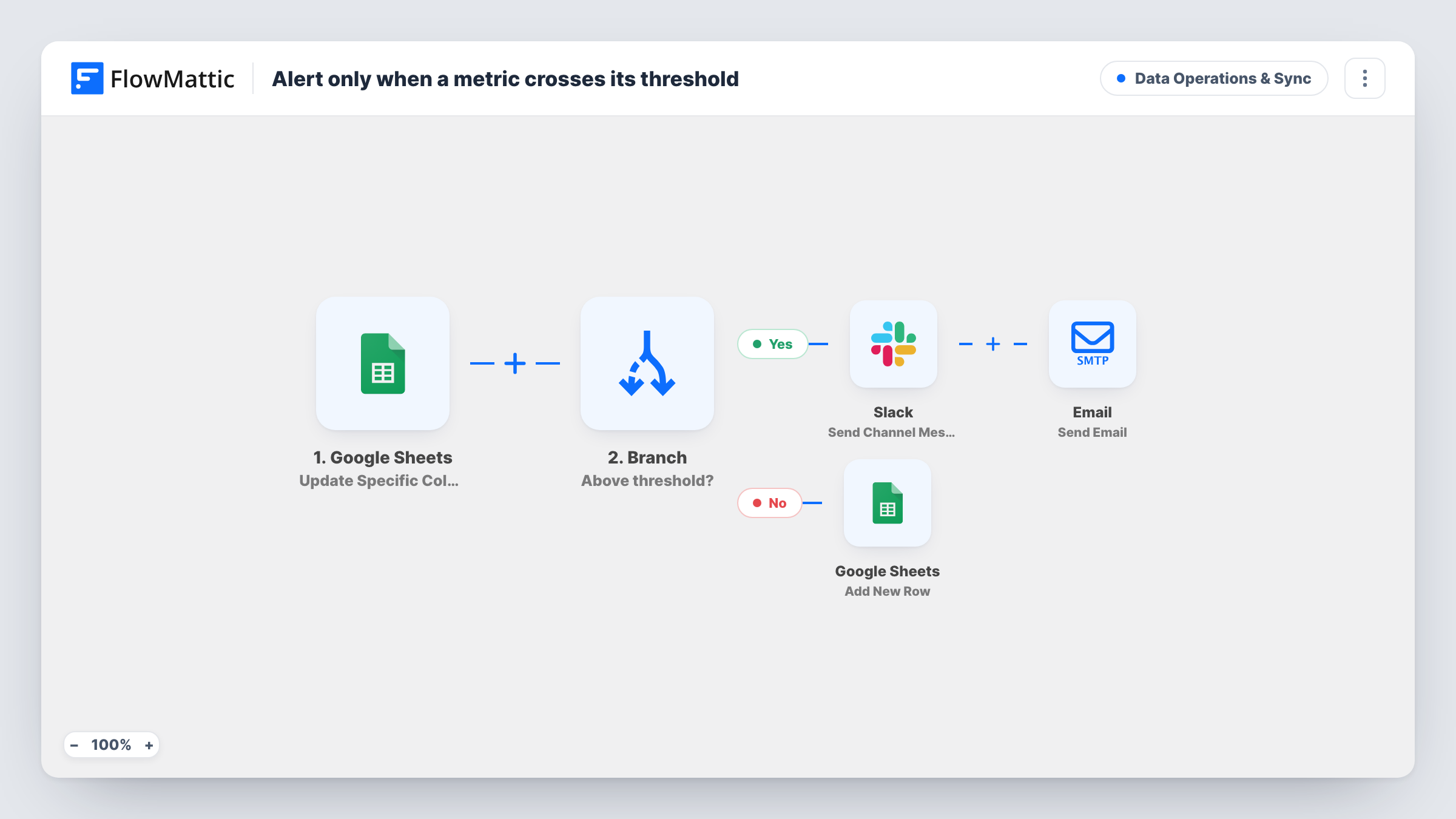
When a metric’s value is updated in your Google Sheet, a Branch compares it with that row’s threshold: above it, Slack and the row’s owner are alerted; otherwise the reading is logged.
 Google Sheets
 Branch
 Slack
Slack
 Email
Email5 steps Setup ~8 min Used on 3.1k sites Data Ops Free to import
What this workflow does
If you track KPIs in a spreadsheet, a figure that goes over its limit can sit unnoticed until someone reads the sheet. This workflow checks each updated value against the threshold on the same row, and only sends alerts when the value is above it. Readings within the limit are logged instead.
The Google Sheets Update Specific Column Value trigger fires when a value in the column you watch is updated. A Branch then asks whether the row's value column is greater than its threshold column.
On the Yes path, a Slack message names the metric and says it breached its threshold with the current value, and an email goes to the address in owner_email with the value and the threshold. On the No path, an Add New Row step logs the reading. It ships unmapped, so pick a log sheet other than the watched one and map the columns.
The comparison uses whole numbers: 19.99 is read as 19, and a blank threshold counts as 0. A value equal to the threshold takes the No path. Each update that leaves the value above the threshold alerts again, not only the first time it crosses. The column names metric, value, threshold and owner_email are examples to rename for your sheet.
Support backlog limit
A support lead updates open-ticket counts in a sheet, and when the count goes over the limit set on that row, Slack and the queue owner hear about it.
Ad spend watch
A marketer records daily spend per campaign, each with its own budget threshold, and gets an email when one goes above budget.
Server or stock metrics from a script
A script writes readings into the sheet, and every in-range reading is logged while out-of-range ones raise an alert.
How this workflow runs
What happens at each step once the workflow is on, and what you need before you import it.
 Google Sheets Update Specific Column Value
Fires when a value in the watched column of your Google Sheet is updated. The row's metric, value, threshold and owner_email columns are passed to the Branch and the actions.
- Branch Branch
Checks whether the row's value is greater than its threshold, comparing both as whole numbers. Yes runs the Slack and email steps; No runs the log step.
- Slack Send Channel Message
On the Yes path, posts the metric name, "breached threshold" and the current value to the Slack channel you pick.
 Email Send Email
Also on the Yes path, emails the row's owner_email address with the subject "Threshold breach" plus the metric, stating the current value and the threshold it exceeds.
- Google Sheets Add New Row
On the No path, adds the reading to a log sheet. The step ships unmapped: choose a spreadsheet or tab other than the watched one and map the columns.
What you need
- FlowMatticCore
- Google Sheets AccountAccount
- Slack AccountAccount
After importing, map your own data. To keep the template universal, not every step is pre-filled. Open each step in the builder and connect your accounts and fields (channels, lists, sheets, recipients) before you switch the workflow on.
Make it yours
Changes worth making after you import it.
- Set the trigger to watch the value column, so edits to the threshold or owner columns don't start a run on their own.
- Fill in the threshold on every row. A blank threshold counts as 0, so almost any value would take the Yes path.
- If your metrics use decimals, scale them to whole numbers in the sheet (for example, cents instead of dollars), because the comparison drops everything after the point.
- Log the readings to a separate spreadsheet or tab, never the watched sheet, so writing the log can't start more runs.
Questions about this workflow
Will I get a Slack alert every time the Google Sheets value changes while it's above the threshold?
Yes. Each update to the watched column runs the Branch again, and any value above the threshold alerts. The workflow doesn't remember the previous value.
What happens when the value equals the threshold?
It isn't greater than the threshold, so it takes the No path and is logged without an alert.
Can each metric have its own threshold?
Yes. The Branch compares against the threshold column on the same row, so each row can hold a different limit.
Who receives the threshold email?
The address in that row's owner_email column. Use a fixed address in the Email step if one person should get every alert.
More Data Operations & Sync workflows
Other ready-to-import templates from the same category.





Import this workflow into your WordPress site
Download the JSON, import it from the Workflows screen and connect your accounts. Every run stays on your server, with no per-task fees.
30-day money-back guarantee Unlimited workflows and runs Self-hosted