

Route new records to the right system by record type
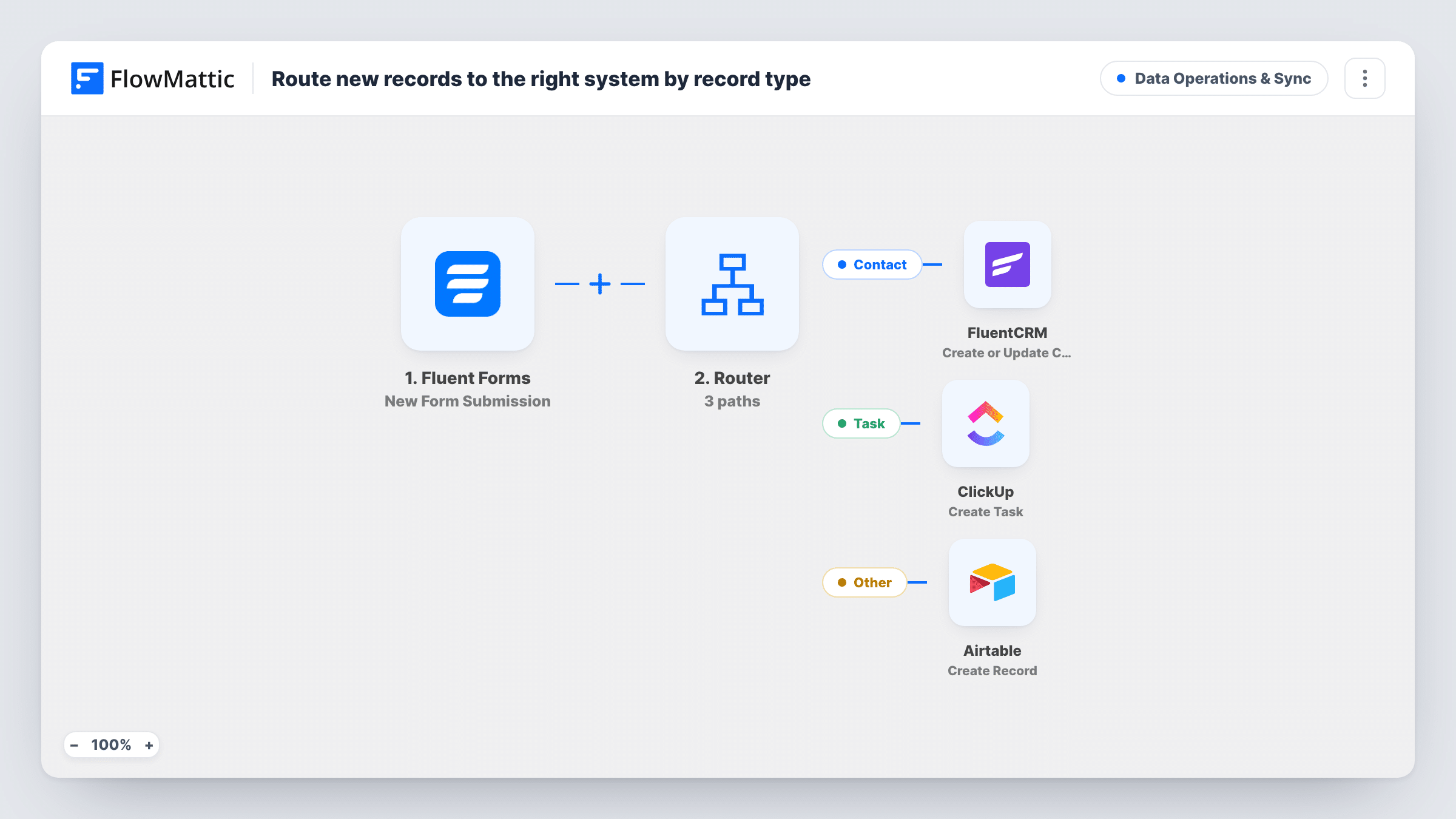
Fluent Forms submissions are routed by a record type field: contacts go to FluentCRM, tasks become ClickUp tasks, and everything else is saved as an Airtable record.
 Fluent Forms
 Router
 FluentCRM
 ClickUp
 Airtable
5 steps Setup ~8 min Used on 1.9k sites Data Ops Free to import
What this workflow does
One intake form can collect very different things: new people to stay in touch with, jobs that need doing, and items that only need storing. This workflow sends each submission to the system built for it, based on a record type field on the form, so you don't sort entries by hand.
The Fluent Forms New Form Submission trigger passes each entry to a Router. The Router checks a field named record_type. If it contains "contact", FluentCRM creates or updates a contact by email, with the name field as the first name. If it contains "task", ClickUp creates a task with the subject as its name and the message as its description.
The Other route takes every entry whose record type contains neither word, and creates an Airtable record. That step ships unmapped: after import you connect Airtable, pick the base and table, and map the form fields you want to keep.
The field names record_type, name, email, subject and message are examples, so swap in the field names your own form uses. A Router runs every route that matches, so a value containing both "contact" and "task" would run both of those routes. A dropdown with single-word choices avoids that.
A single intake form for a small team
A studio uses one internal form to log new client contacts, to-dos and reference notes, and each lands in FluentCRM, ClickUp or Airtable.
Event leads and follow-up jobs
At a trade show, staff log both people they met and actions they promised, and the right system receives each entry.
Catch-all records in Airtable
Anything that isn't a contact or a task, such as supplier details or ideas, is stored in an Airtable table for later review.
How this workflow runs
What happens at each step once the workflow is on, and what you need before you import it.
 Fluent Forms New Form Submission
Fires when the Fluent Forms form you pick receives a submission. The record_type, name, email, subject and message fields are used by the later steps.
- Router 3 paths
Routes the entry by record_type. Contact: it contains "contact". Task: it contains "task". Other: it contains neither word. Every matching route runs.
- FluentCRM Create or Update Contact
On the Contact route, creates a FluentCRM contact or updates the existing one with the same email, putting the name field into the first name.
- ClickUp Create Task
On the Task route, creates a ClickUp task named after the subject with the message as its description. Finish the ClickUp step's setup and test where the task appears.
- Airtable Create Record
On the Other route, creates an Airtable record. The step ships unmapped, so connect Airtable, choose the base and table, and map the form fields into it.
What you need
- FlowMatticCore
- Fluent Forms PluginPlugin
- FluentCRM PluginPlugin
- ClickUp AccountAccount
- Airtable AccountAccount
After importing, map your own data. To keep the template universal, not every step is pre-filled. Open each step in the builder and connect your accounts and fields (channels, lists, sheets, recipients) before you switch the workflow on.
Make it yours
Changes worth making after you import it.
- Make record_type a required dropdown with the choices contact, task and other, so each entry fits exactly one route.
- If your form has separate first and last name fields, map them both into the FluentCRM step instead of putting the whole name in the first name.
- Add a FluentCRM tag or list to the contact route, after the Create or Update Contact step, so contacts from this form are easy to find.
- Map a submission date into the Airtable record, so the catch-all table can be sorted by when entries arrived.
Questions about this workflow
What happens if the email already exists in FluentCRM?
The Create or Update Contact action matches by email, so FluentCRM updates the existing contact instead of creating a second one.
Which Fluent Forms fields does the Router read?
Only record_type. Rename it in the three route conditions if your form uses another field, and keep the words contact and task, or change them too.
Does an entry with no record type go anywhere?
Yes. A blank value contains neither word, so it takes the Other route and becomes an Airtable record.
What does the Airtable record contain?
Whatever you map. The Create Record step ships empty, so after import you choose the table and match form fields to its columns.
More Data Operations & Sync workflows
Other ready-to-import templates from the same category.






Import this workflow into your WordPress site
Download the JSON, import it from the Workflows screen and connect your accounts. Every run stays on your server, with no per-task fees.
30-day money-back guarantee Unlimited workflows and runs Self-hosted