

AI agent that categorises and files incoming records
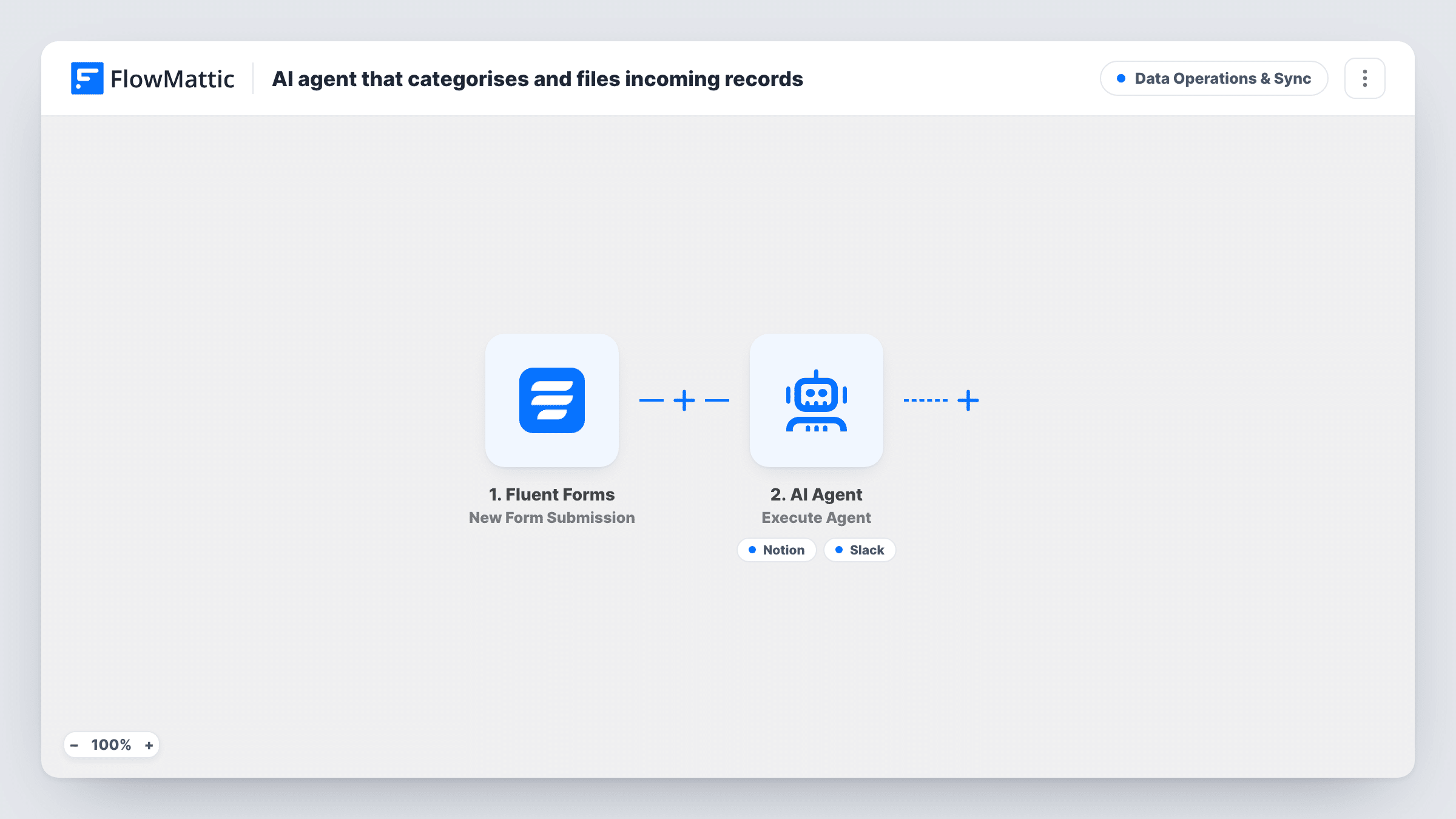
An AI agent reads each Fluent Forms submission, decides its type and priority, files it as an item in your Notion database, and posts a one-line summary to Slack.
 Fluent Forms
 AI Agent
 Notion
 Slack
Slack4 steps Setup ~8 min Used on 1.0k sites Data Ops Free to import
What this workflow does
A general form brings in everything: requests, complaints, ideas, questions. Before anyone can act, someone has to read each one, decide what it is and how urgent it is, and put it somewhere the team will see it. This workflow hands that first read to an AI agent.
The Fluent Forms trigger fires on every submission. The AI Agent gets the sender's name and their message. Its instructions are to categorise the record by type and priority, file it in Notion, and post a one-line summary. To do that it has two tools: Notion Create Database Item and a Slack channel message, both written by the agent.
The Notion tool comes with no values set. After import, connect Notion, pick the database and decide how the agent's type and priority are stored. A test submission shows what the item looks like. The agent chooses which categories to use unless you list them in its instructions, and it decides when to call each tool, so check Task History early on. The agent's model is set to OpenAI's GPT-4o, and you can switch it in the step.
Product feedback triage
Customer messages arrive through one feedback form. The agent marks each as a bug, idea or question with a priority, and the team works through them in Notion.
A small agency's request inbox
Client requests become Notion items with a type and urgency attached, and a Slack line lets the account lead see each one as it comes in.
Community or volunteer submissions
Offers of help, event ideas and complaints from one form are sorted by the agent, so each coordinator finds their kind of item in the Notion database.
How this workflow runs
What happens at each step once the workflow is on, and what you need before you import it.
 Fluent Forms New Form Submission
Starts whenever a visitor sends your Fluent Forms form. The name and message fields are handed to the AI Agent, so your form needs fields with those names.
- AI Agent Execute Agent
The AI Agent reads who sent the record and what it says, assigns a type and a priority, then files it and posts a summary using its tools. Attach your AI provider account to this step.
- Notion Create Database Item
The agent's Notion tool for creating a database item. It arrives without settings, so connect Notion and choose the database and properties before you rely on it.
- Slack Send Channel Message
The agent's Slack tool. It posts the agent's one-line summary of the record to a channel. Connect your workspace and confirm the channel with a test run.
What you need
- FlowMatticCore
- Fluent Forms PluginPlugin
- AI ProviderAccount
- Notion AccountAccount
- Slack AccountAccount
After importing, map your own data. To keep the template universal, not every step is pre-filled. Open each step in the builder and connect your accounts and fields (channels, lists, sheets, recipients) before you switch the workflow on.
Make it yours
Changes worth making after you import it.
- List the exact categories and priority levels you use in the agent's instructions, so the values match your Notion options instead of whatever the agent invents.
- Add the sender's email to the agent's input line if your form asks for it, so the Notion item records who to reply to.
- Send three test messages of different kinds after import and check how the agent labelled each one in Notion before sharing the form.
Questions about this workflow
Which categories does the AI agent use?
As imported, it chooses its own type and priority for each record. If you want a fixed set, write them into the agent's instructions.
Can it file into different Notion databases by category?
Not as imported. There is one Notion tool, so every record goes to the same database. Add a second Notion tool and explain in the instructions when to use it.
Does every Fluent Forms submission go to Notion?
Each submission starts a run, and the instructions tell the agent to file it. The agent still decides which tools to call, so confirm in Task History that items are being created.
What does the agent post in Slack for each record?
A one-line summary that the agent writes for each record. The exact wording varies from run to run because the agent composes it.
More Data Operations & Sync workflows
Other ready-to-import templates from the same category.




Import this workflow into your WordPress site
Download the JSON, import it from the Workflows screen and connect your accounts. Every run stays on your server, with no per-task fees.
30-day money-back guarantee Unlimited workflows and runs Self-hosted