

AI agent that standardises country and region fields on new records
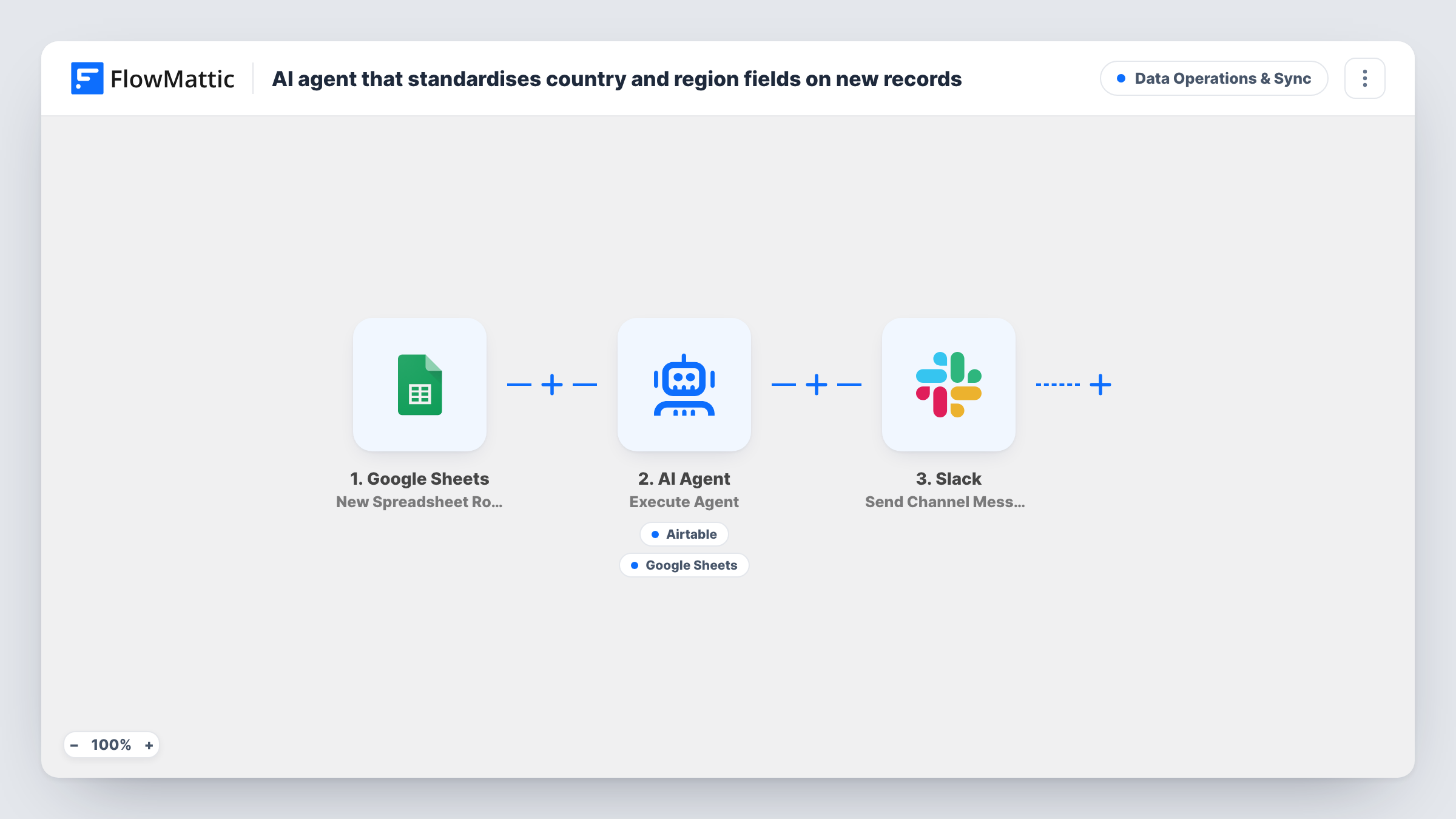
When a new row lands in your Google Sheets intake sheet, an AI agent rewrites its country and region into standard ISO names, can file a tidy record in Airtable and mark the source row, and Slack gets a short notice.
 Google Sheets
 AI Agent
 Airtable
 Slack
Slack5 steps Setup ~8 min Used on 1.5k sites Data Ops Free to import
What this workflow does
Free-text location fields are messy. One person types UK, another United Kingdom, a third Great Britan with a typo, and every report that groups by country splits them three ways. This workflow cleans up country and region values as each new row arrives, before they spread into the rest of your data.
The trigger watches a Google Sheets spreadsheet for new rows. FlowMattic passes the row's country, region and email to an AI Agent told to standardise country and region into canonical ISO names, correct common misspellings and abbreviations, and file a tidy record in Airtable. The template runs the agent on OpenAI's GPT-4o.
The agent has two tools. Create Record adds the cleaned record to Airtable, with the fields filled in by the agent. Update Specific Column Value writes to the Google Sheets source row so you can mark it as cleaned. The agent decides when to call each, so check Task History during your first runs.
After the agent step, Slack receives a fixed message saying a new record from the intake sheet was normalised. That message is sent on every run, whatever the agent did, so treat it as a run notice rather than proof of a clean record.
Lead intake from several forms
Leads from different forms collect in one sheet with countries typed every which way. The Airtable base receives consistent names, so territory reports group correctly.
Event registrations from many countries
Attendees type their own country and state. The cleaned Airtable records make it simple to count attendees by country for travel or shipping plans.
Supplier or partner directory
Partners submit their details to a shared sheet. The agent tidies the location fields before each partner is added to your Airtable directory.
How this workflow runs
What happens at each step once the workflow is on, and what you need before you import it.
 Google Sheets New Spreadsheet Row
Runs when a new row is added to the Google Sheets spreadsheet you choose. The row's country, region and email columns are passed to the agent.
- AI Agent Execute Agent
Runs an AI agent on the raw country, region and email. It is told to convert country and region to canonical ISO names, fix misspellings and abbreviations, and file the record in Airtable.
- Airtable Create Record
A tool the agent can call to create the normalised record in Airtable. The agent fills in the fields, so confirm with a test run that they match your base's columns.
- Google Sheets Update Specific Column Value
A tool the agent can call to update a column in the source Google Sheets row, such as a flag that the row was cleaned. The agent supplies the value; check which row and column it writes to.
- Slack Send Channel Message
Posts a fixed message to a Slack channel saying a record from the intake sheet was normalised. It runs after the agent on every run and doesn't include the cleaned values.
What you need
- FlowMatticCore
- Google Sheets AccountAccount
- AI ProviderAccount
- Airtable AccountAccount
- Slack AccountAccount
After importing, map your own data. To keep the template universal, not every step is pre-filled. Open each step in the builder and connect your accounts and fields (channels, lists, sheets, recipients) before you switch the workflow on.
Make it yours
Changes worth making after you import it.
- Map the agent's text output into the Slack message so the notice shows the cleaned country and region instead of a fixed line.
- Say in the system prompt whether you want ISO country names or two-letter codes, and how to format regions, so the agent's output is consistent.
- Name your Airtable fields in the system prompt, for example Country, Region and Email, so the agent fills the right columns in Create Record.
- Add a status column to the sheet and tell the agent to write cleaned there, so you can see at a glance which rows have been handled.
Questions about this workflow
Does the AI agent change the original Google Sheets row?
It can. Its Update Specific Column Value tool writes to the source row, and the instructions describe marking it cleaned. The raw country and region stay unless the agent overwrites them.
What does the Slack message tell my team?
Only that a new record from the intake sheet was normalised. The text is fixed in the template and is sent after every run, even if the agent did not create an Airtable record.
Which columns does my intake sheet need?
The template reads columns named country, region and email. Rename yours to match, or remap them in the agent's input after a test row is captured.
How reliable are the AI country and region corrections?
They are the AI model's judgement, not a lookup against an official list, so vague or unusual values can be read wrongly. Spot-check the Airtable records in the first weeks and add examples to the prompt where it slips.
More Data Operations & Sync workflows
Other ready-to-import templates from the same category.





Import this workflow into your WordPress site
Download the JSON, import it from the Workflows screen and connect your accounts. Every run stays on your server, with no per-task fees.
30-day money-back guarantee Unlimited workflows and runs Self-hosted