

AI agent that cleans and files messy form submissions
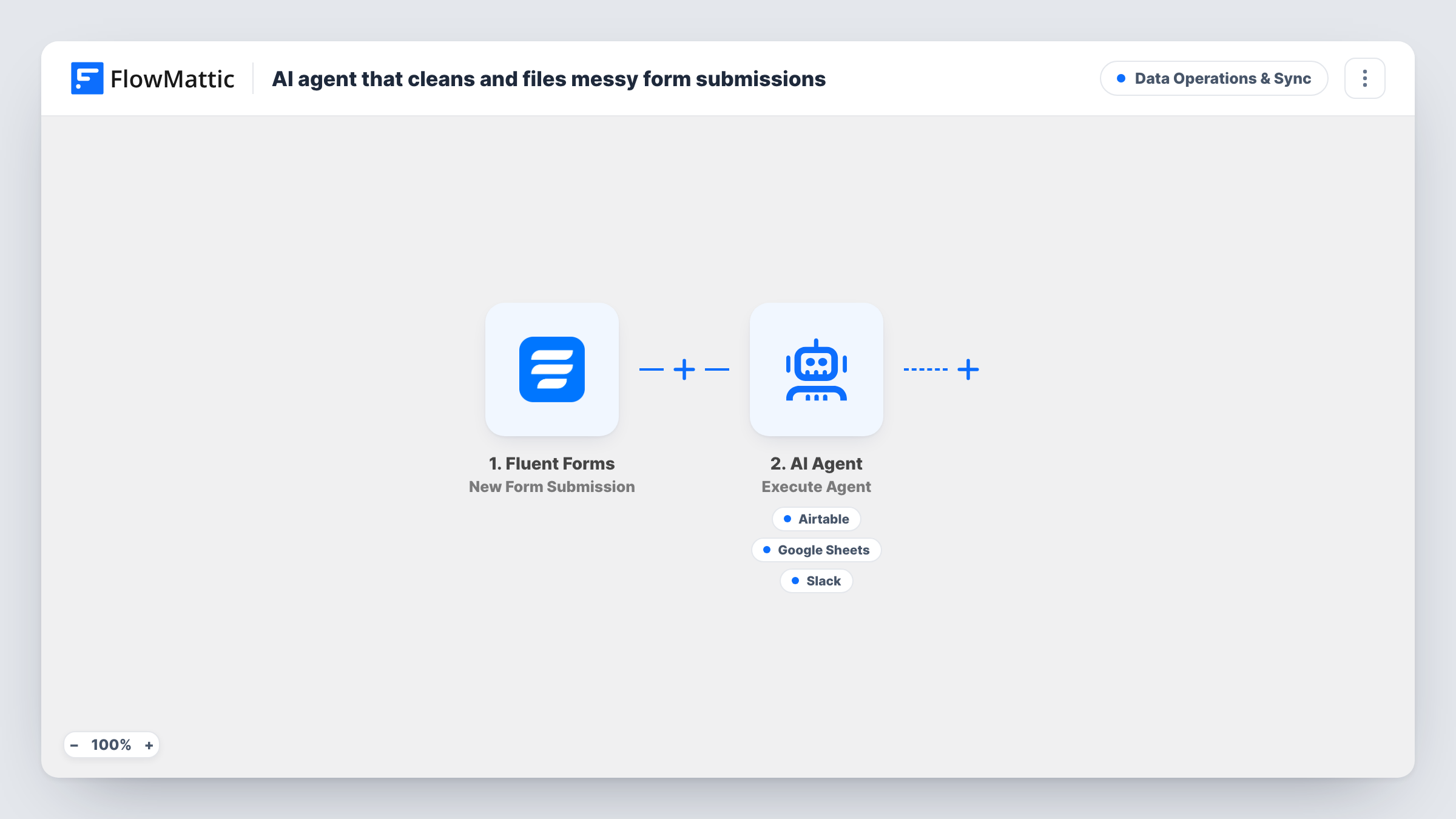
Each Fluent Forms submission goes to an AI agent that tidies the name, email, phone and message, writes a clean record to Airtable and Google Sheets, and can flag odd entries in Slack.
 Fluent Forms
 AI Agent
 Airtable
 Google Sheets
 Slack
Slack5 steps Setup ~8 min Used on 427 sites Data Ops Free to import
What this workflow does
People type forms in a hurry. Names arrive in lower case, phone numbers come in five formats, and the odd entry is plainly junk. If those answers go straight into your records, someone tidies them later or the mess spreads into every report. This workflow puts an AI agent between the form and your records so each entry is cleaned on the way in.
The Fluent Forms trigger runs on every new submission. The AI Agent receives the name, email, phone and message as one line of text. Its instructions are to clean and standardise the submission, write a tidy record to Airtable and Sheets, and flag anything that looks invalid. It has three tools: Airtable Create Record, Google Sheets Add New Row and a Slack channel message for the flags.
The template does not set any values in the Airtable and Google Sheets tools, so open each one after import, connect your accounts and choose where the record goes. Run a test submission to see what the agent writes. The agent decides which tools to call, so an entry it judges invalid may be flagged rather than filed. Task History shows each tool call. The agent is set to OpenAI's GPT-4o.
Enquiry forms filled on phones
Visitors on mobile skip capitals and type numbers loosely. The agent standardises them before the record reaches Airtable, so your team reads a clean list.
One record set, two tools
Operations work in Airtable while finance prefers a Google Sheet. Both receive the same cleaned entry from one form, without anyone retyping it.
Catching junk submissions
An entry with a fake email or nonsense message can be flagged in your Slack channel, so someone decides whether it belongs in your records at all.
How this workflow runs
What happens at each step once the workflow is on, and what you need before you import it.
 Fluent Forms New Form Submission
A visitor sending your Fluent Forms form starts this step. The name, email, phone and message fields are passed to the AI Agent, so your form needs fields with those names.
- AI Agent Execute Agent
The AI Agent reads the four answers and its instructions to clean and standardise them, file a record in Airtable and Sheets, and flag invalid data. Link your AI account here on import.
- Airtable Create Record
The agent's Airtable tool for creating a record. Nothing is pre-filled in the template, so connect Airtable and set where and how the record is written before you go live.
- Google Sheets Add New Row
The agent's Google Sheets tool for adding a row. Like the Airtable tool, it arrives empty: connect your Google account and choose the spreadsheet after import.
- Slack Send Channel Message
The agent's Slack tool for flagging suspicious entries. The agent writes the message text itself. Connect your workspace and check the channel with a test run.
What you need
- FlowMatticCore
- Fluent Forms PluginPlugin
- AI ProviderAccount
- Airtable AccountAccount
- Google Sheets AccountAccount
- Slack AccountAccount
After importing, map your own data. To keep the template universal, not every step is pre-filled. Open each step in the builder and connect your accounts and fields (channels, lists, sheets, recipients) before you switch the workflow on.
Make it yours
Changes worth making after you import it.
- Spell out your house style in the agent's instructions, for example how phone numbers and names should be formatted, so each cleaned record follows the same rules.
- Add more form fields to the agent's input line if you collect them, such as a company name. The agent only sees the four answers listed in the template.
- Send one clean entry and one obviously fake entry after import, then compare what reaches Airtable, Google Sheets and Slack in Task History.
Questions about this workflow
Does Fluent Forms still keep the original messy entry?
Yes. The workflow starts after the form is submitted and does not change the entry. Fluent Forms stores what the visitor typed, and the cleaned version goes to Airtable and Google Sheets.
Will an invalid submission still reach Airtable and Google Sheets?
That is up to the agent. Its instructions ask it to file a tidy record and flag anything invalid, without saying to hold flagged entries back. State in the instructions what you want done with them.
Which Airtable table and Google Sheet does the agent use?
Whichever you set in the two tools after import. The template leaves both tools empty, so the agent cannot file anything until you configure them.
Can I drop Airtable and keep only Google Sheets?
Yes. Remove the Airtable tool from the agent and take Airtable out of its instructions, so the agent does not try to file there.
More Data Operations & Sync workflows
Other ready-to-import templates from the same category.


Import this workflow into your WordPress site
Download the JSON, import it from the Workflows screen and connect your accounts. Every run stays on your server, with no per-task fees.
30-day money-back guarantee Unlimited workflows and runs Self-hosted