

Turn bug reports into ClickUp tasks and alert your dev team on Discord
Bug reports sent through a Fluent Forms form become ClickUp tasks with the severity, steps to reproduce and reporter’s email, and a Discord message tells your developers a new bug is in.
 Fluent Forms
 ClickUp
 Discord
3 steps Setup ~5 min Used on 1.8k sites Productivity Free to import
What this workflow does
Bug reports that arrive by email or chat get lost, and developers end up asking reporters for the same details twice. A structured form fixes the asking. This workflow fixes the hand-off: each report becomes a task in the tool your developers already use, and the team hears about it where they talk.
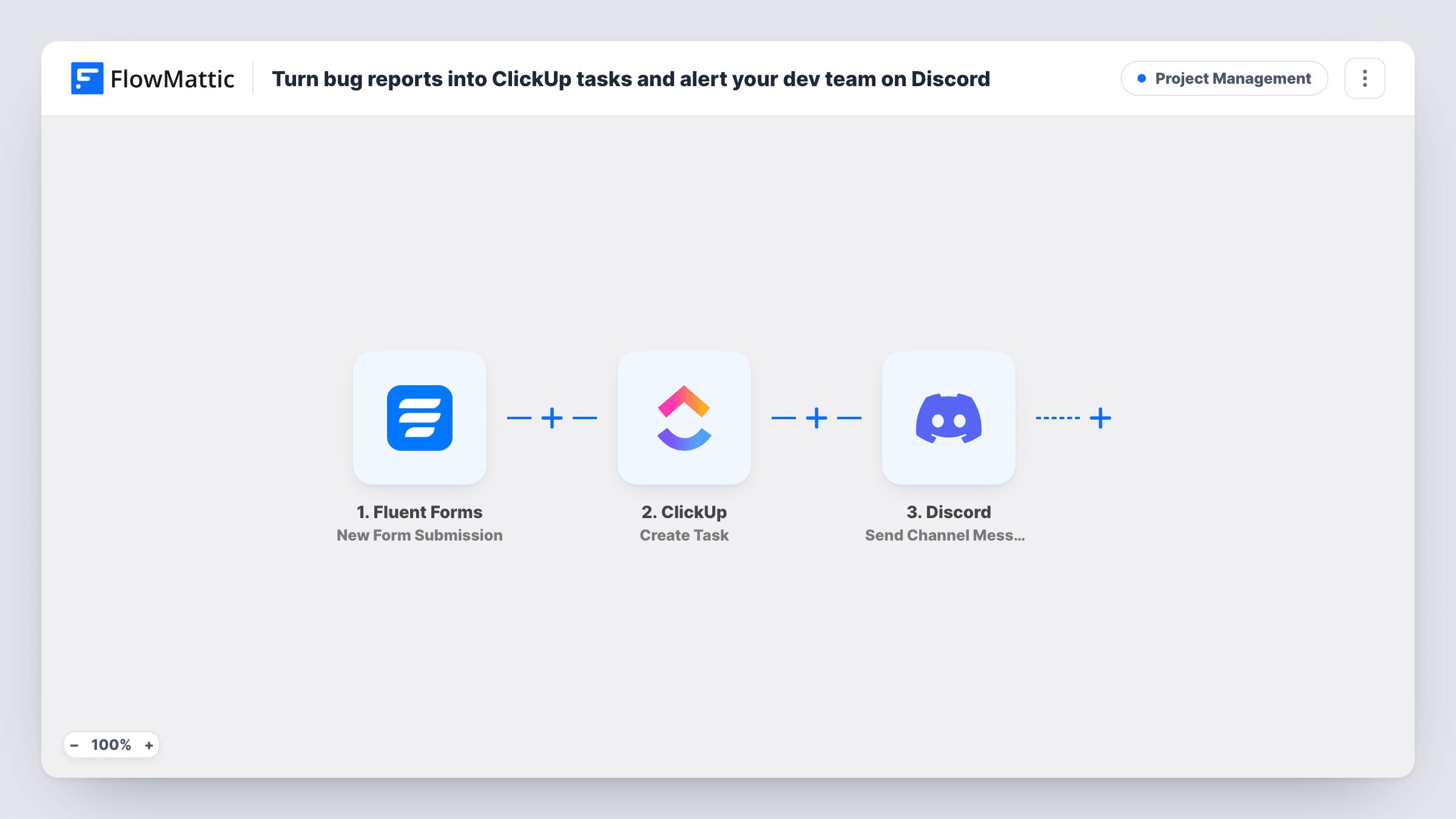
The Fluent Forms trigger fires when someone submits your bug form. ClickUp then gets a new task named Bug followed by the report's subject. Its description lists the severity, the steps to reproduce and the reporter's email. Last, Discord gets a channel message with the subject in bold and the severity in brackets.
The template reads four form fields: subject, severity, steps and email. Build your form with those names, or remap the ClickUp and Discord steps to your own fields after import. Every submission becomes a task and a message, whatever its severity.
Beta testers reporting issues
Testers fill in a bug form on your beta site. Each report becomes a ClickUp task with its steps to reproduce, ready for triage at the next stand-up.
Client sites in maintenance
Your agency adds the bug form to each client site's dashboard. Reports go into ClickUp under one process, and Discord tells whoever is on support that day.
Plugin or theme support
Users of your product report bugs through a public form, and your developers see them in Discord without watching a support inbox.
How this workflow runs
What happens at each step once the workflow is on, and what you need before you import it.
 Fluent Forms New Form Submission
Fires each time someone submits your bug report form in Fluent Forms. The subject, severity, steps and reporter email fields are passed to ClickUp and Discord.
- ClickUp Create Task
Creates a ClickUp task titled Bug plus the report's subject, with the severity, steps to reproduce and reporter's email in its description. Connect ClickUp and confirm with a test report where the task lands.
- Discord Send Channel Message
Posts a message to your Discord channel naming the new bug in bold and its severity, so developers know a task is waiting in ClickUp.
What you need
- FlowMatticCore
- Fluent Forms PluginPlugin
- ClickUp AccountAccount
- Discord AccountAccount
After importing, map your own data. To keep the template universal, not every step is pre-filled. Open each step in the builder and connect your accounts and fields (channels, lists, sheets, recipients) before you switch the workflow on.
Make it yours
Changes worth making after you import it.
- Make severity a dropdown with fixed choices such as Low, Medium and High. The value in the task and in Discord then stays consistent and easy to scan.
- Add a Filter before the Discord step that continues only when severity is High, so the channel hears about urgent bugs while every report still becomes a ClickUp task.
- Map the ClickUp task's URL from step 2 into the Discord message, if the step returns one. Developers can then open the task straight from the alert.
Questions about this workflow
Which Fluent Forms fields does the bug report form need?
The template reads fields named subject, severity, steps and email. You can use other names, as long as you remap the ClickUp task and the Discord message to them after import.
Does every bug report reach Discord, even low-severity ones?
Yes, as imported. Both steps run for every submission. Add a Filter before the Discord step if only some severities should be announced.
Can reporters attach screenshots to the ClickUp task?
Not as shipped. The task gets text only. Add a file upload field to your form and map its URL into the task description, so developers can open the screenshot from the task.
More Project Management workflows
Other ready-to-import templates from the same category.




Import this workflow into your WordPress site
Download the JSON, import it from the Workflows screen and connect your accounts. Every run stays on your server, with no per-task fees.
30-day money-back guarantee Unlimited workflows and runs Self-hosted