

AI agent that writes and files product copy for new products
When you create a WooCommerce product, an AI agent drafts a description and SEO title and is told to save them to a Google Sheets review sheet, then Slack tells your team the draft is ready.
 WooCommerce
 AI Agent
 Google Sheets
 Slack
Slack5 steps Setup ~8 min Used on 1.6k sites Content Ops Free to import
What this workflow does
Writing product copy is the step that holds up a new listing. This workflow gets a first draft written the moment a product is created, and parks it in a spreadsheet for someone to review before it goes anywhere near the store.
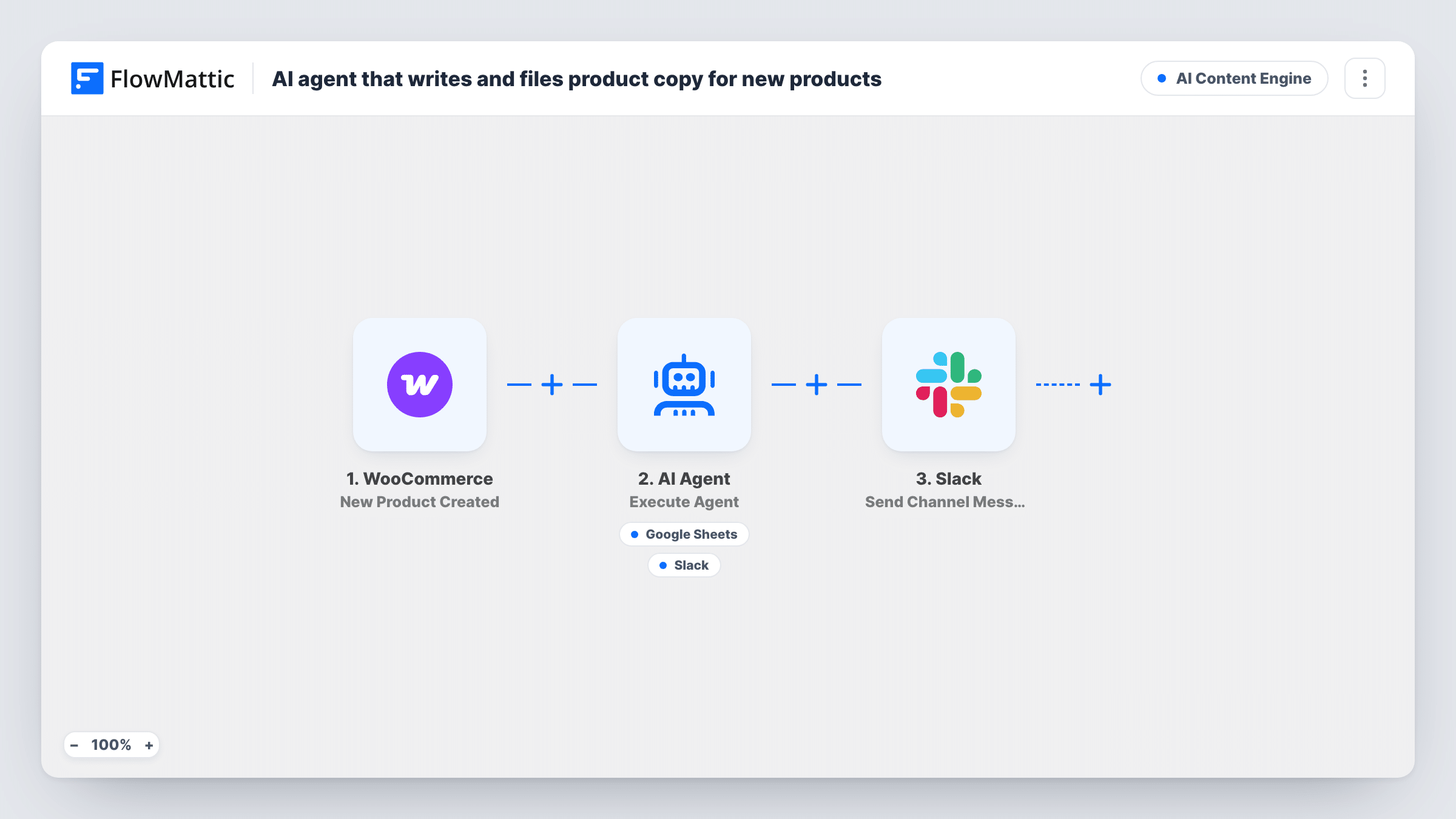
The WooCommerce trigger fires when a new product is created. FlowMattic hands the product name, categories and price to the AI Agent step, which runs on OpenAI GPT-4o. Its instructions are to write an e-commerce product description and an SEO title, then save them to the review sheet. It has two tools: Add New Row in Google Sheets, and Send Channel Message in Slack with text the agent writes. The agent decides when to call each one.
A final Slack step then posts a fixed message saying AI drafted copy for the product, by name. That message is sent whatever the agent did, so it works as a nudge to open the sheet.
The workflow does not change the product in WooCommerce. The draft stays in the sheet until a person copies the approved text into the product.
Store adding products in batches
You add a dozen products after a supplier delivery. Each one gets a drafted description and SEO title in the review sheet, so your writer edits instead of starting from nothing.
Copy approval before publishing
A manager signs off on all listing copy. The sheet becomes the review queue, and the Slack message tells them which product has a draft waiting.
Freelancer managing a client's catalogue
You build products for a client in WooCommerce. The client reads the drafts in a shared Google Sheet and comments there without logging in to WordPress.
How this workflow runs
What happens at each step once the workflow is on, and what you need before you import it.
 WooCommerce New Product Created
Runs when a new product is created in WooCommerce. The product name, categories and price are passed to the AI agent.
- AI Agent Execute Agent
Hands the product details to an AI agent backed by OpenAI GPT-4o. It is told to write a product description and an SEO title, then save them to the review sheet, and it chooses which of its tools to call.
- Google Sheets Add New Row
A tool the agent can call to add a row to your review spreadsheet in Google Sheets. Connect your Google account after import, then check a test run to see which sheet gets the row and how the agent fills it.
- Slack Send Channel Message
A tool the agent can call to post in Slack, with message text the agent writes. Its tool description says to notify the content team, though the agent's instructions don't ask for it.
- Slack Send Channel Message
Posts a fixed message to a Slack channel saying AI drafted copy for the new product, by name. It runs after the agent step on every product the workflow picks up.
What you need
- FlowMatticCore
- WooCommerce PluginPlugin
- AI ProviderAccount
- Google Sheets AccountAccount
- Slack AccountAccount
After importing, map your own data. To keep the template universal, not every step is pre-filled. Open each step in the builder and connect your accounts and fields (channels, lists, sheets, recipients) before you switch the workflow on.
Make it yours
Changes worth making after you import it.
- Put your column order in the agent's instructions, for example product name, SEO title, description. The agent then fills the review sheet the same way each time.
- Add brand rules to the system prompt, such as reading level, words to avoid and a target length, so drafts need less editing.
- If you only want Slack to hear from the final step, remove the Slack tool from the agent. That stops a second, AI-written message reaching the channel for the same product.
- Add a Filter after the trigger on the product category if only some ranges need drafted copy. Products outside it skip the agent and the Slack message.
Questions about this workflow
Does the AI write the description straight into my WooCommerce product?
No. None of the steps update the product. The agent is told to save its draft to the Google Sheets review sheet, and you copy approved text into WooCommerce yourself.
Will every new WooCommerce product get a row in the review sheet?
The agent is told to save each draft there, but it chooses when to call the Google Sheets tool, so a run can end without a row. Task History shows each tool call, which helps you tune the prompt.
Why might my Slack channel get two messages for one product?
The agent has its own Slack tool, and the last step also posts a fixed message. If the agent uses its tool, you see both. Remove the agent's Slack tool if you want one message.
What product details does the AI agent see?
The product name, its categories and its price, taken from the WooCommerce trigger. Map more product fields into the agent's input after import if you want it to use them.
More AI Content Engine workflows
Other ready-to-import templates from the same category.





Import this workflow into your WordPress site
Download the JSON, import it from the Workflows screen and connect your accounts. Every run stays on your server, with no per-task fees.
30-day money-back guarantee Unlimited workflows and runs Self-hosted