

Book revenue into the USD or EUR ledger by currency
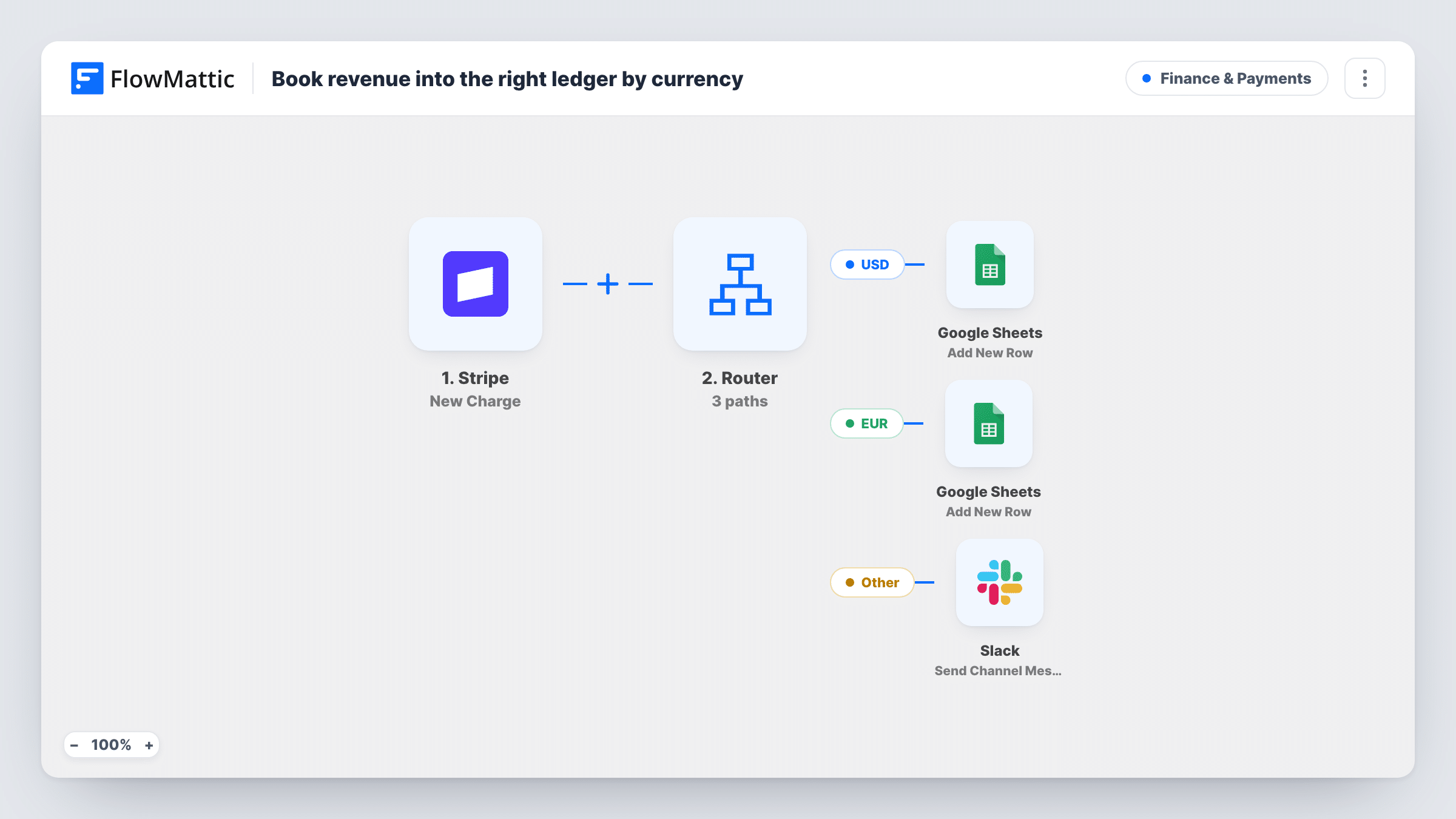
Each successful Stripe charge is checked for its currency: USD charges add a row to your USD ledger sheet and EUR charges to your EUR ledger, so each currency’s revenue stays in its own Google Sheet.
 Stripe
 Router
 Google Sheets
4 steps Setup ~8 min Used on 2.7k sites Finance Free to import
What this workflow does
Mixing currencies in one revenue sheet makes totals meaningless until someone splits them out. If you charge customers in both dollars and euros through Stripe, this workflow keeps them apart from the start, with one ledger per currency that you can sum and reconcile on its own.
The Stripe New Charge trigger starts a run for each charge that goes through successfully. A Router then checks the charge's currency. The USD route runs when the currency is exactly usd, and the EUR route when it is exactly eur. Stripe reports currency codes in lower case, which is what these conditions expect.
Each route ends with a Google Sheets Add New Row step. Both ship unmapped: after import, choose the USD ledger for the first and the EUR ledger for the second, then map the charge fields you want, such as amount, date, customer and charge ID. Stripe gives amounts in the smallest currency unit, so 2500 means 25.00; add a sheet column that divides by 100 if you want readable totals.
The two conditions can't both match, so each charge lands in one ledger. Charges in any other currency match neither route and aren't logged anywhere.
US and EU customers on one Stripe account
A software company billing in dollars and euros keeps two ledgers, so its accountant can total each currency without converting rows.
Separate VAT reporting
An online course seller uses the EUR ledger as the starting point for its European VAT records, kept apart from US sales.
Reconciling payouts per currency
A design studio matches each Stripe payout against the ledger in the same currency at month end.
How this workflow runs
What happens at each step once the workflow is on, and what you need before you import it.
 Stripe New Charge
Fires for each new Stripe charge that succeeds. The charge's amount, currency, customer and ID are passed on to the Router and the sheet steps.
- Router 2 paths
Holds two routes: USD when the currency is exactly usd, and EUR when it is exactly eur. A charge has one currency, so it follows one route at most.
- Google Sheets Add New Row
USD route. Adds a row to your USD ledger. Ships unmapped: pick the spreadsheet and sheet, then map the charge fields to your columns.
- Google Sheets Add New Row
EUR route. Adds a row to your EUR ledger. Ships unmapped too: choose a different sheet from the USD one and map the same charge fields.
What you need
- FlowMatticCore
- Stripe AccountAccount
- Google Sheets AccountAccount
After importing, map your own data. To keep the template universal, not every step is pre-filled. Open each step in the builder and connect your accounts and fields (channels, lists, sheets, recipients) before you switch the workflow on.
Make it yours
Changes worth making after you import it.
- Add a third route for another currency you charge in, such as gbp, with its own condition and its own Add New Row step pointing at a third ledger.
- Map the charge ID into its own column in both ledgers, so you can find any row in Stripe when reconciling.
- A charge may carry only a Stripe customer ID, so check a test run before mapping an email. If it's missing, add Stripe's Find Customer by ID between the trigger and the Router, so both routes can map from its result.
Questions about this workflow
What happens to Stripe charges in GBP or another currency?
Nothing. They match neither route, so no row is added. Add a route with that currency's code if you want those charges logged too.
Why do Stripe amounts look 100 times too large in my sheet?
Stripe sends amounts in the smallest unit of the currency, cents for USD and EUR. Divide by 100 in a sheet formula column to show dollars and euros.
Are refunds removed from the Google Sheets ledger?
No. The workflow only adds rows for successful charges. A refund doesn't change the ledger, so record refunds separately if your books need them.
Can I keep both currencies in one spreadsheet?
Yes. Point the two Add New Row steps at different sheets of the same spreadsheet, so each currency still has its own tab and totals.
More Finance & Payments workflows
Other ready-to-import templates from the same category.





Import this workflow into your WordPress site
Download the JSON, import it from the Workflows screen and connect your accounts. Every run stays on your server, with no per-task fees.
30-day money-back guarantee Unlimited workflows and runs Self-hosted