

Send a weekly reminder for every invoice on an overdue-invoices sheet
Once a week, FlowMattic reads every row of your overdue-invoices sheet in Google Sheets, emails each client a reminder with the invoice number and amount, and posts to Slack.
 Schedule
 Google Sheets
 Iterator
 Email
Email
 Slack
Slack5 steps Setup ~8 min Used on 2.8k sites Finance Free to import
What this workflow does
Chasing late invoices is easy to put off when each reminder means writing a fresh email. If you keep a sheet of the invoices that are overdue, this workflow sends those nudges for you on a fixed weekly schedule.
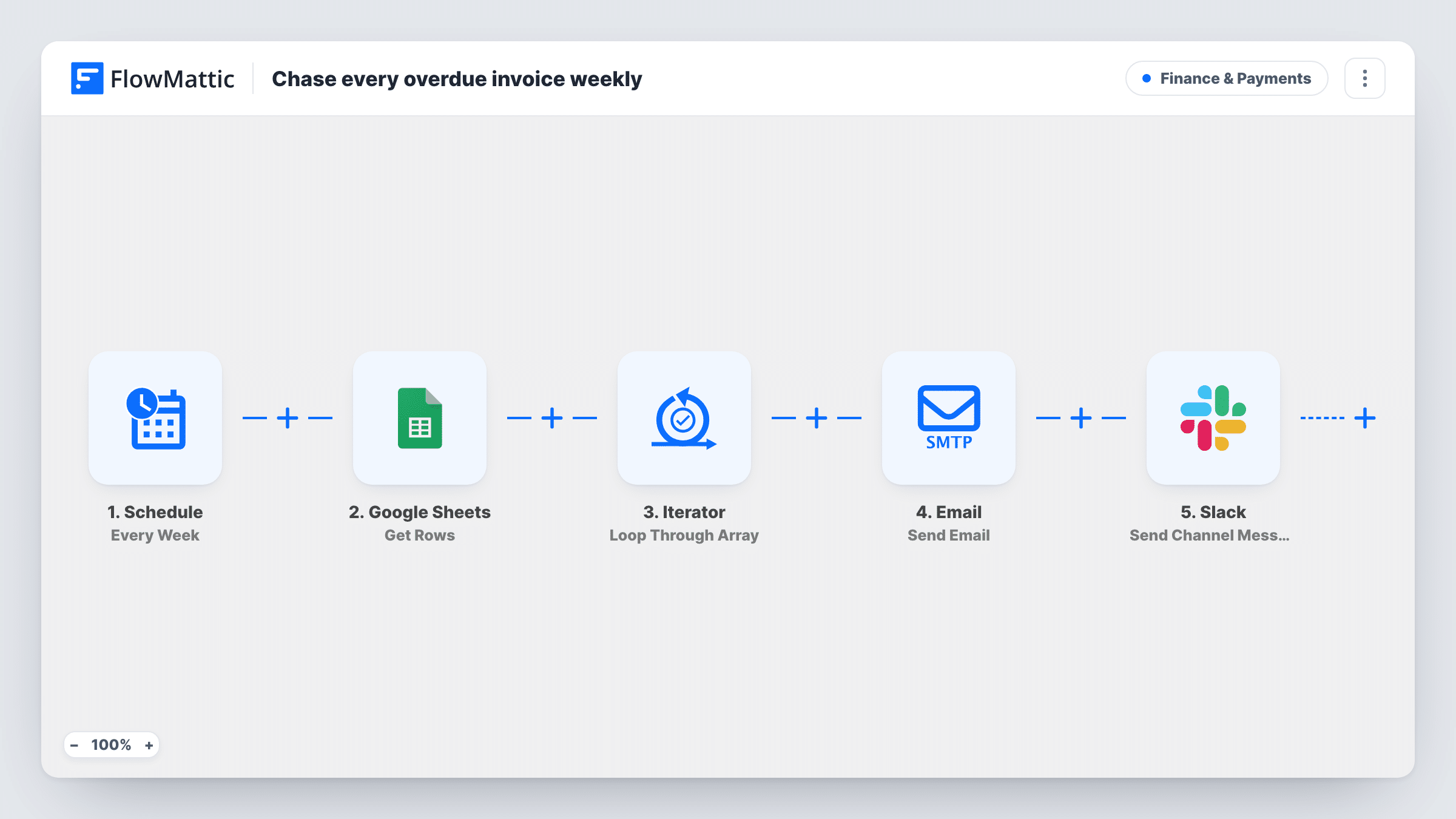
A Schedule trigger runs every week. The Google Sheets Get Rows step then reads the rows of your overdue-invoices sheet, and an Iterator goes through them one at a time. For each row, the Email step writes to the address in the client_email column, with a subject naming the invoice number and a body that greets the client_name and quotes the invoice_number and amount.
The workflow doesn't decide which invoices are overdue. It emails every row the sheet holds, every week, so the sheet must contain only unpaid, overdue invoices. Remove a row once it is paid, or that client keeps getting reminders.
The Slack step sits after the email inside the loop, so as imported it posts Weekly invoice reminders sent once for every invoice, not once per run. To get a single summary, end the loop before it, as the tips explain.
Freelancer with a few slow payers
A designer keeps a short sheet of overdue invoices and lets the workflow send each client a reminder every Monday until the row is removed.
Agency accounts team
An agency's bookkeeper updates the overdue list on Friday, and clients on it get a reminder at the next weekly run while the team sees the activity in Slack.
Membership dues follow-ups
A sports club lists members whose annual dues are late, with the amount owed, and each gets a weekly email until they pay.
How this workflow runs
What happens at each step once the workflow is on, and what you need before you import it.
 Schedule Every Week
Runs on a weekly schedule. Set the day and time after import so reminders arrive when clients are likely to read them.
- Google Sheets Get Rows
Reads the rows of your overdue-invoices sheet. Connect Google Sheets and choose the sheet after import; it needs client_email, client_name, invoice_number and amount columns.
- Iterator Loop Through Array
Loops through the rows from the sheet, running the next steps once for each invoice.
 Email Send Email
Emails the client at the row's client_email with the subject Reminder: invoice number is overdue, greeting them by client_name and quoting the invoice number and amount as past due.
- Slack Send Channel Message
Posts Weekly invoice reminders sent to a Slack channel you pick when you connect Slack. Because it sits inside the loop, it posts once per invoice as imported.
What you need
- FlowMatticCore
- Google Sheets AccountAccount
- Slack AccountAccount
After importing, map your own data. To keep the template universal, not every step is pre-filled. Open each step in the builder and connect your accounts and fields (channels, lists, sheets, recipients) before you switch the workflow on.
Make it yours
Changes worth making after you import it.
- Add Iterator End's End the Iterator step between the Email step and the Slack step, so the Slack summary posts once per weekly run instead of once per invoice.
- Keep paid invoices off the sheet. Delete the row, or move it to a separate Paid tab, as soon as payment arrives.
- Add a payment link or bank details to the email body, so clients can pay straight from the reminder.
- Include a due_date column and map it into the email, so clients can see how long the invoice has been outstanding.
Questions about this workflow
Does this workflow check which invoices in Google Sheets are overdue?
No. It reminds every row on the sheet each week. Keep the sheet limited to overdue, unpaid invoices, or add a Filter between the Iterator and the Email step on a status column you maintain.
Will a client with two overdue invoices get two emails?
Yes. Each row is handled separately, so every invoice gets its own reminder in the same weekly run.
Why does the Slack message appear several times each week?
Steps after the Iterator repeat for each row unless the loop is ended first. Put an End the Iterator step between the Email step and the Slack step to post one message per run.
Can the overdue reminders come from my own email address?
Yes. The Email step sends through WordPress mail or an SMTP account you set in FlowMattic, so connect the mailbox you use for billing.
More Finance & Payments workflows
Other ready-to-import templates from the same category.




Import this workflow into your WordPress site
Download the JSON, import it from the Workflows screen and connect your accounts. Every run stays on your server, with no per-task fees.
30-day money-back guarantee Unlimited workflows and runs Self-hosted