

AI agent that writes personalised thank-you notes for each donation
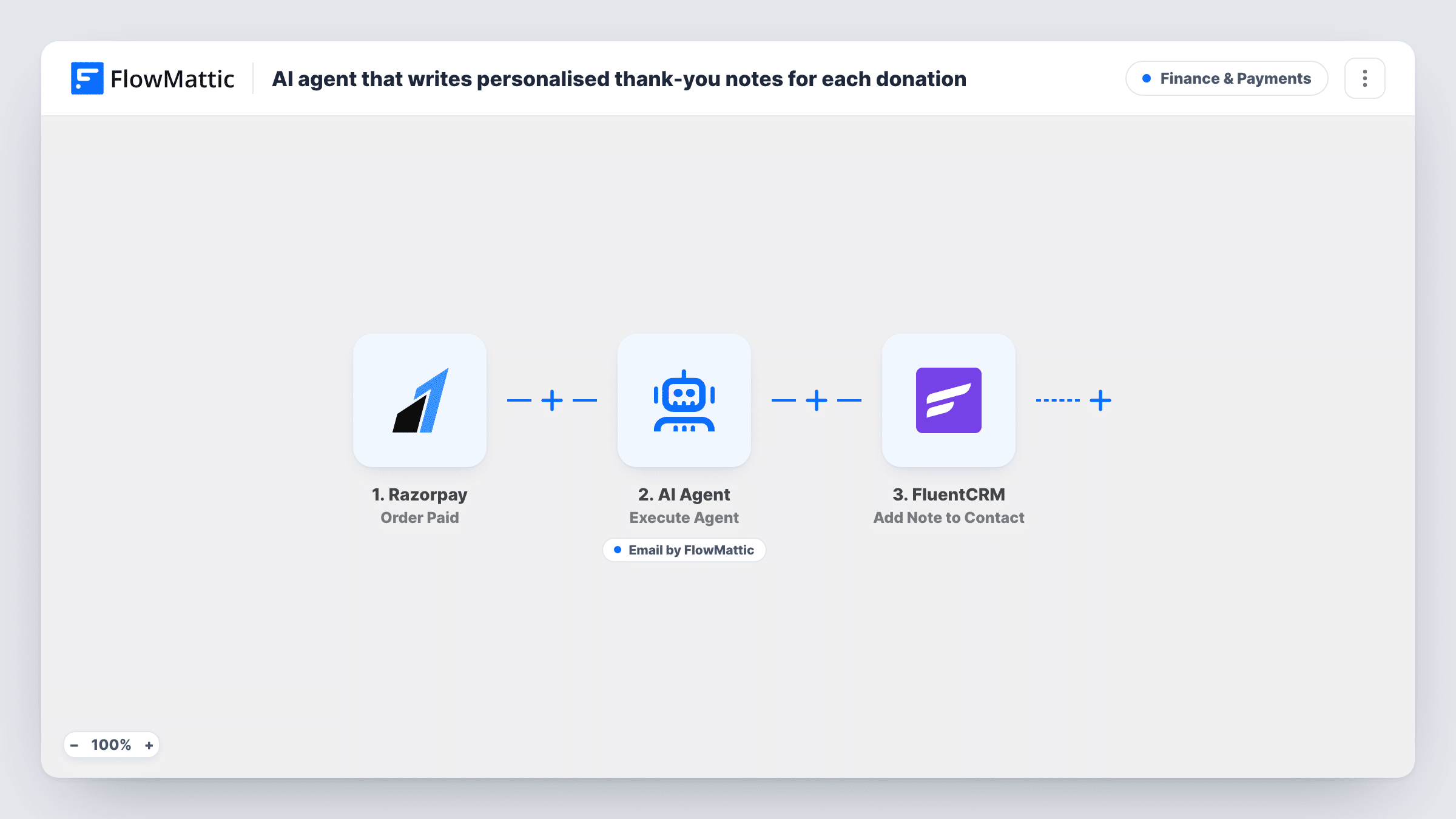
When a Razorpay order is paid, an AI agent writes a personal thank-you that mentions the amount and emails it to the donor, then FluentCRM records a note on their contact.
 Razorpay
 AI Agent
 Email
Email
 FluentCRM
4 steps Setup ~8 min Used on 2.7k sites Finance Free to import
What this workflow does
Donors notice when a thank-you sounds like a form letter. Writing each one yourself is kind but slow, and on a busy campaign day some people wait days for a reply. This workflow sends a personal note within moments of each payment and keeps a record in your CRM.
The Razorpay trigger fires when an order is paid. The donor's email, the amount and the currency go to the AI Agent, which is told to write a heartfelt thank-you that refers to the amount and email it to the donor. It sends with its Email tool, choosing the subject and body itself, addressed to the email from the payment.
Afterwards a FluentCRM step adds a note titled "Donation thank-you sent" to the contact with that email, recording the amount and currency. Your team can then see in FluentCRM who has been thanked and for what.
Small charity appeals
A local charity collecting through Razorpay sends every donor a warm note that mentions their gift, even during a busy appeal week.
Creator support pages
A writer who accepts tips through Razorpay thanks each supporter by email and sees in FluentCRM who has given before.
Temple or community funds
Volunteers no longer need to email contributors by hand, and the CRM note shows which contributions have been acknowledged.
How this workflow runs
What happens at each step once the workflow is on, and what you need before you import it.
 Razorpay Order Paid
Runs when an order is paid in your Razorpay account. The payer's email, amount and currency are passed to the AI Agent for the thank-you.
- AI Agent Execute Agent
The AI Agent writes a personalised thank-you note that refers to the amount, following its instructions, then sends it with its Email tool. Link the account for your AI service when you import.
 Email Send Email
Email's Send Email, available to the agent as a tool. It reaches the donor at the address from the payment, carrying a subject and body the agent composes. Set up Email's SMTP details on import.
- FluentCRM Add Note to Contact
Adds a note to the FluentCRM contact matching the donor's email, titled Donation thank-you sent, with the amount and currency in the note.
What you need
- FlowMatticCore
- Razorpay AccountAccount
- AI ProviderAccount
- FluentCRM PluginPlugin
After importing, map your own data. To keep the template universal, not every step is pre-filled. Open each step in the builder and connect your accounts and fields (channels, lists, sheets, recipients) before you switch the workflow on.
Make it yours
Changes worth making after you import it.
- Razorpay reports amounts in the smallest unit, such as paise. Run a test payment, and if the amount looks a hundred times too large, tell the agent to divide by 100 before writing.
- Add your organisation's name and what donations fund to the agent's instructions, so every note sounds like it came from you.
- Put a FluentCRM step that creates or updates the contact before the note step, so first-time donors have a contact for the note to attach to.
Questions about this workflow
What if the donor is not in FluentCRM yet?
The note step looks for a contact with the donor's email. If none exists, check Task History for that run, or add a create-contact step before it.
Can I read the note before it is sent?
Not as imported, since the agent writes and sends in one step. To approve each note, remove the agent's Email tool, add Human in the Loop after the agent, then a Send Email step that uses the agent's text.
Which AI model writes the notes?
GPT-4o from OpenAI is the model this template is set to. You connect your own provider account on import and can change the model in the agent step.
Does it work for any Razorpay payment, not only donations?
It runs on every paid order in the connected Razorpay account. Add a Filter after the trigger if only some orders are donations.
More Finance & Payments workflows
Other ready-to-import templates from the same category.





Import this workflow into your WordPress site
Download the JSON, import it from the Workflows screen and connect your accounts. Every run stays on your server, with no per-task fees.
30-day money-back guarantee Unlimited workflows and runs Self-hosted