

Give high-value new subscriptions VIP treatment, standard-welcome the rest
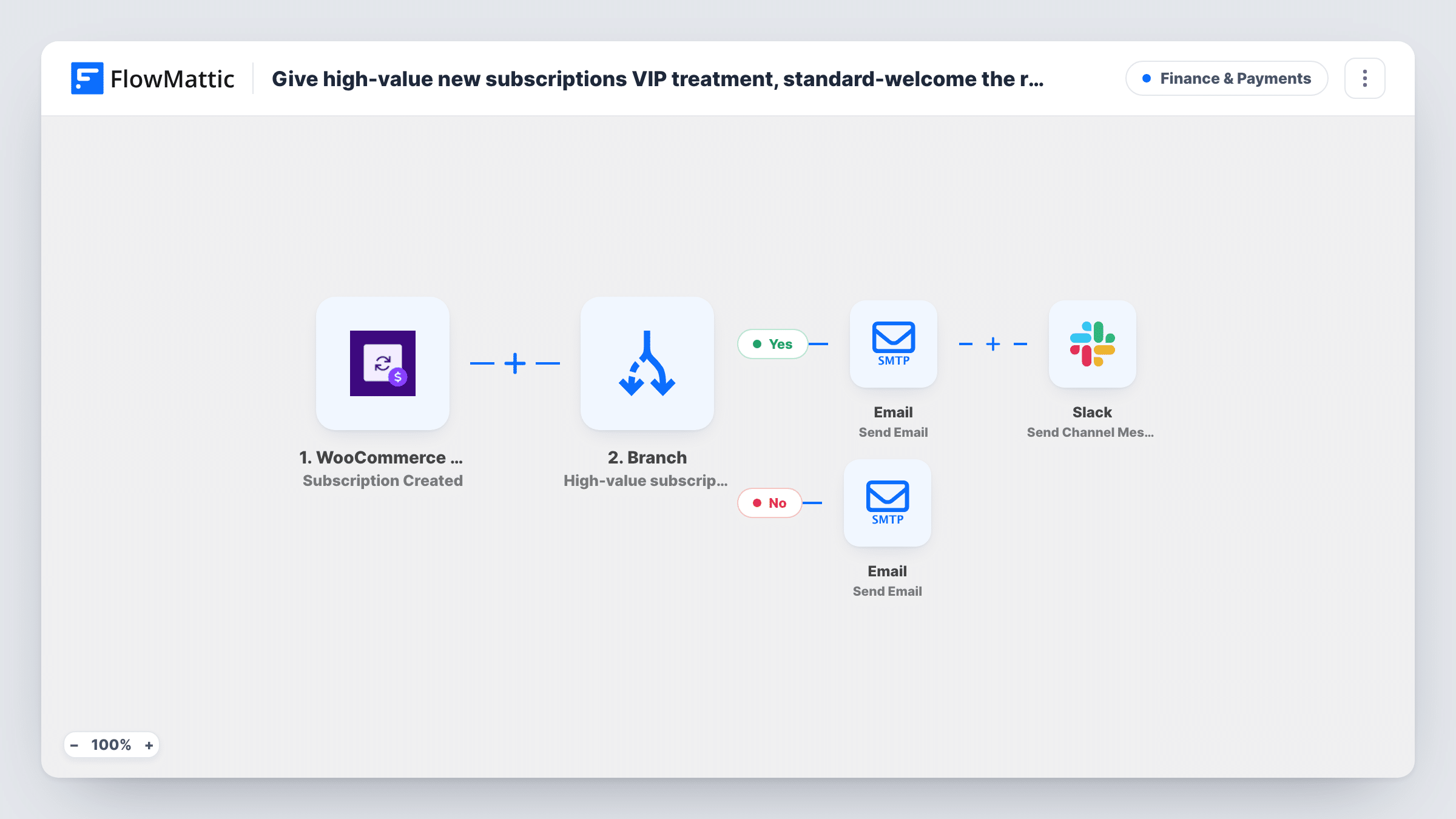
When someone starts a WooCommerce subscription, a Branch checks its amount: above 500 they get a VIP welcome email and your team is asked in Slack to assign a success manager, otherwise a standard welcome goes out.
 WooCommerce Subscriptions
 Branch
 Email
Email
 Slack
Slack5 steps Setup ~8 min Used on 1.4k sites Finance Free to import
What this workflow does
Your biggest subscribers are worth a different first impression. A generic welcome suits most sign-ups, but someone on a premium plan should hear that a real person will look after them, and your team needs to know so that promise is kept. This workflow sorts new subscriptions by value and does both.
The WooCommerce Subscriptions Subscription Created trigger runs when a new subscription is set up, passing the plan, amount and subscriber email. A Branch labelled High-value subscription? asks whether the amount is greater than 500. On the yes path, the subscriber receives a VIP welcome naming their plan and saying a dedicated success manager will be in touch, and a Slack channel message asks the team to assign one. On the no path, the subscriber gets a standard welcome with tips on getting the most from their plan.
Every new subscription takes exactly one of the two paths. The emails go out through FlowMattic's SMTP settings, in addition to anything WooCommerce sends on its own.
Agency retainers sold as subscriptions
A monthly retainer above the threshold sends the client a VIP welcome and tells the account team in Slack to pick an account lead before the kickoff call.
Premium tiers of a membership site
Members joining the top tier hear they will get a personal onboarding contact, while standard members get a self-serve welcome with links to start.
Subscription boxes with a luxury option
Customers who choose the premium box are flagged in Slack so the team can add a handwritten card to the first shipment, and the customer gets a matching welcome.
How this workflow runs
What happens at each step once the workflow is on, and what you need before you import it.
 WooCommerce Subscriptions Subscription Created
Runs when a new subscription is created in WooCommerce Subscriptions. The subscriber's email, plan name and amount are passed to the Branch and the emails.
- Branch High-value subscription?
Checks whether the subscription amount is greater than 500. Greater takes the yes path to the VIP welcome; anything else takes the no path to the standard welcome.
 Email Send Email
On the yes path, emails the subscriber with the subject Welcome - you're a VIP, naming their plan and saying a dedicated success manager will reach out shortly.
- Slack Send Channel Message
On the yes path, sends a Slack channel message with the subscription amount and the subscriber's email, asking the team to assign a success manager.
- Email Send Email
On the no path, emails the subscriber a standard welcome that names their plan and promises tips on getting the most out of it. Add those tips to the text.
What you need
- FlowMatticCore
- WooCommerce Subscriptions PluginPlugin
- Slack AccountAccount
After importing, map your own data. To keep the template universal, not every step is pre-filled. Open each step in the builder and connect your accounts and fields (channels, lists, sheets, recipients) before you switch the workflow on.
Make it yours
Changes worth making after you import it.
- Change 500 in the Branch to the amount that separates your premium plans from the rest, in your store's currency.
- The standard welcome says here's how to get the most out of it but lists nothing yet. Add your top three getting-started links before turning it on.
- Mention a teammate in the Slack message or post it to a channel the success team watches, so the VIP email's promise of a quick reply is kept.
Questions about this workflow
What counts as high value?
As imported, a subscription amount greater than 500. Change the number in the Branch condition to match your price list.
Does this need WooCommerce Subscriptions?
Yes. The trigger comes from the WooCommerce Subscriptions extension, which must be active on the same site as WooCommerce and FlowMattic. You also connect Slack for the team alert.
Will WooCommerce still send its own emails?
Yes. The workflow does not change WooCommerce's email settings. These welcome emails are sent by FlowMattic in addition to the store's order and subscription emails.
Is a success manager assigned automatically?
No. The Slack message asks your team to assign one. A person still needs to pick it up and contact the subscriber.
More Finance & Payments workflows
Other ready-to-import templates from the same category.







Import this workflow into your WordPress site
Download the JSON, import it from the Workflows screen and connect your accounts. Every run stays on your server, with no per-task fees.
30-day money-back guarantee Unlimited workflows and runs Self-hosted