

Email a monthly thank-you to every contact tagged high-value in FluentCRM
Once a month, FlowMattic fetches every FluentCRM contact with the tag you choose, such as high-value, loops through them and emails each one a personal thank-you.
 Schedule
 FluentCRM
 Iterator
 Email
Email4 steps Setup ~8 min Used on 1.7k sites Finance Free to import
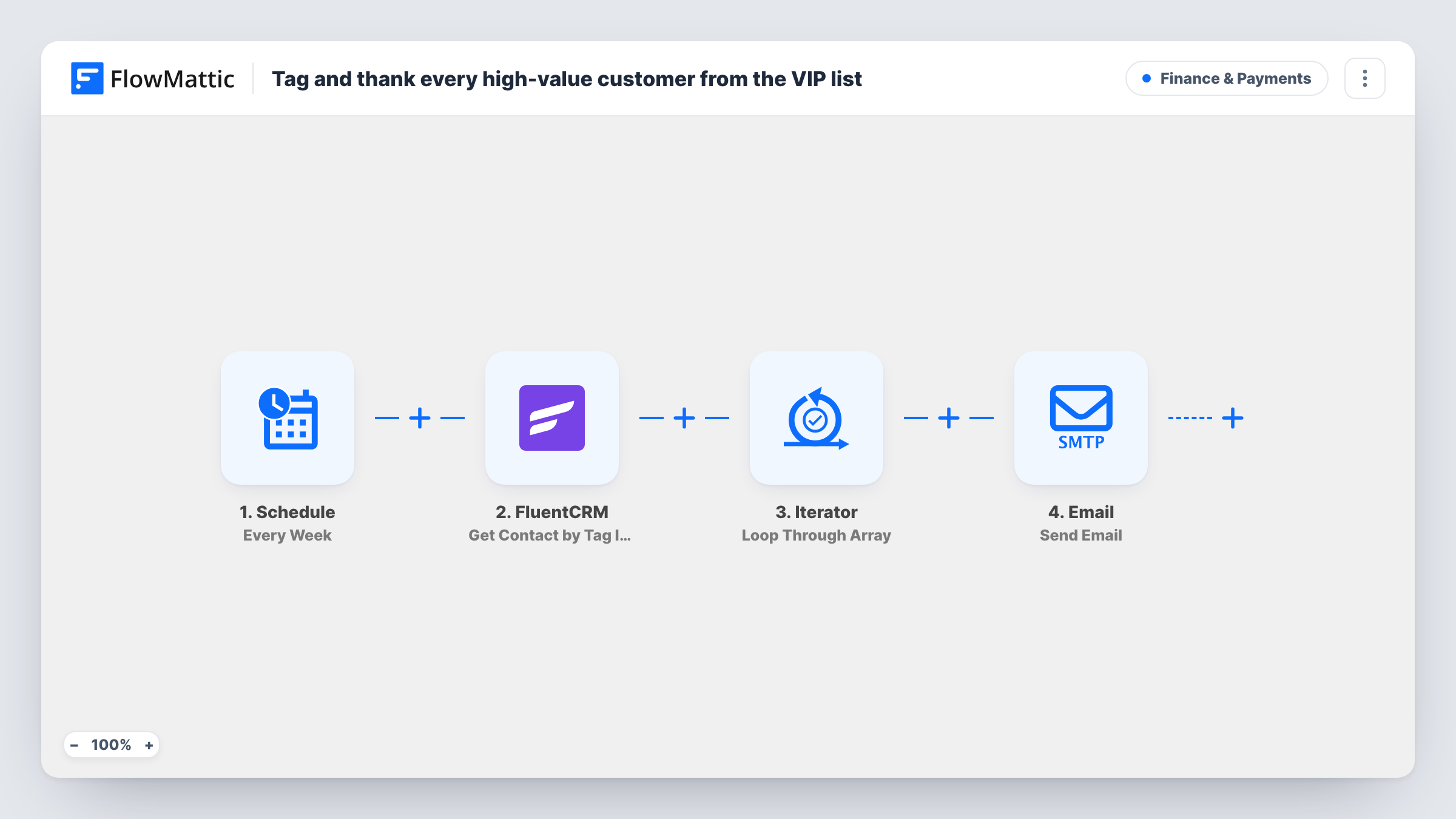
What this workflow does
Your best customers are easy to forget once their order is shipped. If you already tag them in FluentCRM, this workflow turns that tag into a regular gesture: a short thank-you note in their inbox each month, without building a campaign by hand.
The Schedule trigger starts a run every month. The FluentCRM step then retrieves contacts by tag ID. It ships without a tag set, so after import you pick the tag that marks your high-value customers.
An Iterator loops through the contacts FluentCRM returns, and the Email step runs once for each person. The email text comes prewritten: it greets the contact by first name, with the subject "A thank-you for our best customers", and goes to their email address. The body mentions an exclusive perk, so add the real perk, such as a discount code, before you go live.
Each monthly run emails everyone who carries the tag at that moment, so the same people hear from you every month. Remove the tag from anyone who should stop getting it. Run the workflow once with a test tag and check Task History to confirm how many contacts came back.
Monthly perk for repeat buyers
A coffee subscription shop tags its biggest spenders in FluentCRM and sends them a fresh discount code in the thank-you each month.
Recognising long-term clients
An agency tags clients on retainer and emails them a short note of thanks each month, with a link to book a free strategy call.
VIP early access
A fashion store uses the monthly email to give tagged customers first look at a new collection before it goes on sale.
How this workflow runs
What happens at each step once the workflow is on, and what you need before you import it.
 Schedule Every Month
Starts the workflow once a month on the schedule you set. No contact data comes from this step; it only decides when the run happens.
- FluentCRM Get Contact by Tag IDs
Retrieves FluentCRM contacts by one or more tag IDs. The tag isn't set in the template, so choose the tag that marks your high-value customers after import.
- Iterator Loop Through Array
Loops through the contacts list from FluentCRM, one contact at a time, so the email step that follows runs once for each tagged person.
 Email Send Email
Sends the thank-you email to the current contact's address, greeting them by first name. Edit the subject and body, and add the perk the message promises, before going live.
What you need
- FlowMatticCore
- FluentCRM PluginPlugin
After importing, map your own data. To keep the template universal, not every step is pre-filled. Open each step in the builder and connect your accounts and fields (channels, lists, sheets, recipients) before you switch the workflow on.
Make it yours
Changes worth making after you import it.
- Replace the line about an exclusive perk with the actual offer, such as a coupon code or a free-shipping link, so the email gives the contact something specific.
- Put a Filter between the Iterator and the Email step that continues only when the contact's status is subscribed, if a test run shows the status field. Inside the loop, it skips just the contacts who fail and the loop moves on.
- Pick a day in the Schedule trigger that fits your sending rhythm, such as the first Monday of the month, so the thank-you doesn't land on top of a newsletter.
Questions about this workflow
Will the same FluentCRM contacts get this email every month?
Yes. Each run fetches everyone who has the tag at that moment and emails all of them. Remove the tag from a contact, or use a different tag, to stop the monthly email for that person.
Which tag does the workflow use as imported?
None. The Get Contact by Tag IDs step ships without a tag, so you choose the high-value tag, or any other, when you set the step up.
Is the email sent through FluentCRM?
No. The last step is FlowMattic's Email module, which sends with WordPress mail or your SMTP account. FluentCRM only supplies the list of contacts.
What if a tagged contact has no first name in FluentCRM?
The greeting will show without a name. Fill in first names in FluentCRM, or reword the email body so it reads well without one.
More Finance & Payments workflows
Other ready-to-import templates from the same category.






Import this workflow into your WordPress site
Download the JSON, import it from the Workflows screen and connect your accounts. Every run stays on your server, with no per-task fees.
30-day money-back guarantee Unlimited workflows and runs Self-hosted