

Fan out urgent data changes and log routine ones
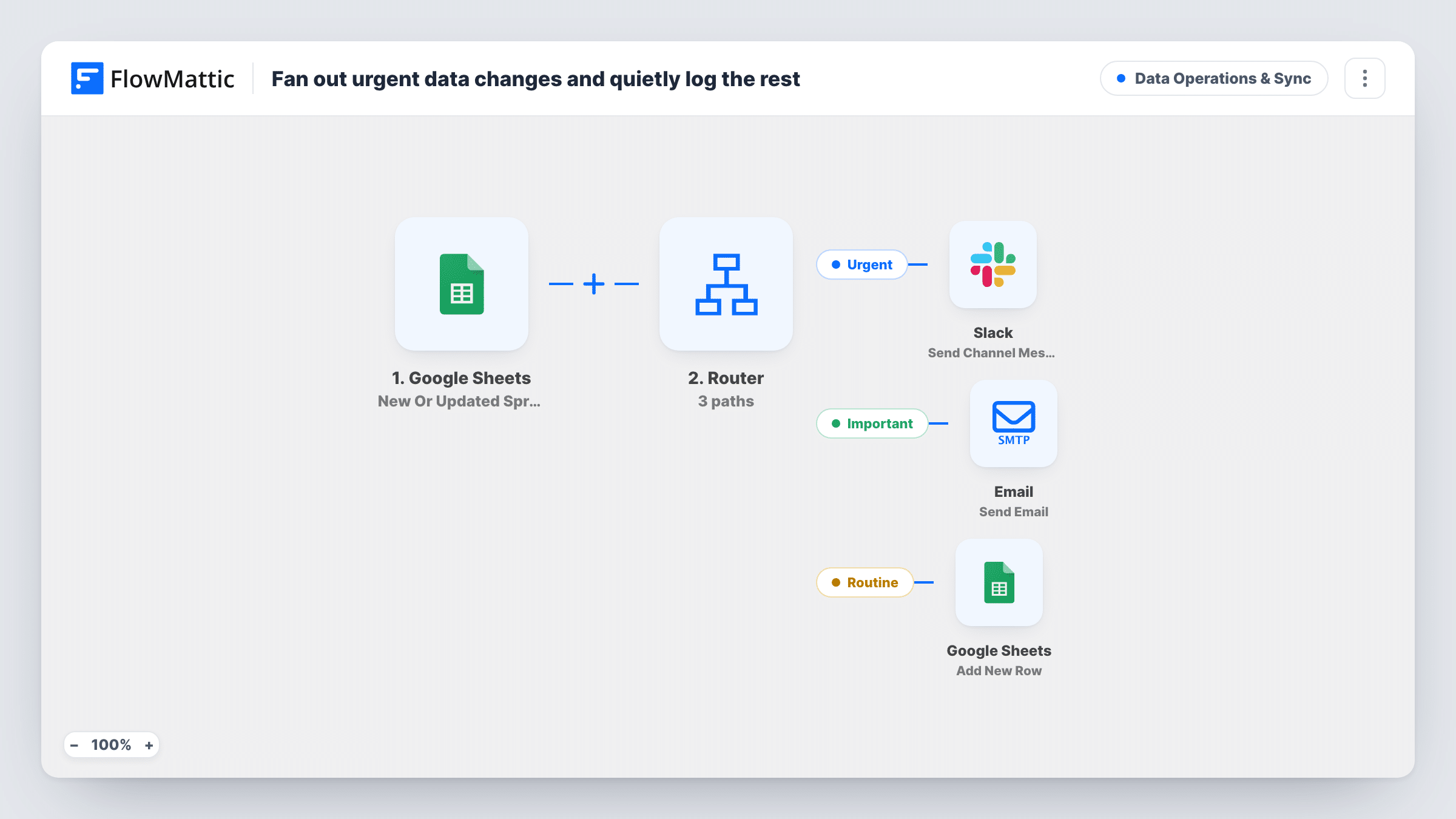
When a row in your Google Sheet is added or changed, a Router reads its status: urgent rows alert Slack, important ones email the row’s owner, and routine ones are logged to another sheet.
 Google Sheets
 Router
 Slack
Slack
 Email
Email5 steps Setup ~8 min Used on 2.8k sites Data Ops Free to import
What this workflow does
Shared tracking sheets change all day, and most edits don't need anyone's attention. This workflow sorts each change by the row's status, so urgent items reach the team in Slack, important ones reach the person responsible, and routine updates are quietly recorded.
The Google Sheets New Or Updated Spreadsheet Row trigger fires when a row in the watched sheet changes, and new rows can start a run too. A Router then checks the row's status column for the words "urgent", "important" and "routine".
Urgent rows post "Urgent change" with the item name to a Slack channel you pick. Important rows send an email to the address in the owner_email column, saying the item changed and may need attention. Routine rows go to an Add New Row step that ships unmapped: pick a different spreadsheet or sheet as the log and map the columns you want to keep. Don't log into the sheet the trigger watches, or each logged row could start another run.
Every edit to a row runs the workflow again, so an urgent row that is edited three times posts three alerts. A status with none of the three words takes no route. The column names status, item and owner_email are examples to rename for your sheet.
Inventory or stock tracker
An operations team marks items urgent when stock is critical, so Slack hears about it at once, while routine count updates are written to a log sheet.
Project status board in a spreadsheet
A project manager sets a task to important, and its owner gets an email to look at it without being tagged in a chat.
Change history for audits
Routine edits to a shared price list are copied to a separate log sheet, giving a record of what changed and when.
How this workflow runs
What happens at each step once the workflow is on, and what you need before you import it.
 Google Sheets New Or Updated Spreadsheet Row
Fires when a row in the watched Google Sheet is updated, and new rows can start it too. The row's status, item and owner_email columns are passed on.
- Router 3 paths
Checks the status column. Urgent: it contains "urgent". Important: it contains "important". Routine: it contains "routine". Every matching route runs, and other values take no route.
- Slack Send Channel Message
On the Urgent route, posts "Urgent change" with the item from the row to the Slack channel you choose.
 Email Send Email
On the Important route, emails the address in the row's owner_email column with the subject "Update needed" plus the item, saying it changed and may need their attention.
- Google Sheets Add New Row
On the Routine route, adds a row to a log sheet. The step ships unmapped: choose a spreadsheet other than the watched one and map the columns to record.
What you need
- FlowMatticCore
- Google Sheets AccountAccount
- Slack AccountAccount
After importing, map your own data. To keep the template universal, not every step is pre-filled. Open each step in the builder and connect your accounts and fields (channels, lists, sheets, recipients) before you switch the workflow on.
Make it yours
Changes worth making after you import it.
- Keep status as a dropdown column with the values urgent, important and routine, so each change matches one route and none fall through.
- Add a date or timestamp column to the routine log mapping, so you can see when each change happened.
- Add the owner's email and other row details to the Slack message next to the item, so the alert shows who is responsible without opening the sheet.
- Point the Add New Row step at a different spreadsheet or tab from the one the trigger watches, so writing the log never starts another run.
Questions about this workflow
Does every edit to a Google Sheets row send an alert?
Every edit to a watched row starts a run. If the status still contains urgent, Slack gets another message, so frequent edits to urgent rows mean repeated alerts.
Can I log routine changes into the same sheet?
No. Use a separate sheet or spreadsheet. Writing log rows into the sheet the trigger watches could start new runs from those rows.
What if a row's status is blank or says something else?
It contains none of the three words, so no route runs and nothing is sent or logged for that change.
Who receives the email for important changes?
The address in the row's owner_email column. Keep that column filled for rows that can become important, or map a fixed address instead.
More Data Operations & Sync workflows
Other ready-to-import templates from the same category.







Import this workflow into your WordPress site
Download the JSON, import it from the Workflows screen and connect your accounts. Every run stays on your server, with no per-task fees.
30-day money-back guarantee Unlimited workflows and runs Self-hosted